Transport and runners
Everyone moving,
on one map.
Crew shuttles on a schedule, airport vans planned from the flights that are actually landing, ride requests from the crew, and errands with a runner and a receipt on them. Drivers and runners work from their phones, and the office sees where they all are.
In TourOps, FestivalOps and ActionOps. No module to buy.

What it replaces
The van left at noon.
The flight landed at two.
Ground transport is a group chat and a whiteboard. Somebody writes the van times from the flight sheet in the morning, and by lunchtime one flight has slipped and five people are standing at a carousel waiting for a van that already left.
The van list
Typed from flights that moved
The pickup times come from a flight sheet that was right when it was typed. GigOps builds the vans from the arriving flights themselves, and rebuilds them when one slips, so the van waits for the flight rather than the person.
The group chat
Who is actually out there
Nobody can say where the drivers and the runners are without asking them, which is how a radio call becomes four. Every driver and runner on shift is on one map while they are working.
The errand
A favour nobody wrote down
A pickup gets asked for in a message, the person who does it pays for it, and the receipt turns up weeks later. Here an errand is a task with a runner, a route and an expense you approve and push into the budget.

How it works
From the schedule to the last run back.
Schedule the run, not the reminder
A shuttle has a route, its stops, a driver, a vehicle and a size. Make it recurring for the hotel loop that goes every night, or private for the one that should not be on the board. Crew ask for a ride from their phones and you approve it onto a run or assign a driver to it.
Airport vans built from the flights
GigOps reads the arriving flights and groups the people landing within an hour of each other into a van that leaves twenty five minutes after the last of them is down. When a flight slips or is cancelled, the van is rebuilt around the new time and the people who no longer fit move to another one. Each van has a manifest with the flight, the belt and the terminal on it.
Errands with a runner and a receipt
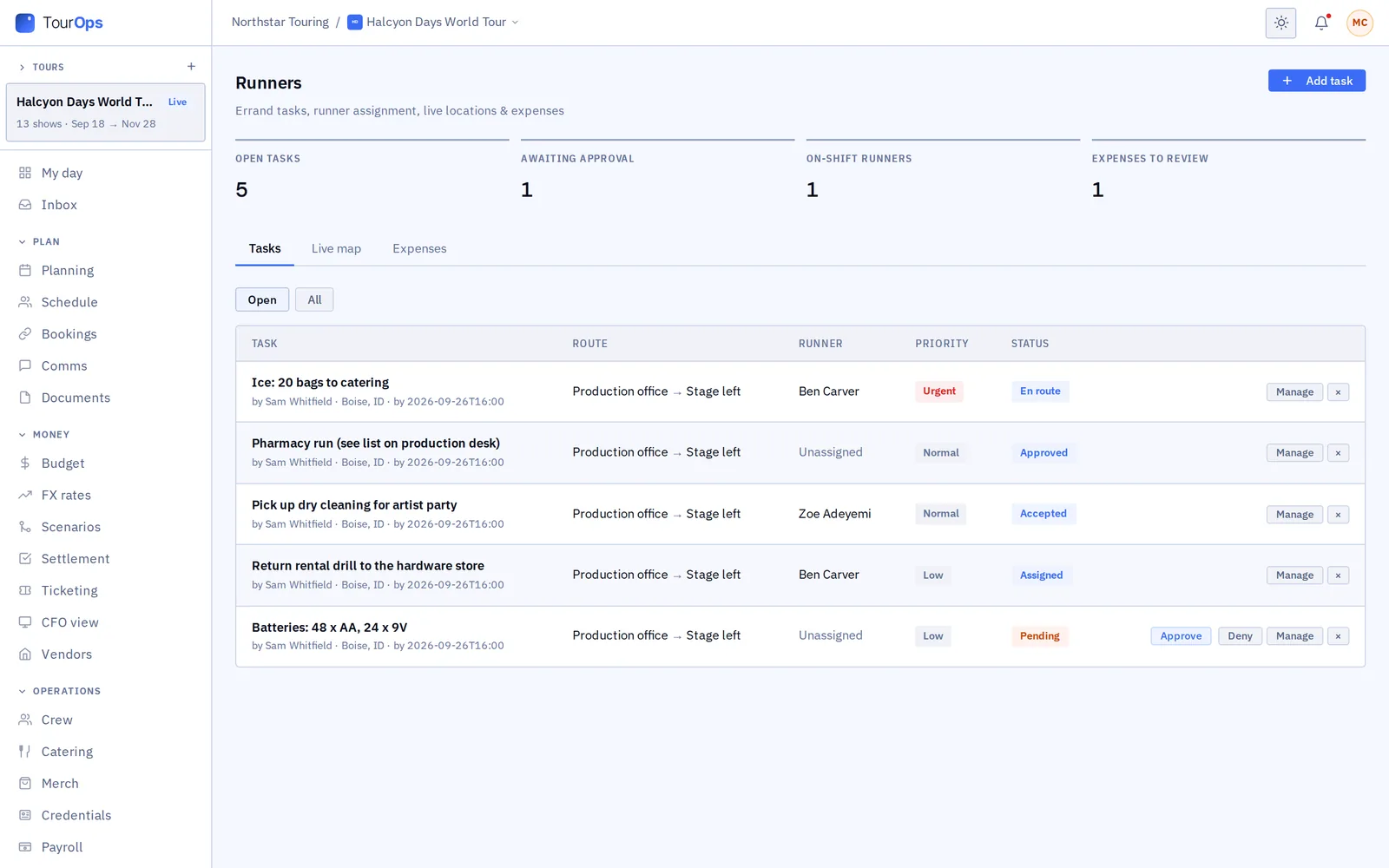
Add a task with a route and a priority, assign it or let any runner claim it, and watch it move from pending to accepted to en route to done. Runners log expenses against the task with a photo of the receipt, GigOps reads the receipt, you approve it, and the line goes into the budget.
What it connects to
- One live map
- Dispatch is every on-shift driver and runner in one place, so you can see who is nearest to the thing that just went wrong instead of asking.
- Manifests the driver can read
- A van’s manifest lists who is on it with their flight and their drop-off, so the driver knows who they are waiting for.
- It starts in Travel
- Flights live in Travel; the airport vans are built from them. Change a flight and the van planning sees the change.
- On the crew’s phone
- Drivers go on shift and run the route in GigOps Crew. Runners work the same way from the Runner tab. Crew seats are free.
- Expenses that reach the budget
- An approved runner expense pushes into the budget as a line with its receipt attached, so the errand is in the number.
- Shipments and gear
- Logistics tracks inbound and outbound shipments with carrier tracking, and gear checked out to people and back in with QR labels.
- Who can see it
- Company Admins and Manager, Ops and Coordinator seats run transport and runners. Finance, Legal and View only seats do not see them unless a Company Admin turns them on.
Step by step in the help guide: shuttles and airport pickups, runners, tasks and expenses, the dispatch map, shipments and gear and travel. Drivers and runners work in GigOps Crew.
Who it is for
Who it moves.
TourOps
Hotel loops, the airport runs on a travel day and the errands that keep a show day moving, with the expenses landing in the tour budget.
Explore TourOpsFestivalOps
Artist pickups from the airport, shuttles around a site that is too big to walk, and runners working the grounds while the gates are open.
Explore FestivalOpsActionOps
Athletes, teams and officials moved between hotels, the venue and the airport across a comp, with the vans built from the arrivals.
Explore ActionOpsQuestions
What people ask about transport.
- How does it know to move a van when a flight is late?
- The vans are built from the arriving flights rather than from a typed list. People landing within an hour of each other share a van that leaves twenty five minutes after the last of them lands, so when a flight slips the van is rebuilt around the new time and anyone who no longer fits moves to another one.
- Can crew ask for a ride?
- Yes. A crew member asks from GigOps Crew, and the request lands in Transport for somebody to approve onto a run or assign a driver to. The counts at the top of the page show how many are waiting.
- Where do drivers and runners see their work?
- In GigOps Crew on their own phone. A driver goes on shift and runs the route with its stops and manifest; a runner works from the Runner tab, takes or claims a task and logs the expense against it. Crew seats are free in every product.
- Do I need Google Maps for the live map?
- The map itself needs Google Maps connected for the workspace. Without it, Dispatch still lists everyone on shift with how long ago they reported, so you know who is out even when there is no map to put them on.
- What happens to a runner’s receipt?
- The runner photographs it against the task. GigOps reads the receipt, you approve the expense, and it pushes into the budget as a line with the receipt attached, instead of turning up on somebody’s card statement later.
- Can a shuttle be hidden from the crew?
- Yes. A shuttle can be private, so it does not show on the board the crew see. Recurring runs cover the loop that goes every night without somebody rebuilding it each day.
Put the next load-in on one map.
Transport and runners come with TourOps, FestivalOps and ActionOps. 7-day free trial. Company Users are $39 per user / month. View only seats are $0. Crew are always free.
Book a demo.
Tell us about the show you are planning, and we will walk you through the product that fits it, on your own dates. We reply within 48 hours.