{{ menuLabel }} How it connects Apps Pricing Sign in Start free trial
{{ f.tagline }}

Enter it once. The whole show updates.

GigOps.AI is operations software for tour and production managers. Festivals, venues, promoters and action sports events run on it too. Change a date, a venue or a crew name once. The schedule, the day sheet and the crew's phones all show it, with no spreadsheet to update by hand.

Venue, tour and promoter share one page per show. See how it works →

Start free trial Book a demo

7-day free trial, cancel any time. Your schedules, budgets and settlements export as CSV or PDF. How we keep your data safe →

{{ flav.tagline }} {{ flav.desc }}

{{ heroImg }}
The five products

Pick the one built for your company.

GigOps is one platform with five products. Each one shows the tools and the words for your kind of company, on the same login and the same data.

{{ f.tagline }}

{{ f.forWho }}

  • {{ b }}

{{ f.note }}

Explore {{ f.name }} →
The shared core

Included in every product

The same login and the same data, whichever product you run.

  • {{ c }}
See the shared core →
The connected network

One show, shared with every company on it.

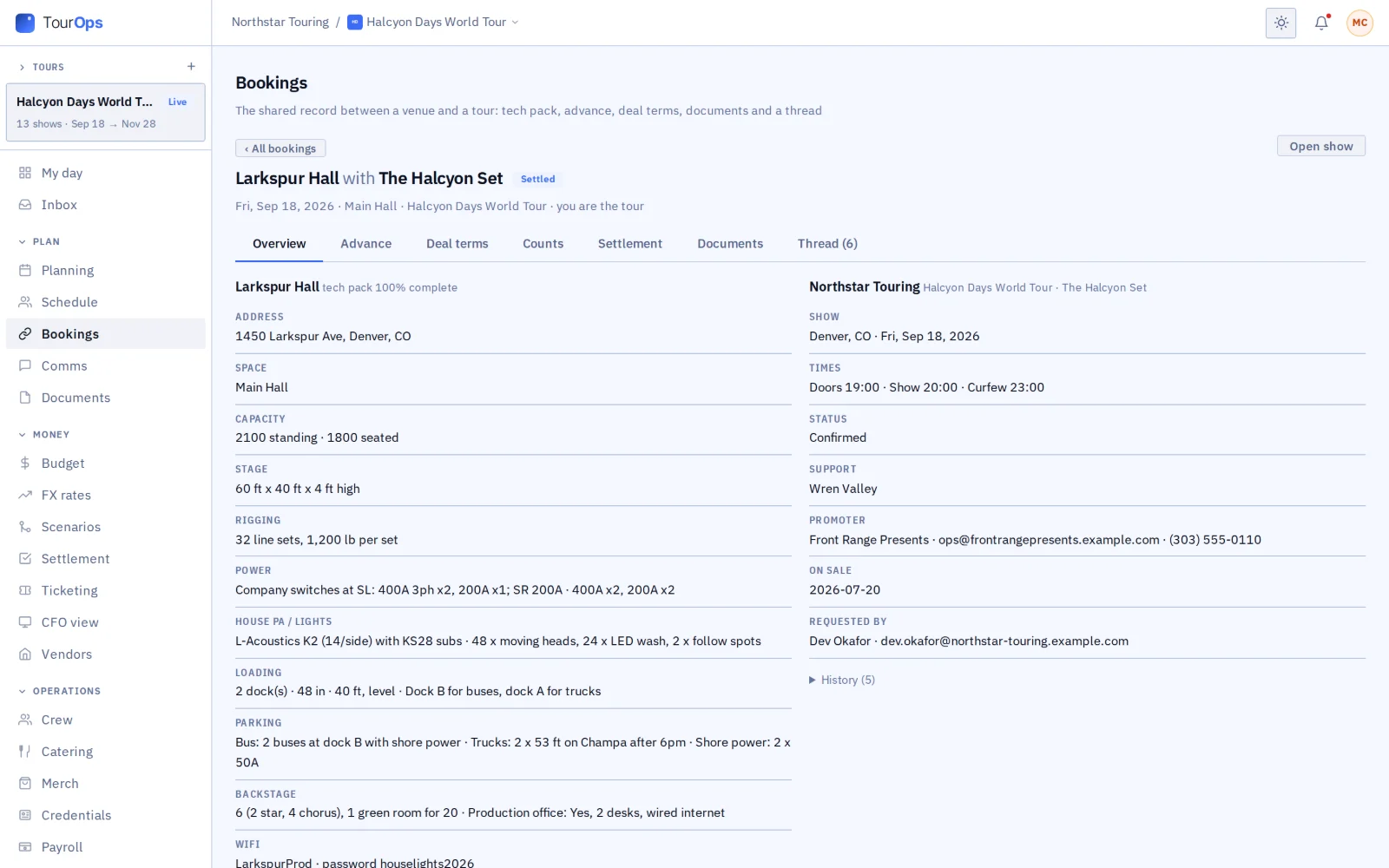
When the venue, the tour and the promoter are all on GigOps, they share one page for the show. No more emailing versions back and forth, and no one walks into load-in with last week's day sheet. A clean advance and a settlement that adds up are what get you the next offer. Each company sees its own part, and nothing else.

  1. {{ s.num }} / 05

    {{ s.title }}

    {{ s.body }}

    {{ s.img }}
See how it connects →
Graham Sauser, founder of GigOps.AI
Who built it

Built from the road.

GigOps.AI was built by Graham Sauser, in live and touring entertainment since 2012, with arena and stadium shows in more than 25 countries. Built so a date or a crew name changes once, not in every spreadsheet.

The shared core

Included in every product.

{{ c.icon }}

{{ c.name }}

{{ c.line }}

{{ s.img }}
{{ s.caption }}
Where AI helps

Paste a venue's advance reply, a flight confirmation, a tech pack, a box office count email or a list of athletes. GigOps fills in the fields for you to check.

The apps

Four iPhone apps. Crew are always free.

On the App Store
{{ a.name }}
{{ a.line }} App Store → Coming to the App Store

Everything also works in a phone browser.

See the apps →
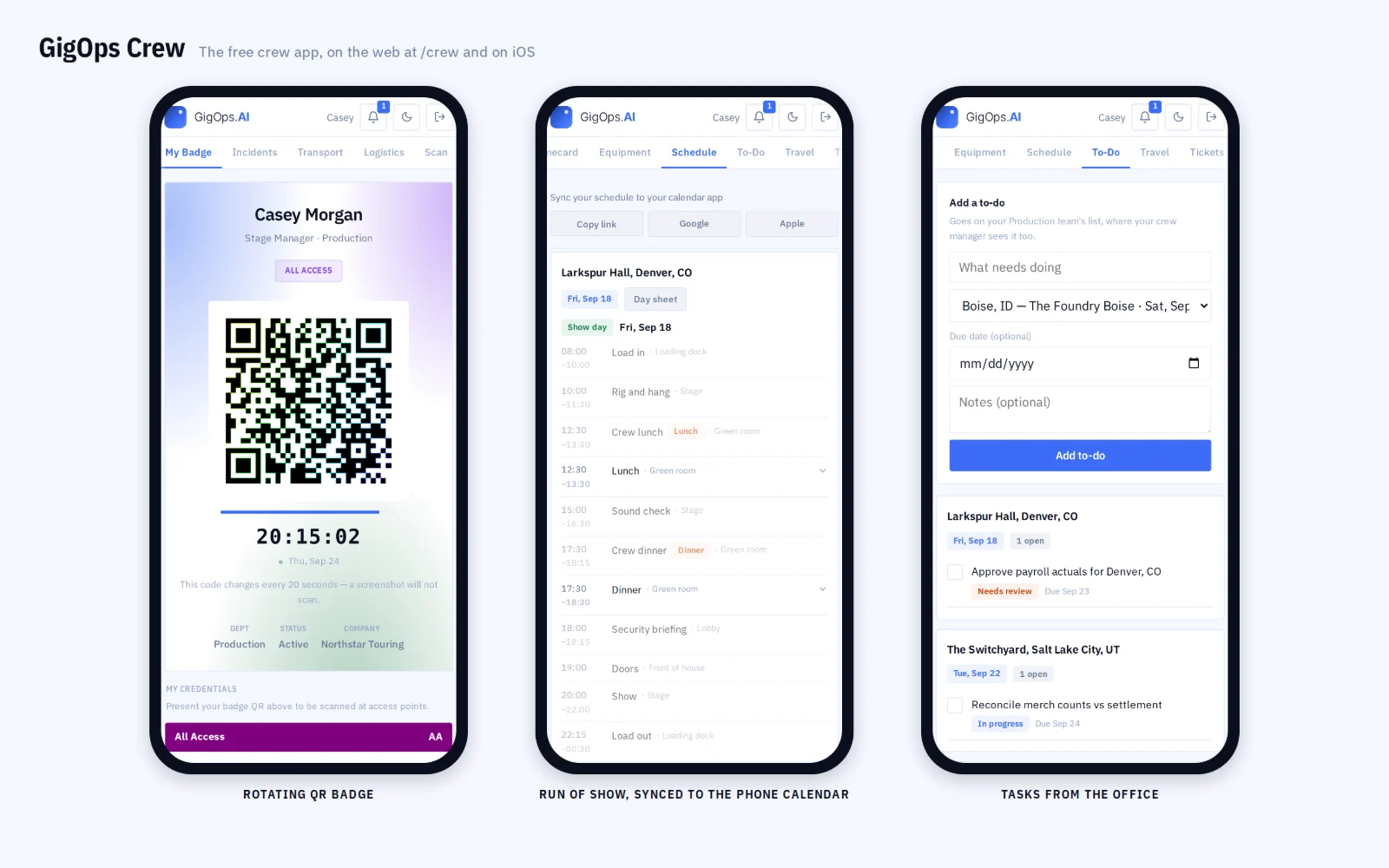
GigOps Crew on three phones
In numbers
What other companies can see

Only three things are shared between companies.

A booking joins a venue and a tour or festival. The promoter link joins a tour and its promoter. The festival link joins a festival and an act on its lineup. Everything else stays inside your company.

{{ b.title }}

{{ b.line }}

Pricing

Pay for Company Users. Crew are free.

$39per user / month

One Company User seat replaces the stack of spreadsheets your office re-keys by hand. Everyone who only needs to look, and every crew member, costs nothing.

View only $0. Read access to every module, no edits. Not billed.

Start free trial Book a demo
Your data

Your show data lives once, and only your company sees it, apart from what a booking, a promoter link or a festival link shares. Bank details on advance forms are stored encrypted, changes to access, pay rates and shared links go in an audit trail nobody can edit, and the data is backed up every day. What other companies can see → How we keep your data safe →

Questions

Before you move a tour onto GigOps.

{{ q.q }}
{{ q.a }}
Book a demo

Book a demo.

Leave your name and email, and we'll reply the same week to set up a walkthrough of the product that fits.
{{ accLabel }}
{{ accLabel }}
{{ accLabel }}
Could not send. Please email hello@gigops.ai directly.

$39 per user / month · View only $0 · 7-day free trial

Your name, company and email go to a Google Sheet through Google Apps Script, where only the GigOps team reads them.

Enter it once. The whole show updates.

GigOps.AI is operations software for tour and production managers. Festivals, venues, promoters and action sports events run on it too. Change a date, a venue or a crew name once. The schedule, the day sheet and the crew's phones all show it, with no spreadsheet to update by hand.

Venue, tour and promoter share one page per show. See how it works →

Start free trial

7-day free trial, cancel any time. Your schedules, budgets and settlements export as CSV or PDF. How we keep your data safe →

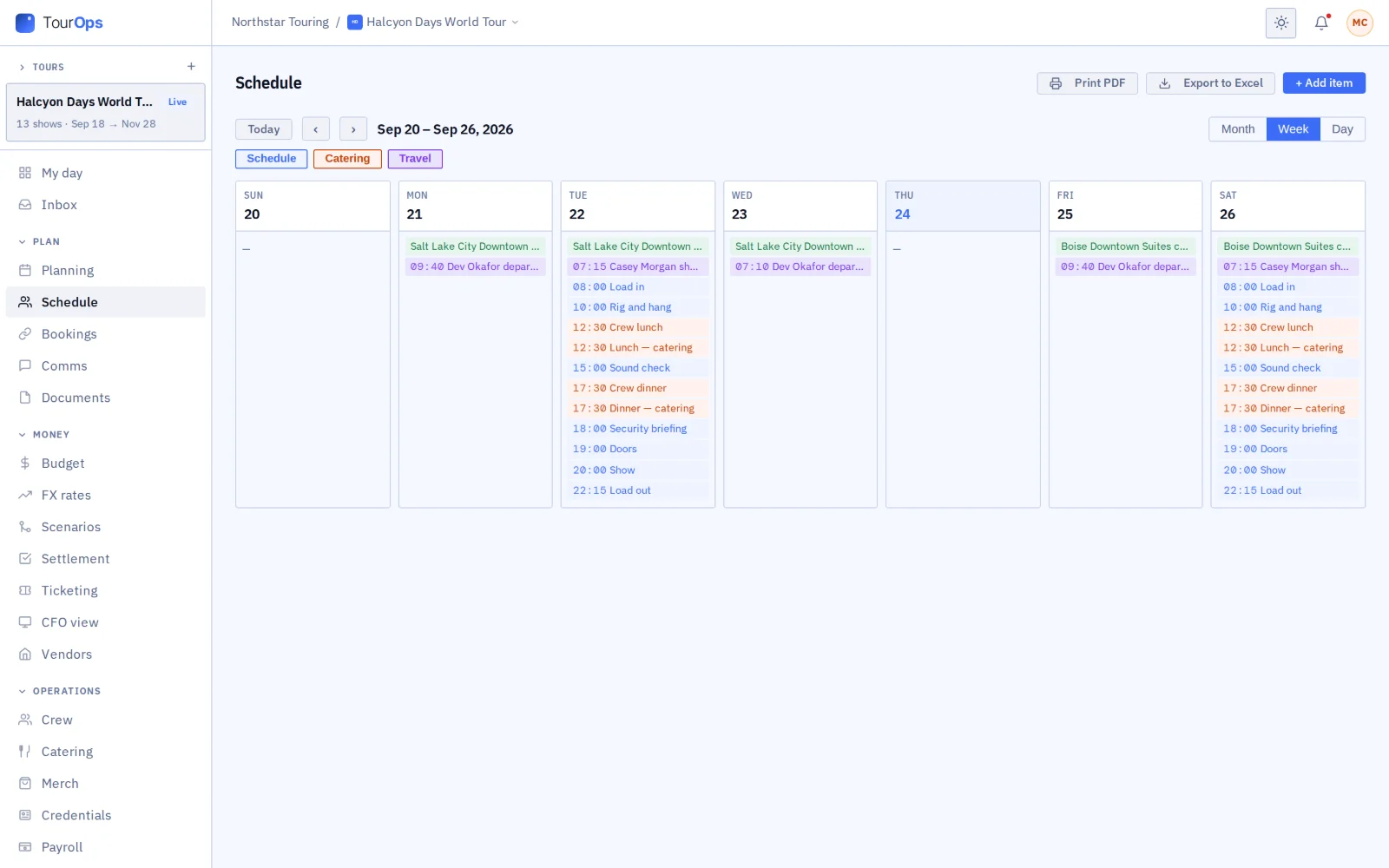
Run the road. Routing, advancing, travel, show day and settlement for one act in many cities.

Tour schedule, week view
The five products

Pick the one built for your company.

GigOps is one platform with five products. Each one shows the tools and the words for your kind of company, on the same login and the same data.

TourOps
Run the road.

Touring acts, tour managers, production companies.

  • Route the tour with drive times, and find open venues for the nights you have not booked.
  • Advance every venue. Paste a venue’s reply and GigOps fills in the advance for you to check.
  • Print a day sheet built from the run of show, travel, hotels and crew.
Explore TourOps →
FestivalOps
Run the grounds.

Festivals and their site and production teams.

  • Run the festival from a set-times grid by stage and day.
  • Send each act an advance form. Confirmed answers become passes, meal counts and run-of-show times.
  • Manage the vendor village, wristbands, site map and incident log.
Explore FestivalOps →
VenueOps
Run the house.

Venues, rooms and venue groups.

  • Enter your tech pack once, or import the one you have and let AI fill in the profile.
  • Hold dates with H1, H2 and H3, and challenge a hold with a deadline.
  • Work each booking with the tour on one shared page, from the checklist to the signed settlement.
Explore VenueOps →
PromoterOps
Run the deal.

Promoters and talent buyers.

  • Send offers the agent accepts, counters or declines on a private link.
  • Track ticket counts every day against the pace a show needs to sell out.
  • Settle each show with the tour on one shared page, and both sign it.
Explore PromoterOps →
ActionOps
Run the comp.

Action and adventure sports events.

  • Schedule each comp by course and day, with start lists by bib, seed and heat.
  • Judges score each run from their phones, and the leaderboard updates as the scores land.
  • Share live results with the media, and work out prize money by place.
Explore ActionOps →
The shared core

Included in every product

The same login and the same data, whichever product you run.

  • My day
  • Planning and tasks
  • Crew and payroll
  • Catering and meal check-in
  • Credentials and gate scanning
  • Guest list and will-call
  • Budget and finance
  • Documents
  • Signatures
  • Comms and alerts
  • Logistics and dispatch
  • Weather
  • Your own systems
  • CAD
See the shared core →
The connected network

One show, shared with every company on it.

When the venue, the tour and the promoter are all on GigOps, they share one page for the show. No more emailing versions back and forth, and no one walks into load-in with last week's day sheet. A clean advance and a settlement that adds up are what get you the next offer. Each company sees its own part, and nothing else.

  1. 01 / 05

    The venue shares its open dates.

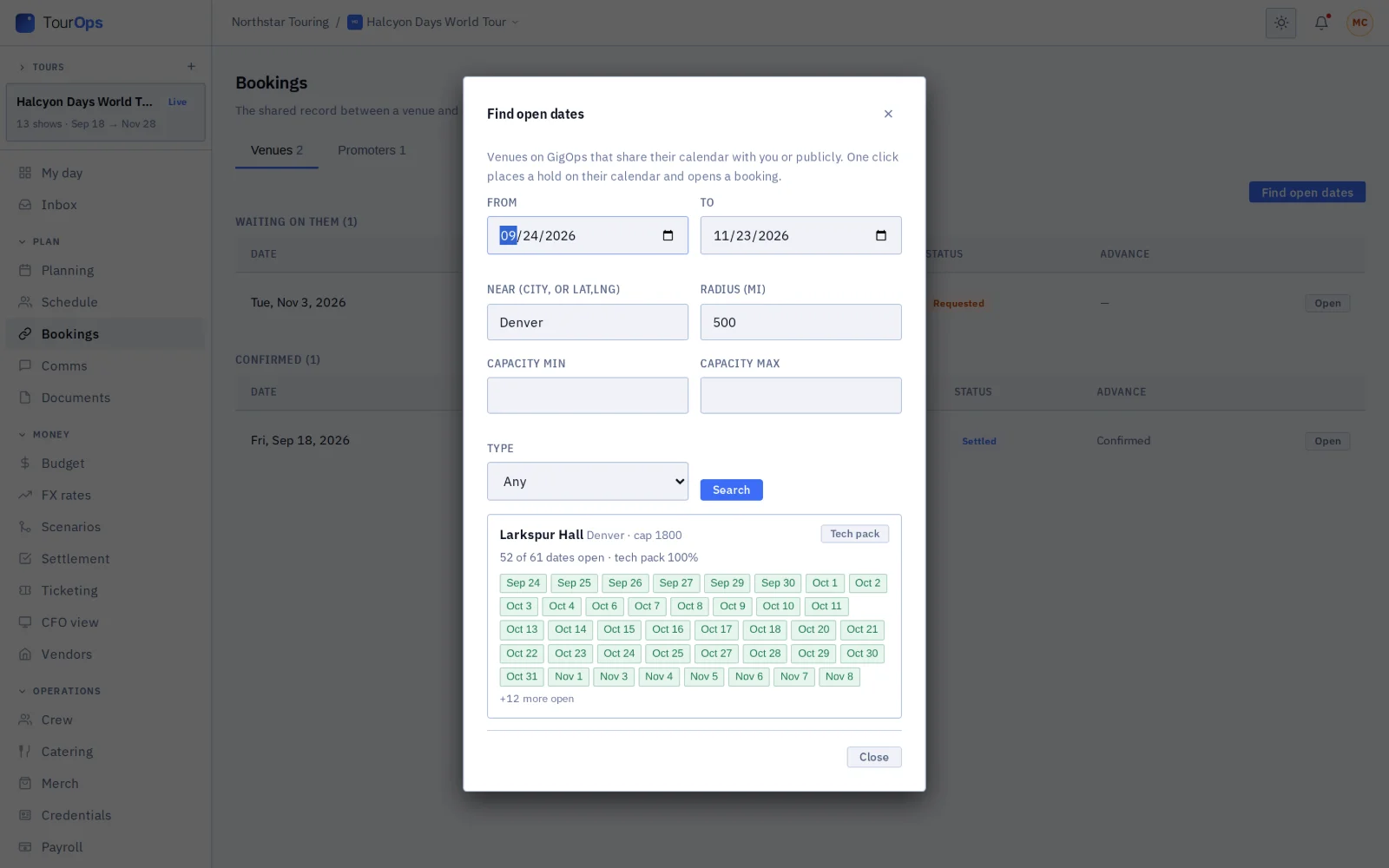
    Publicly, or only with the companies it picks. Tours search by city, distance, capacity and type of room.

    Tour searching venue avails
  2. 02 / 05

    The tour asks for a hold, and a booking opens.

    One click holds the date, adds the show to the tour and opens the booking. The venue’s tech pack is on it from the start.

    Booking, tour side: venue tech pack and show
  3. 03 / 05

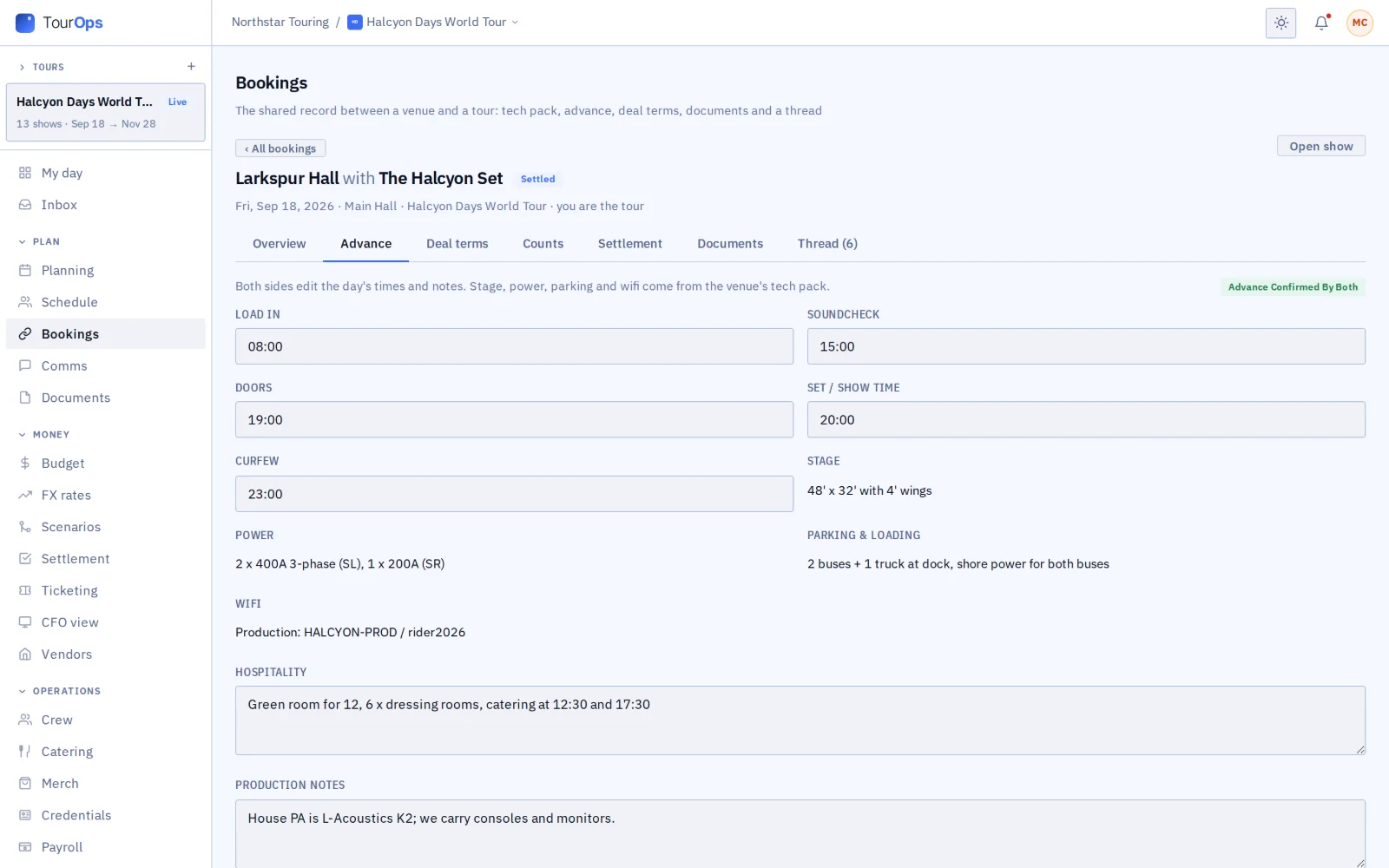
    Both sides advance the show together.

    Each side fills in its own part of one advance, and both sign off when it is done.

    Shared advance, confirmed by both
  4. 04 / 05

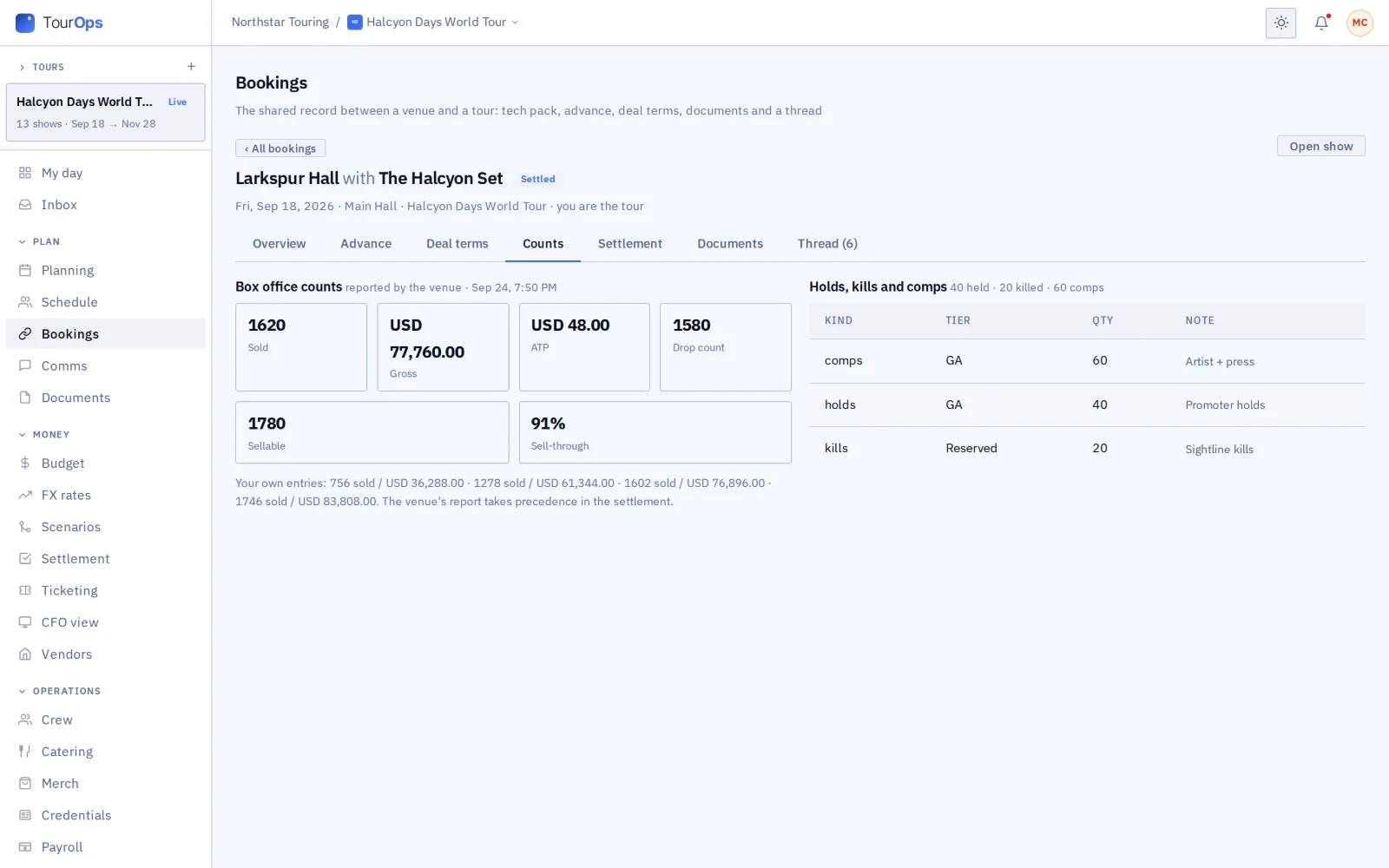
    Ticket counts come from the box office.

    The venue’s counts reach the tour’s ticketing, each marked with where it came from.

    Venue-reported counts and allocations
  5. 05 / 05

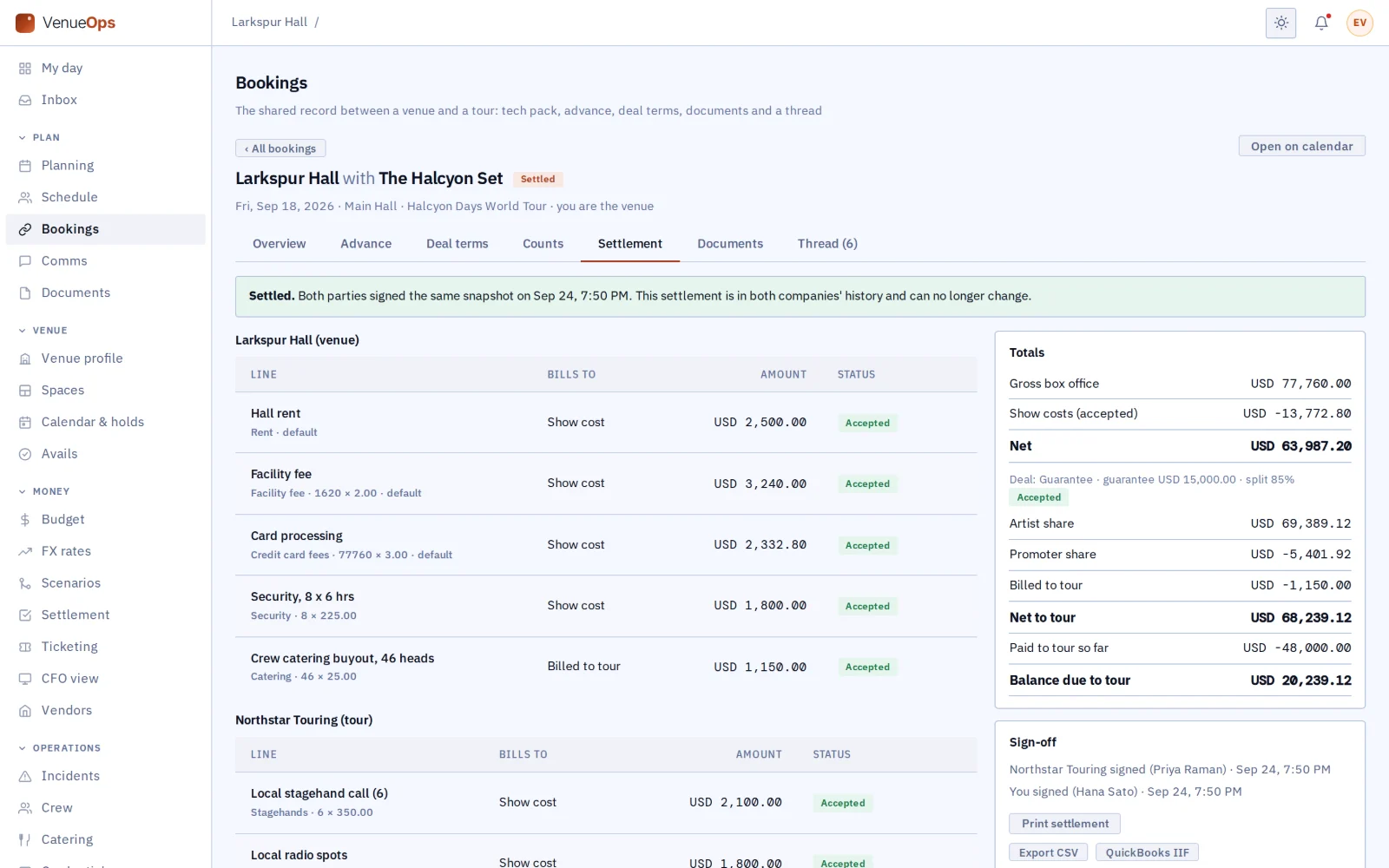
    Both sides sign the settlement.

    Both add their lines to one settlement, with the math done for guarantee, versus, percentage and door deals. Once both sign, it locks.

    Two-party settlement, signed and locked
See how it connects →
Graham Sauser, founder of GigOps.AI
Who built it

Built from the road.

GigOps.AI was built by Graham Sauser, in live and touring entertainment since 2012, with arena and stadium shows in more than 25 countries. Built so a date or a crew name changes once, not in every spreadsheet.

The shared core

Included in every product.

My day

Your first screen each morning: the weather, the budget and anything waiting for your approval.

Planning and tasks

Give each team its tasks, with sign-off from the right person.

Crew and payroll

Keep the crew list and time cards, and export payroll to ADP, QuickBooks and Paylocity.

Catering and meal check-in

Plan meals and head counts, and set out a tablet where crew check in for each meal.

Credentials and gate scanning

Issue passes by zone, scan them at the gate, and answer the passes other companies on the date ask for.

Guest list and will-call

Merge every guest list into one, and run will-call from a live board at the box office.

Budget and finance

Track budget lines, import your chart of accounts from QuickBooks or Xero, save what-if scenarios, and see profit and loss by show. Approved costs and locked settlements can sync to your own QuickBooks Online.

Documents

Mark every file with who can see it: anyone, the companies you book with, those companies once the booking is confirmed, or only your team.

Signatures

Send a PDF, contract, settlement or deal memo for signature with GigOps Sign. Every signed copy carries QR codes anyone can check.

Comms and alerts

Message your team in channels, and text and email everyone on a show when the call time moves.

Logistics and dispatch

Track shipments, and send runners on errands.

Weather

See the show-day forecast for every venue on your first screen.

Your own systems

Let your own software read from GigOps with an API key, hear about changes through webhooks, and sign your team in through your identity provider.

CAD

Draw stages, sites and docks to real size, import DXF and DWG files, compare drafts and print to scale.

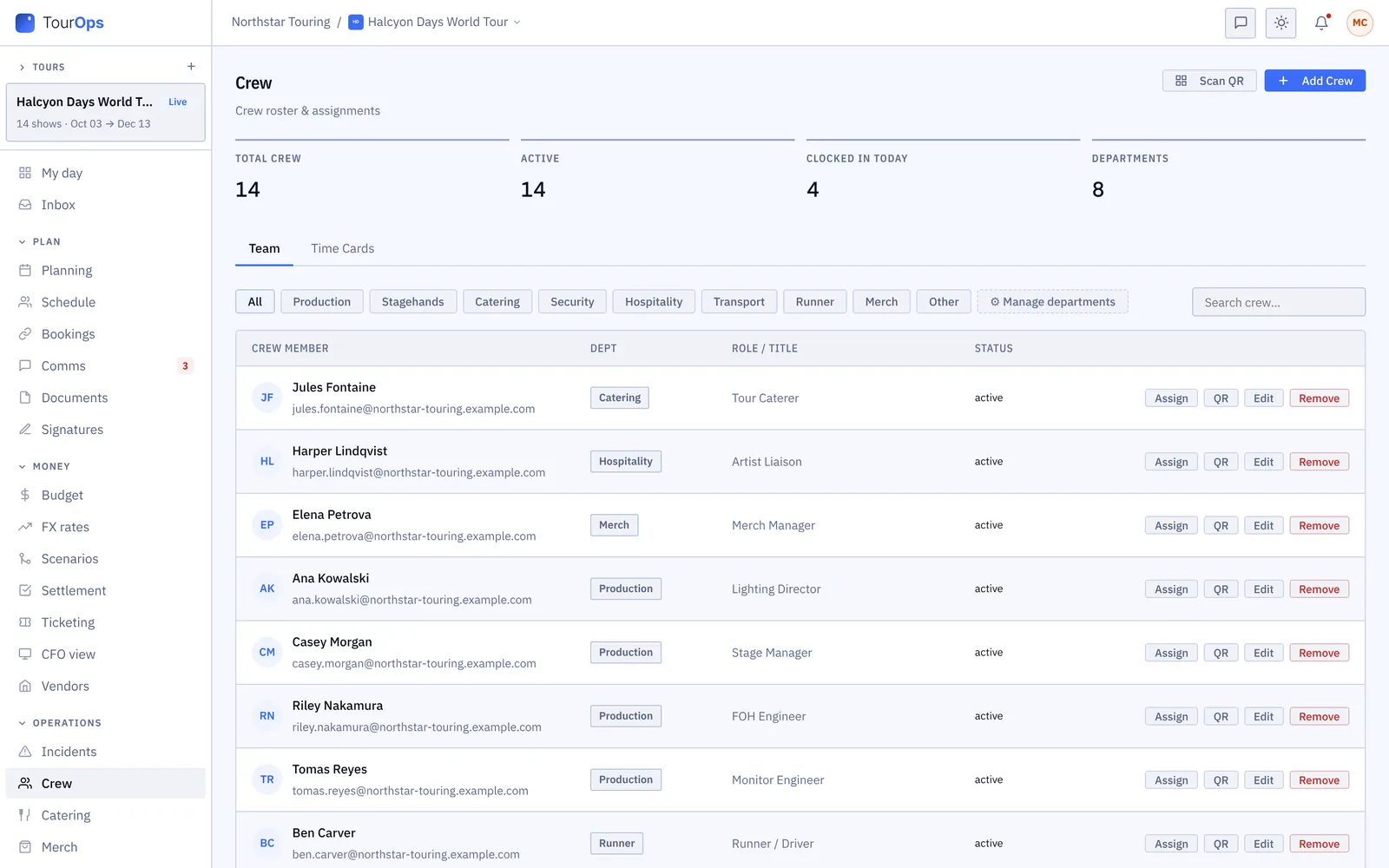
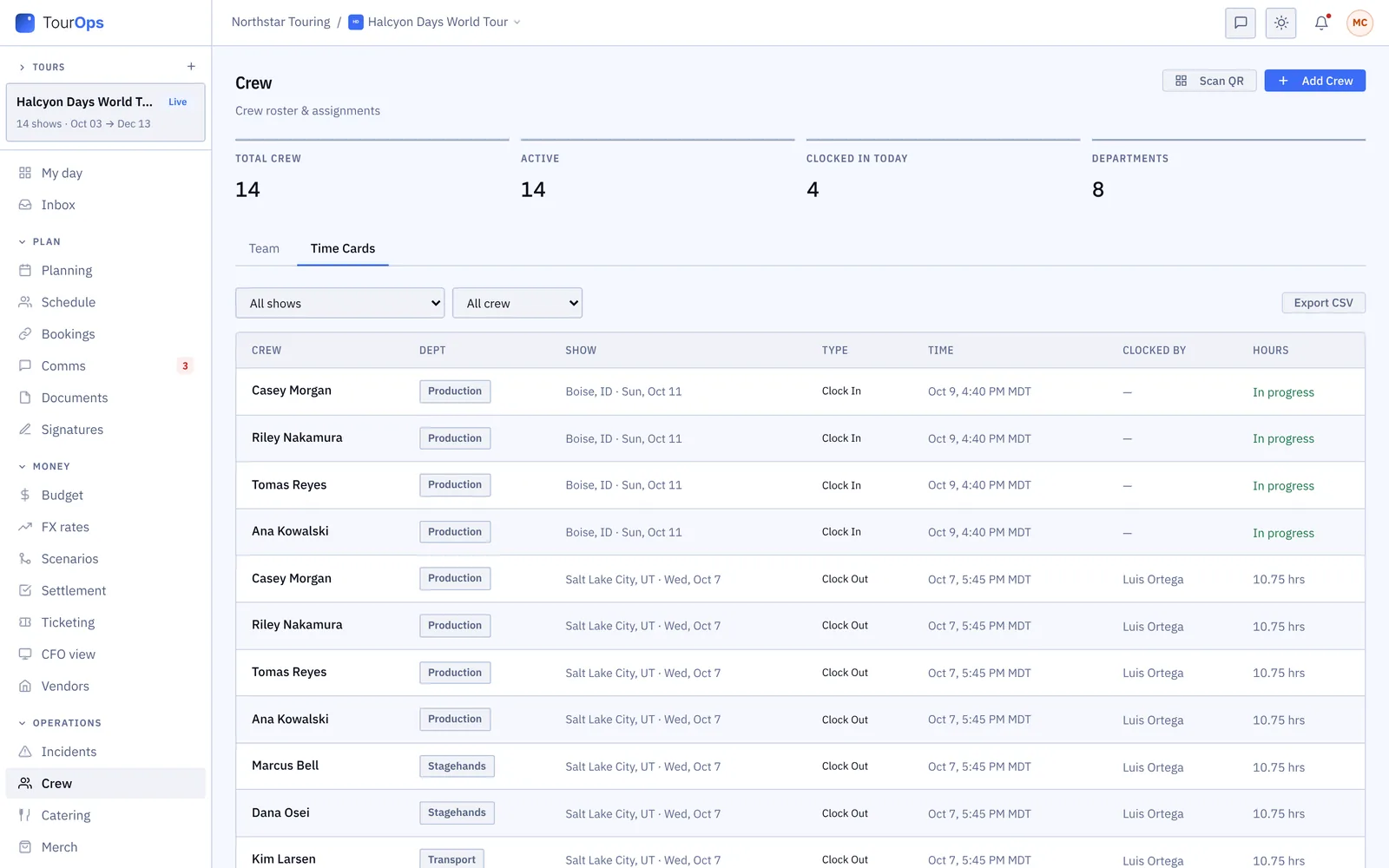
The crew roster by department, with each person’s role
Crew: the roster by department, with each person’s role and contact.
Time cards: clock-ins and clock-outs by show, with the hours worked
Time cards: every clock-in and clock-out by show, with the hours.
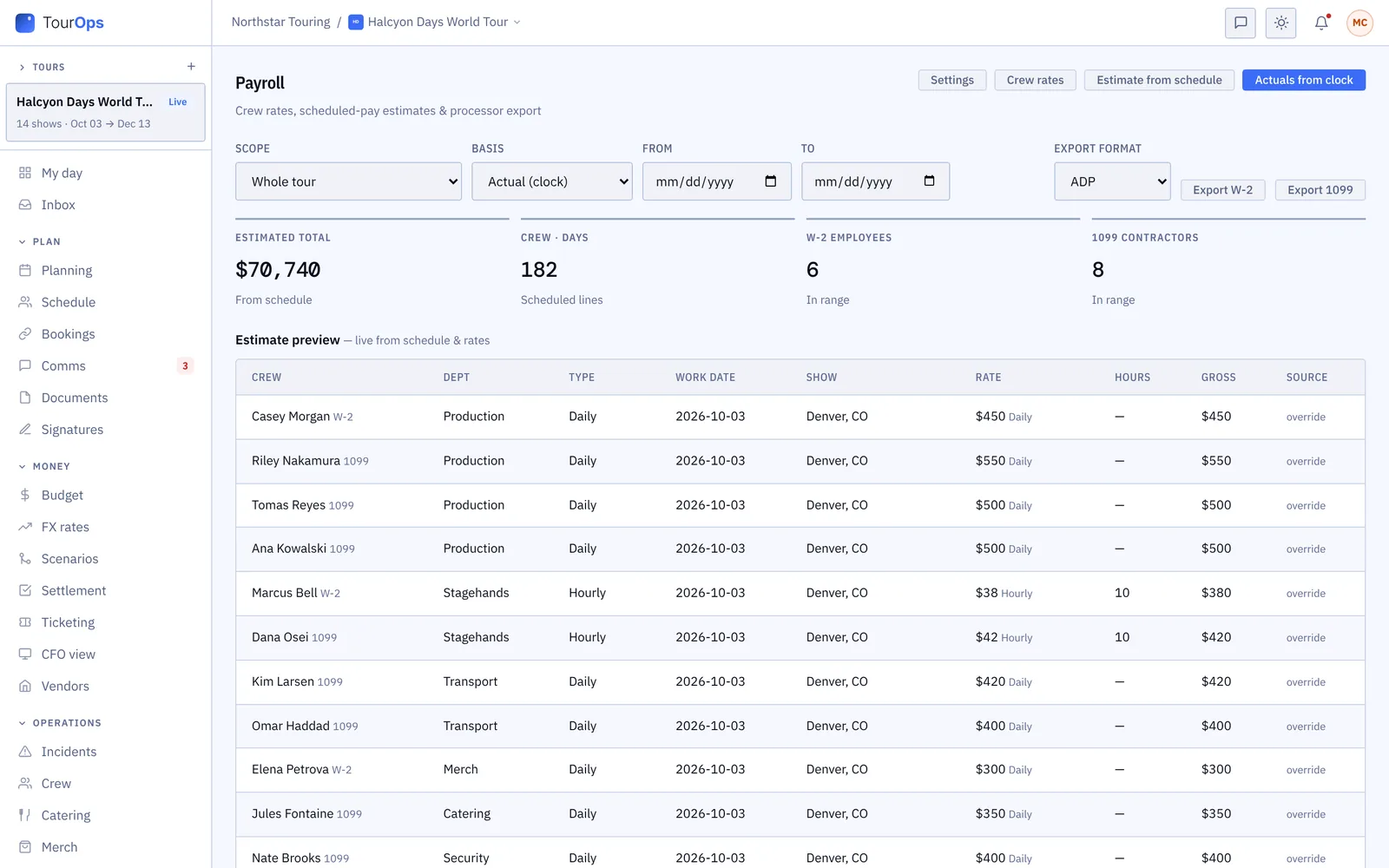
Payroll: estimates from the schedule or the clock, with the export format
Payroll: estimates from the schedule or the clock, ready to export.
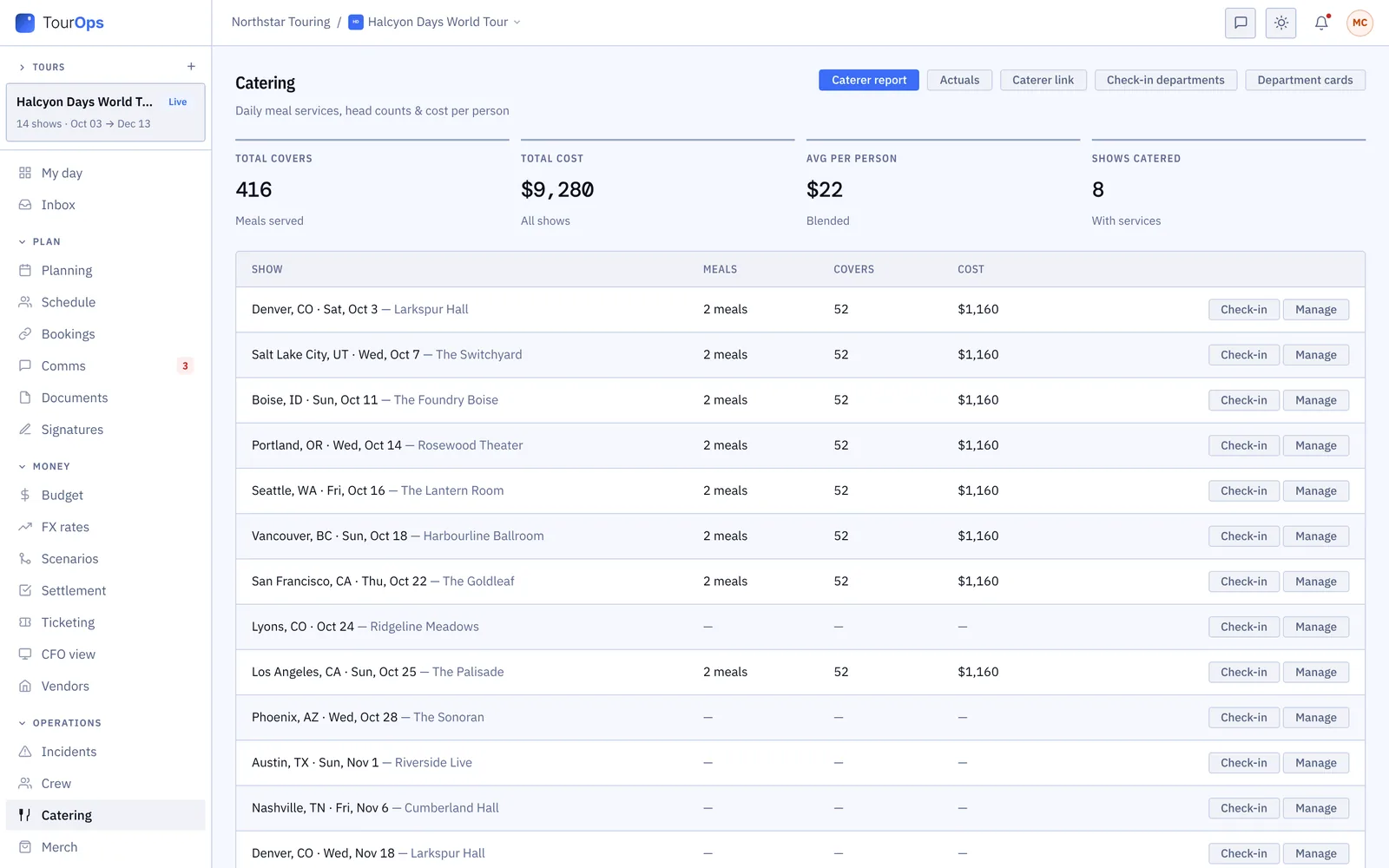
Catering: meals, covers and cost for each show
Catering: meals, covers and cost for each show.
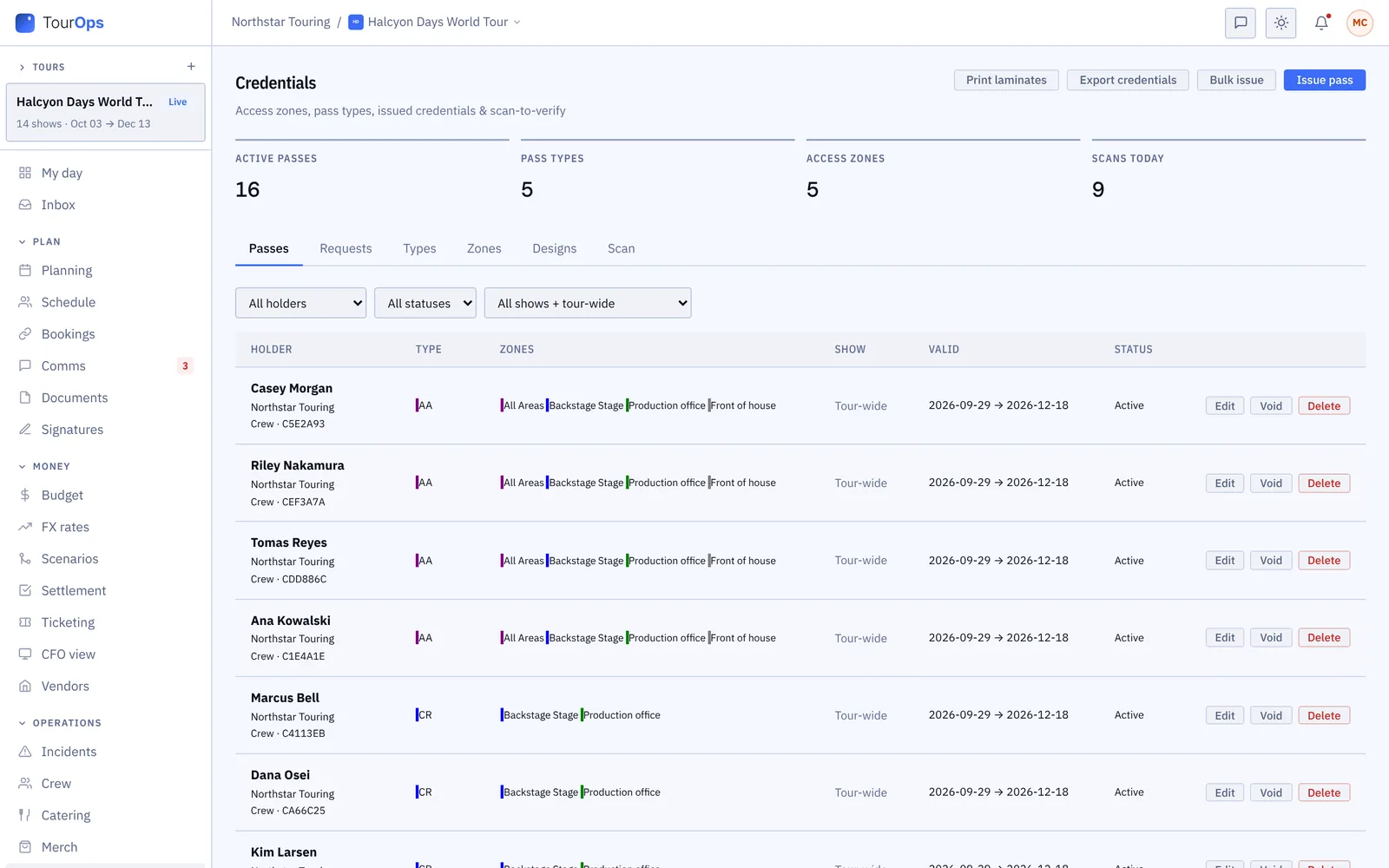
Credentials: passes with their zones, for the tour or one show
Credentials: passes by zone, for the whole tour or one show.
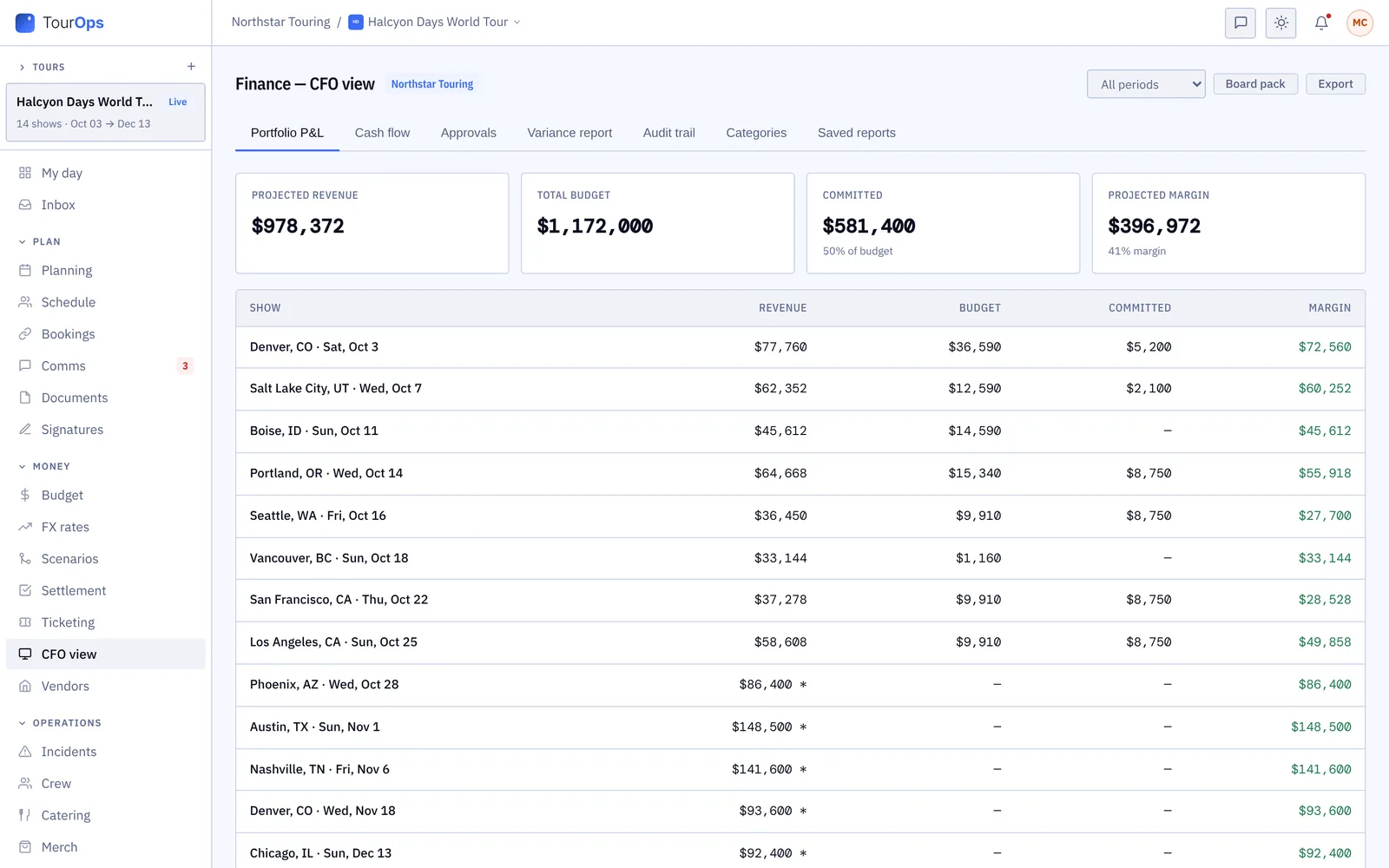
The CFO view: revenue, budget, committed costs and margin by show
The finance summary (CFO view): revenue, budget and margin by show.
Where AI helps

Paste a venue's advance reply, a flight confirmation, a tech pack, a box office count email or a list of athletes. GigOps fills in the fields for you to check.

The apps

Four iPhone apps. Crew are always free.

On the App Store
GigOps Crew
The free crew app: badge, schedule, tasks and travel on the phone. Coming to the App Store
GigOps Athlete
The ActionOps athlete app: comps and start positions, live results, travel, pass and alerts. App Store →
GigOps Company
The office on your phone, for Company Users. On the App Store as GigOps. App Store →
GigOps Scan
The gate scanner: verify credentials online or offline, and log every scan. App Store →

Everything also works in a phone browser.

See the apps →
GigOps Crew on three phones
In numbers
Products on one platform
5
Login for every company you work with
1
Per user / month, for people who make changes
$39
View only seats
Free
Crew seats
Free
iPhone apps
4
Free trial
7 days
What other companies can see

Only three things are shared between companies.

A booking joins a venue and a tour or festival. The promoter link joins a tour and its promoter. The festival link joins a festival and an act on its lineup. Everything else stays inside your company.

Each role changes only its own part.

The calendar, bookings and day-to-day work take an owner, admin, manager, ops or coordinator. Deal terms, settlements and signatures take an owner, admin, manager, finance or legal. View only changes nothing. A Company Admin can change access for one person, or switch a part off for everyone.

Two-factor sign-in, or your own.

A code from an authenticator app at sign-in, which a company can require for everyone. Or, once a Company Admin sets it up, sign in through your own identity provider.

You pick what the promoter sees.

A promoter sees a budget line, ticket count, guest, schedule item, document or plan only after the tour shares it.

Every file says who can see it.

Anyone, the companies you book with, those companies only once the booking is confirmed, or only your team. A booking partner never sees a file marked for your team.

Support without the figures.

When GigOps Support opens your account to help, every money and ticket figure shows as “xxxx”, hidden before it reaches their screen, and the settlement and payroll exports are blocked.

Signed records anyone can check.

A document signed with GigOps Sign carries a QR code on every page and beside every signature. Scanning one opens its verification page. A copy dropped there is checked page by page, in the browser, without uploading it.

Pricing

Pay for Company Users. Crew are free.

$39per user / month

One Company User seat replaces the stack of spreadsheets your office re-keys by hand. Everyone who only needs to look, and every crew member, costs nothing.

View only $0. Read access to every module, no edits. Not billed.

Start free trial
  • Company Users who can make changes are the paid seats, at $39 per user / month.
  • View only seats read everything their role covers, and are not billed.
  • 7-day free trial. The card is collected up front and billing starts when the trial ends.
  • Cancel any time from the billing portal.
  • Crew are always free, in every product, including the crew and athlete apps.
  • Full pricing →
Your data

Your show data lives once, and only your company sees it, apart from what a booking, a promoter link or a festival link shares. Bank details on advance forms are stored encrypted, changes to access, pay rates and shared links go in an audit trail nobody can edit, and the data is backed up every day. What other companies can see → How we keep your data safe →

Questions

Before you move a tour onto GigOps.

What happens to my data if I leave?
It stays yours. Cancel from the billing portal and access runs to the end of the paid period. Closing the account deletes nothing. Email hello@gigops.ai for a copy of your company’s data in one file, or to delete it for good, which is done within 30 days. You can also export schedules, budgets, payroll and settlements yourself, as CSV or PDF, at any time.
We run on spreadsheets today. How long does setup take?
Sign-up is five short steps: your company, your account, your team, your first tour and launch. You can skip ahead and come back. Much of what you have does not need retyping: paste a venue’s tech pack, a box office count email or a list of athletes and GigOps fills in the fields for you to check, and import your chart of accounts from a CSV or Excel file. Book a demo to walk through your own show with us.
Who runs GigOps, and what if you’re hit by a bus?
Graham Sauser built GigOps and runs it day to day: in live and touring entertainment since 2012, with tours and shows in nearly every major arena and stadium in the USA and Canada and in more than 25 countries. Your shows never depend on GigOps alone. The data is backed up every day, your schedules, budgets, payroll and settlements export as CSV or PDF at any time, and hello@gigops.ai sends you a copy of all your company’s data in one file on request. Write to that address with anything, and you get a reply the same week.
Does GigOps sell tickets?
No. GigOps runs the operations behind the show, not ticket sales, a fan CRM or marketing email. If you are looking for a ticketing platform, GigOps is not it. Keep your ticketing company, and track the counts it reports in GigOps.
Book a demo

Book a demo.

Leave your name and email, and we'll reply the same week to set up a walkthrough of the product that fits.
$39 per user / month · View only $0 · 7-day free trial

Your name, company and email go to a Google Sheet through Google Apps Script, where only the GigOps team reads them.