{{ menuLabel }} How it connects Apps Pricing Sign in Start free trial
{{ f.tagline }}
by GigOps

Run the deal.

Your own seat on every show you promote: offers, holds, deal terms, counts and exactly what the tour shares with you, organized by market.

Start free trial Book a demo
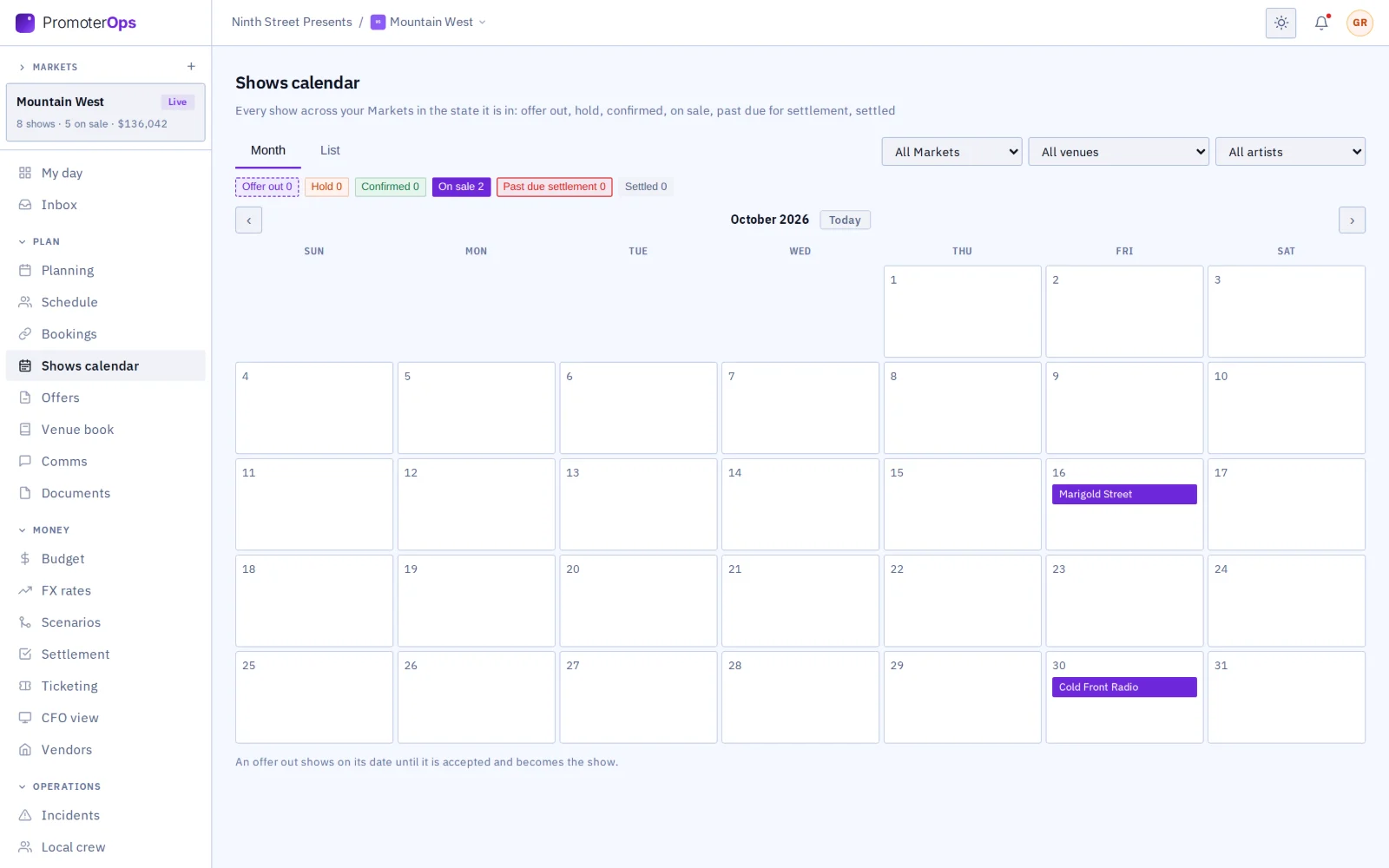
Shows calendar: the month by state across markets
What you get

Everything the deal runs on, in one place.

{{ c.title }}

{{ c.body }}

Also in PromoterOps

{{ a.title }}
{{ a.body }}
A market in PromoterOps

From the deal to the settlement.

{{ r.num }}

{{ r.title }}

{{ r.body }}

{{ r.img }}

More from PromoterOps

{{ s.img }}
{{ s.caption }}
Works with the rest of GigOps

The tour picks exactly what you see.

{{ w.title }}

  • {{ i }}
See how it connects →
Also included

The shared core

  • {{ c }}
And the apps

Crew are always free.

{{ a.name }}
{{ a.line }}
See the apps →

Put your markets on PromoterOps.

7-day free trial. Company Users are $39 per user / month. View only seats are $0. Crew are always free.

Start free trial Book a demo
Book a demo

Book a demo.

Leave your name and email, and we'll reply the same week to set up a walkthrough of the product that fits.
{{ accLabel }}
{{ accLabel }}
{{ accLabel }}
Could not send. Please email hello@gigops.ai directly.

$39 per user / month · View only $0 · 7-day free trial

Your name, company and email go to a Google Sheet through Google Apps Script, where only the GigOps team reads them.

PromoterOps
by GigOps

Run the deal.

Your own seat on every show you promote: offers, holds, deal terms, counts and exactly what the tour shares with you, organized by market.

Start free trial
Shows calendar: the month by state across markets
What you get

Everything the deal runs on, in one place.

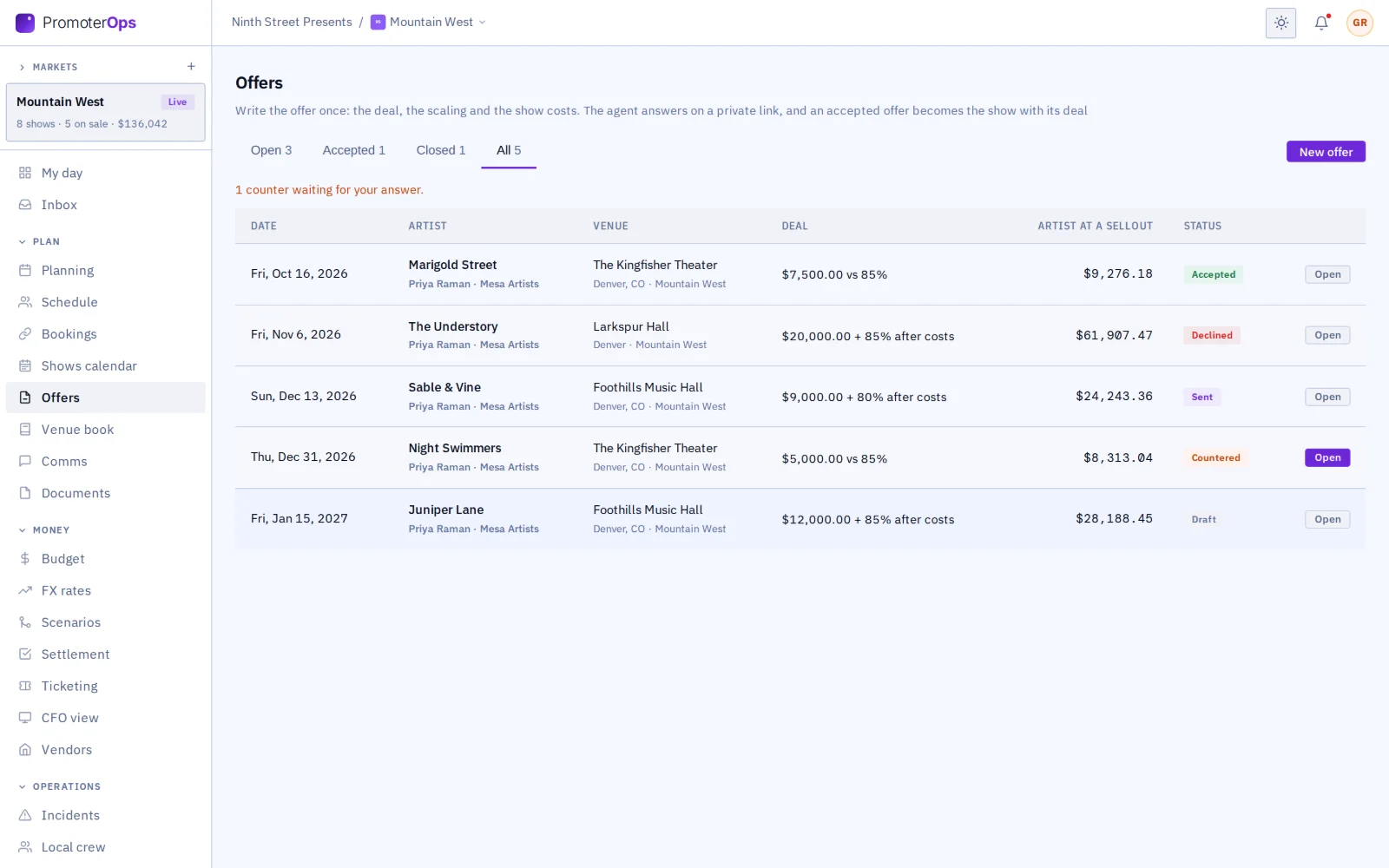
Offers that become the deal

Write the offer once: the deal, the ticket scaling and the show costs, with what they come to at a sellout. The agent gets a private link to accept it with a typed name, counter or decline, with no account. Accepted, it books the show in the market with its deal and costs, asks the venue for the hold and asks the tour to link.

Shows calendar

Every show across the markets in the state it is in: offer out, hold, confirmed, on sale, past due for settlement, settled. Month grid or list, filtered by market, venue, artist and state.

Venue book

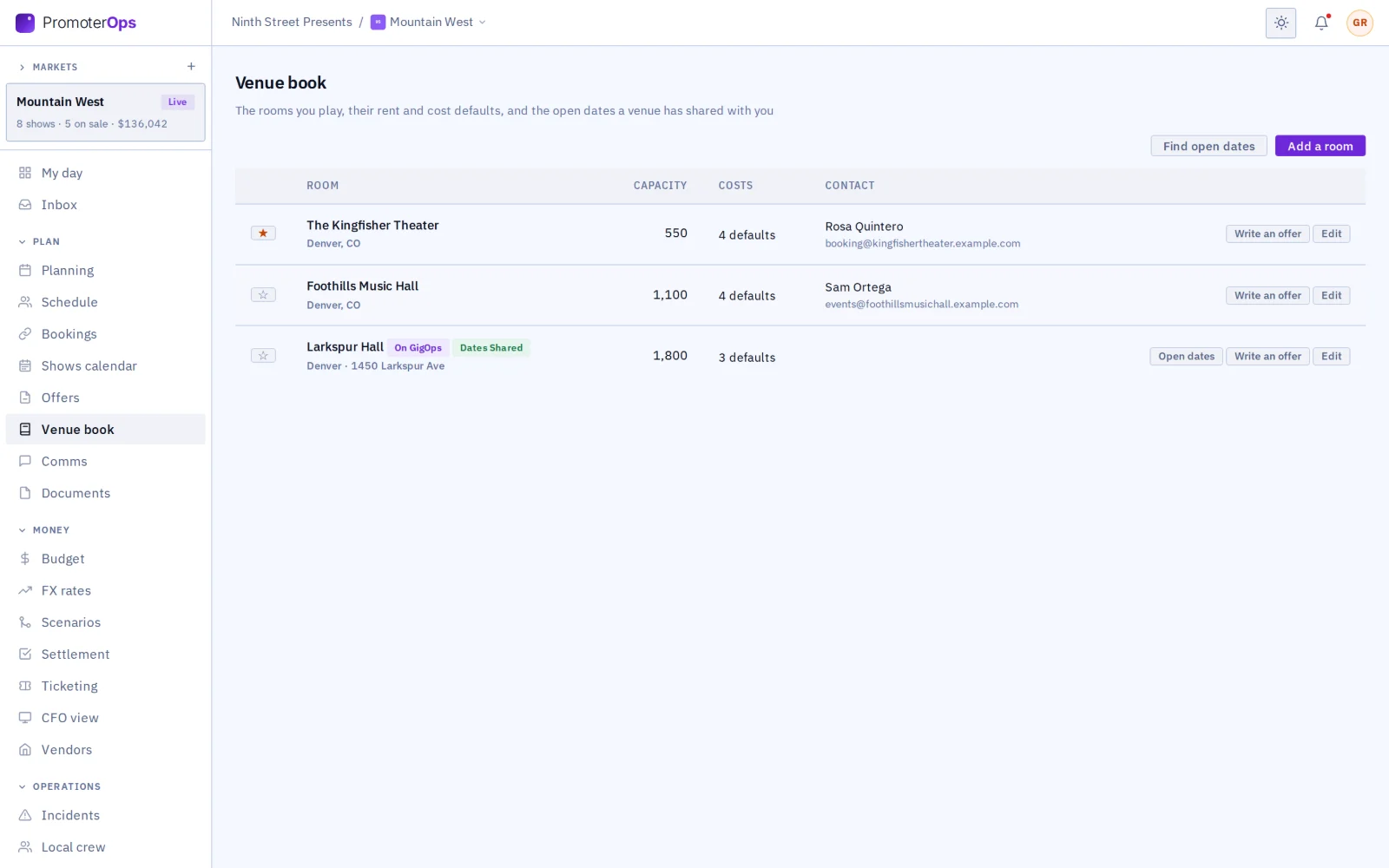
The rooms the promoter plays, on GigOps or not, with their rent and cost defaults, which an offer at the room starts from. Find open dates shows the venues that share their calendars.

The buyer at the venue

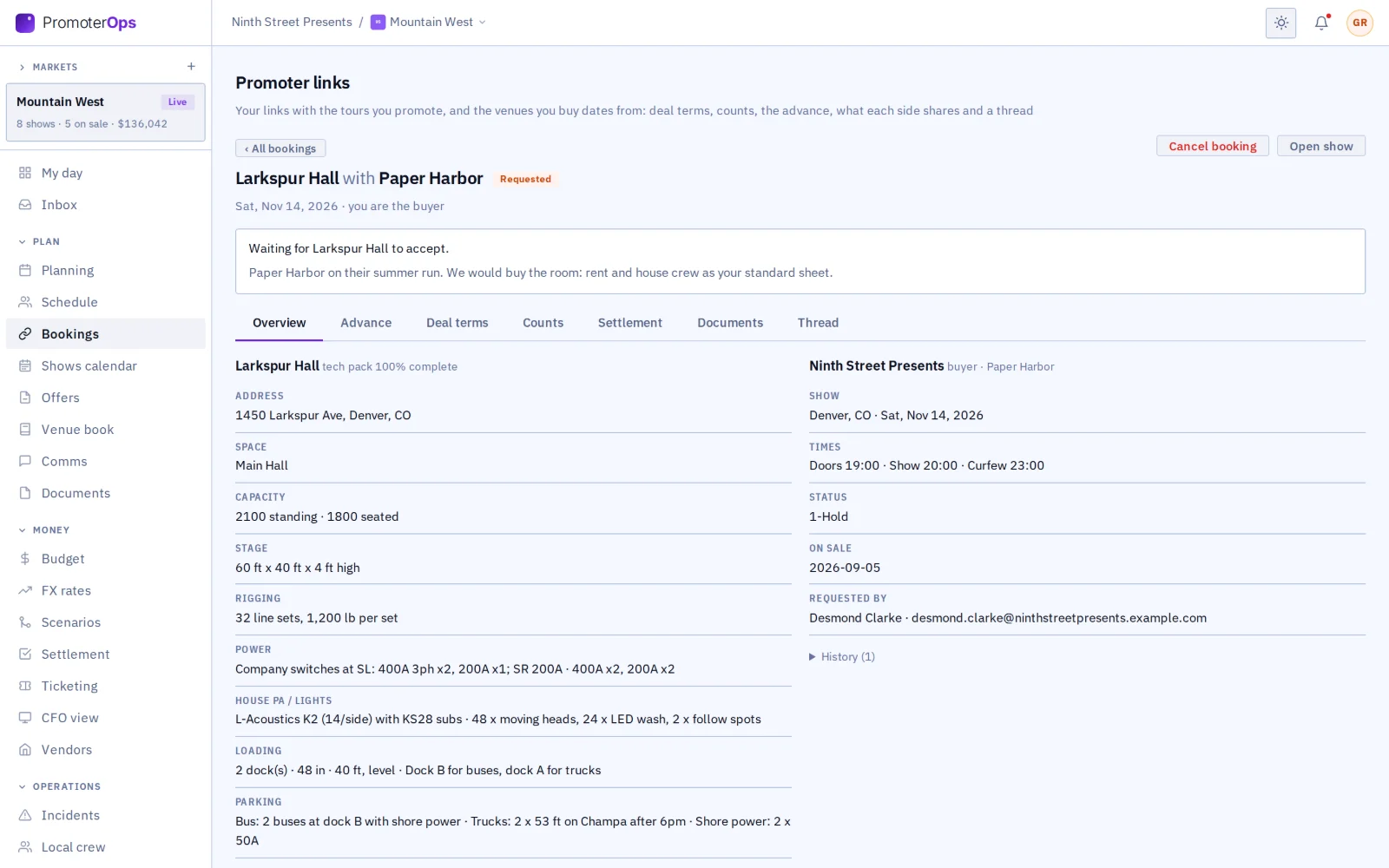
A promoter asks a venue on GigOps for a date as the buyer: the venue’s tech pack, the advance and the room settlement are one shared page, and the promoter’s deal with the act stays its own.

The promoter link

The promoter and the tour share one page for the show. Either side can start it, and one tick does it when the venue is the promoter. One link can carry several dates, each side lists its contacts, and plans shared on it open read only.

What the tour shares

The tour picks exactly which budget lines, ticket counts, guests, schedule items, documents and plans the promoter sees.

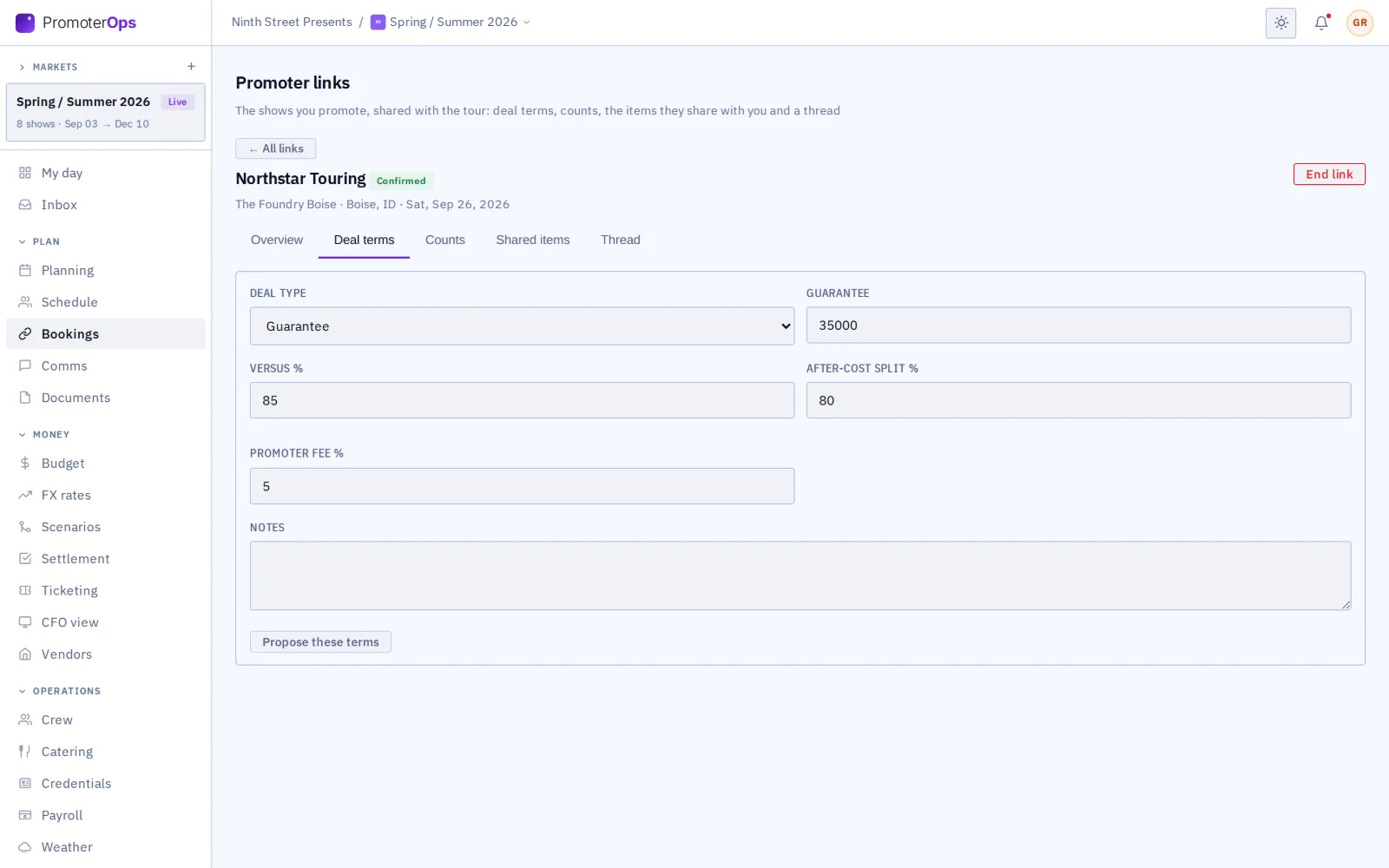
Deal terms on the link

Agree the guarantee, versus, after-cost split and promoter fee in one place.

Counts go back to the tour

The promoter’s counts reach the tour’s ticketing, marked as reported by the promoter.

Counts

The box office’s daily wrap for every show on sale, typed in, imported as CSV or pulled from a ticket feed: sold against sellable, holds, kills and comps, the day’s sales, and the pace a show needs to sell out. The bell says when a show falls behind at the halfway mark or sells out, and a linked show’s wrap reaches the tour as its count.

Also in PromoterOps

Marketing spend
Every buy by channel (radio, digital, print, outdoor, street), planned against spent, read against the advertising budget agreed in the offer, by show and by market. The promoter chooses which lines the tour sees.
The settlement on the link
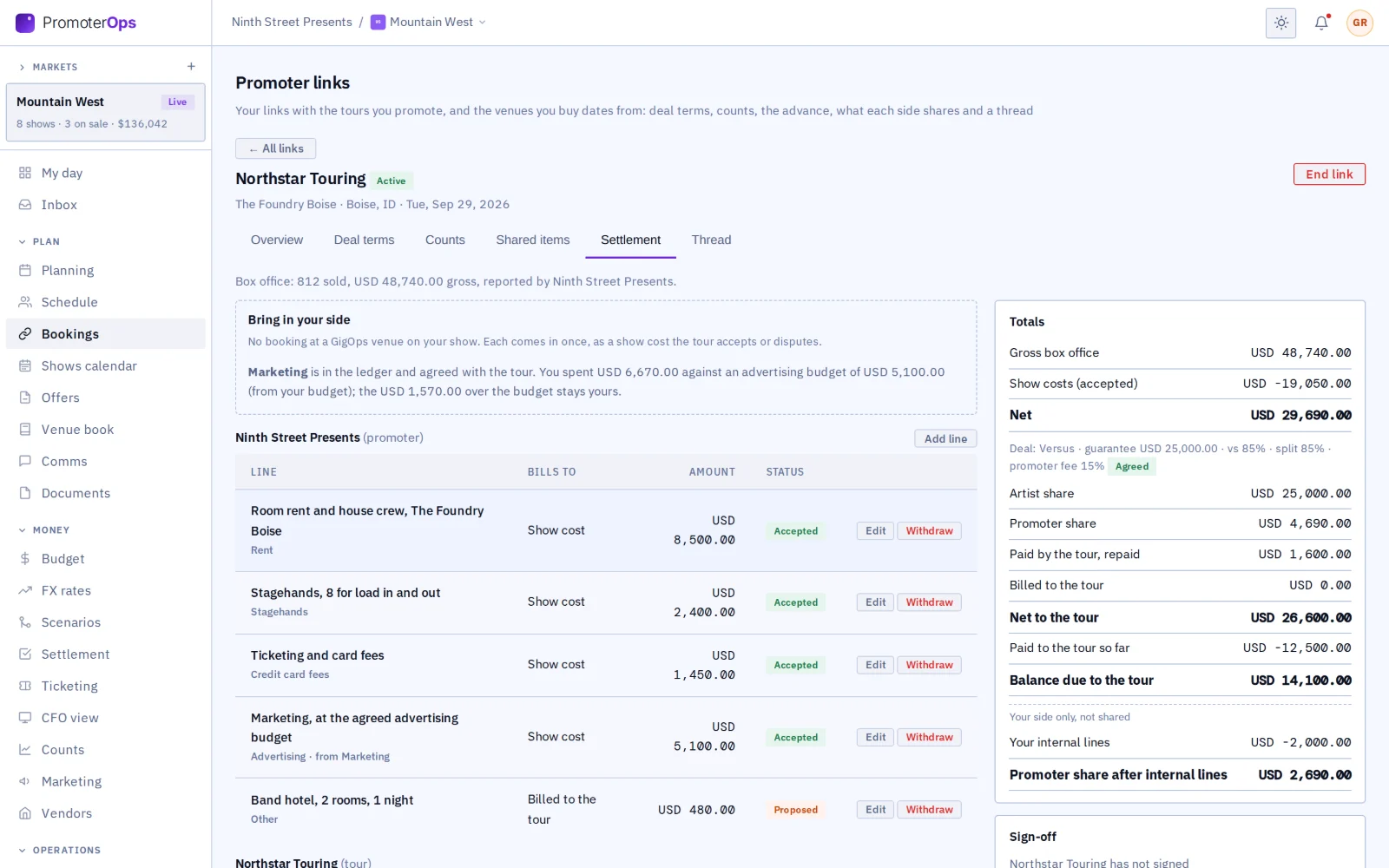
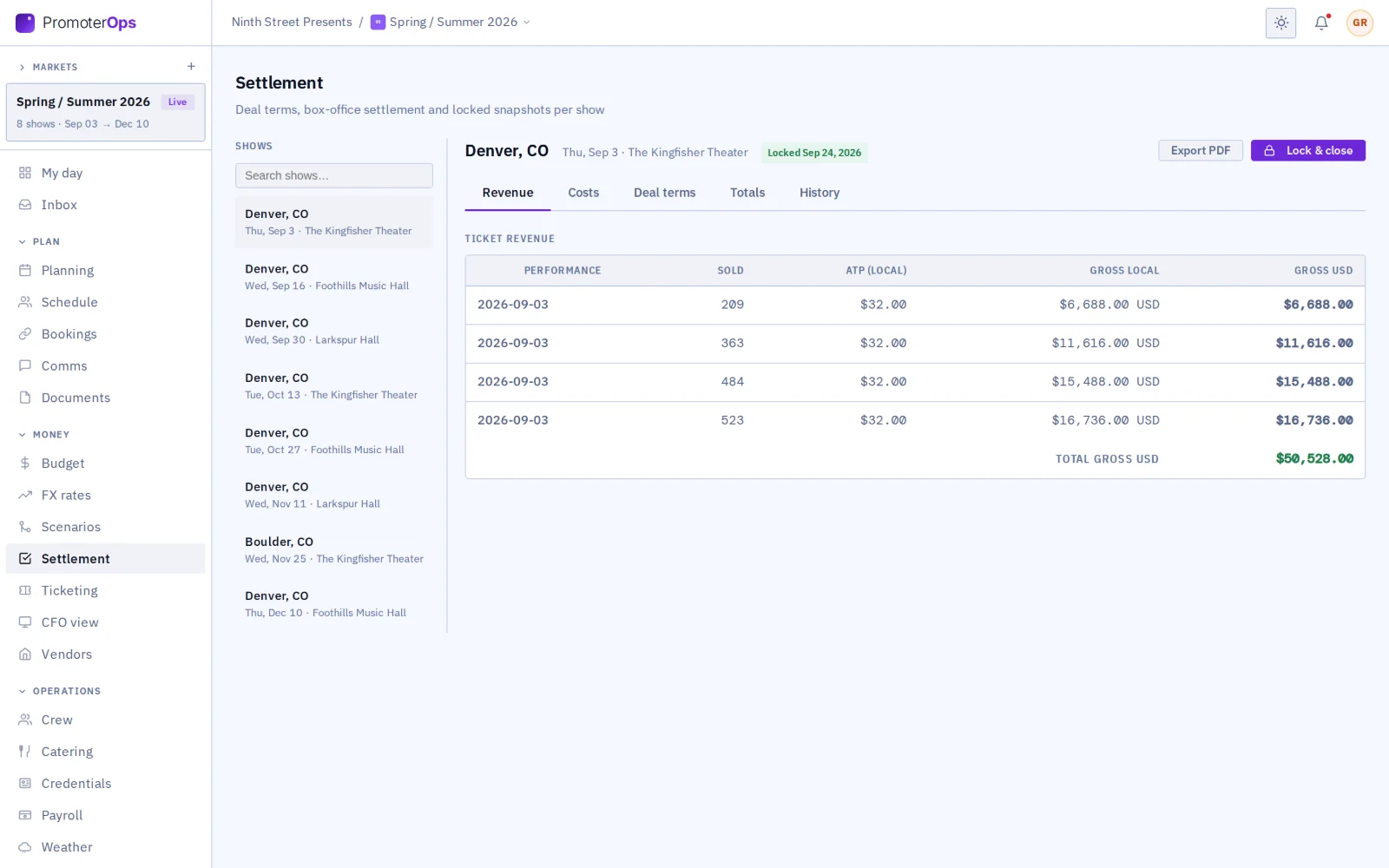
The promoter and the tour settle the date where they agreed it: the promoter brings in the room and its marketing up to the agreed budget, the tour its own costs, each side accepts the other’s lines, deposits are recorded, and two signatures lock one settlement into both companies’ history. Each side’s internal lines stay its own. The signed settlement is sealed with GigOps Sign, with a QR code on every page.
The room, passed through
When the promoter turns it on, the tour sees the venue the promoter booked: its tech pack, contacts, vendors and documents. It sees as much as a booking shows before the date is confirmed.
Markets
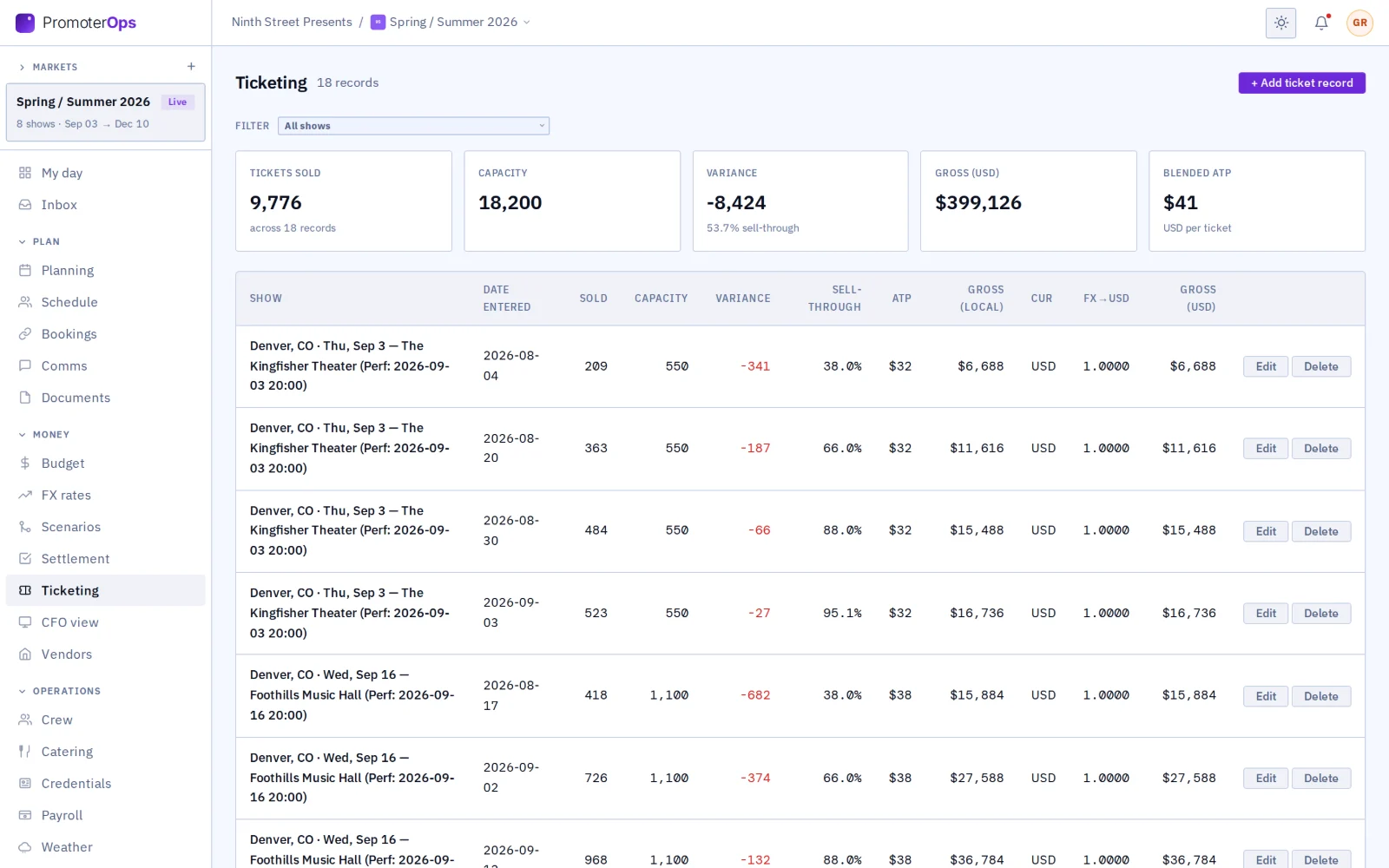
Organize every show by market. Each market shows its shows, how many are on sale and the gross so far, with its own marketing budget, ticketing, settlements and finance summary.
Analytics
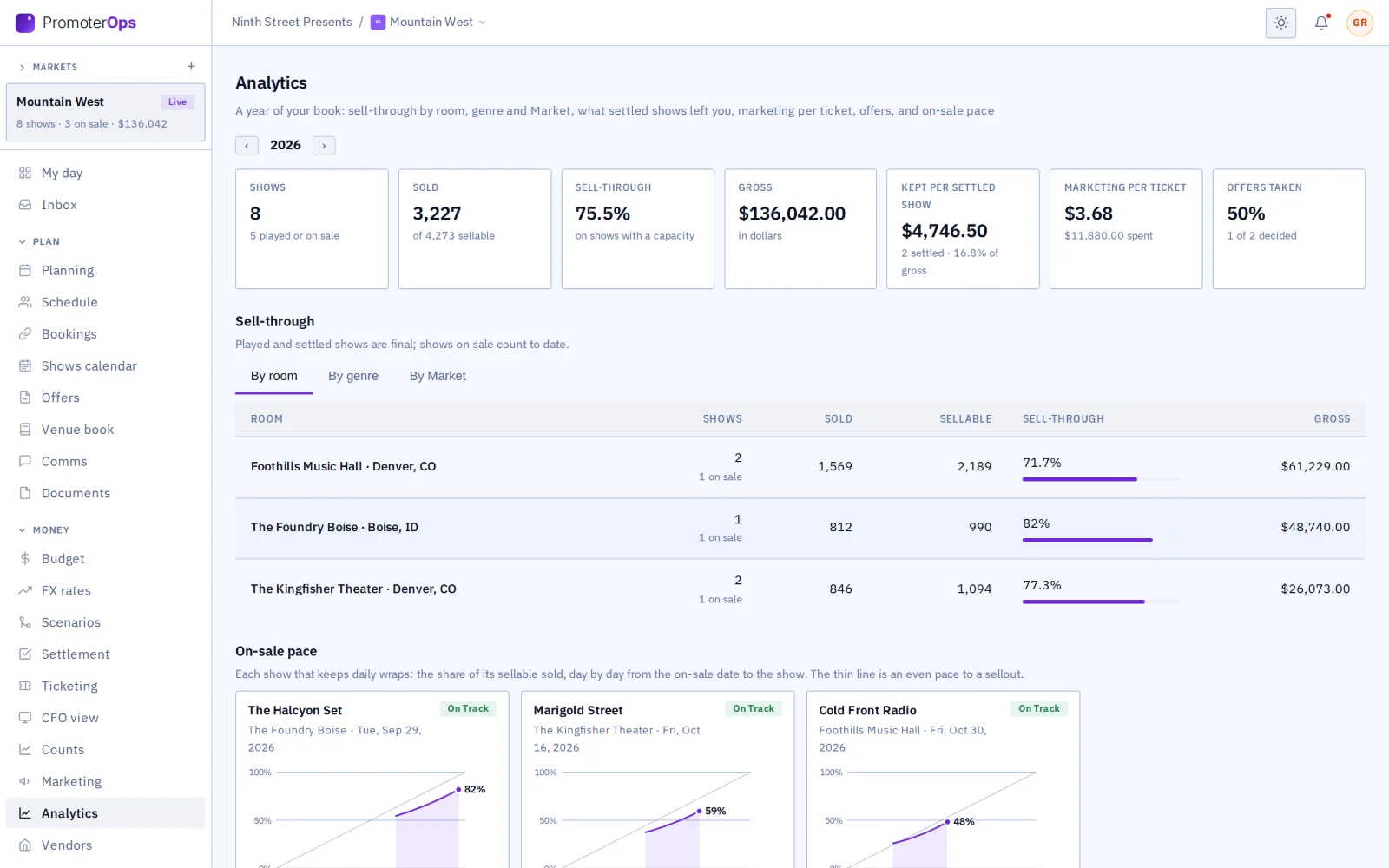
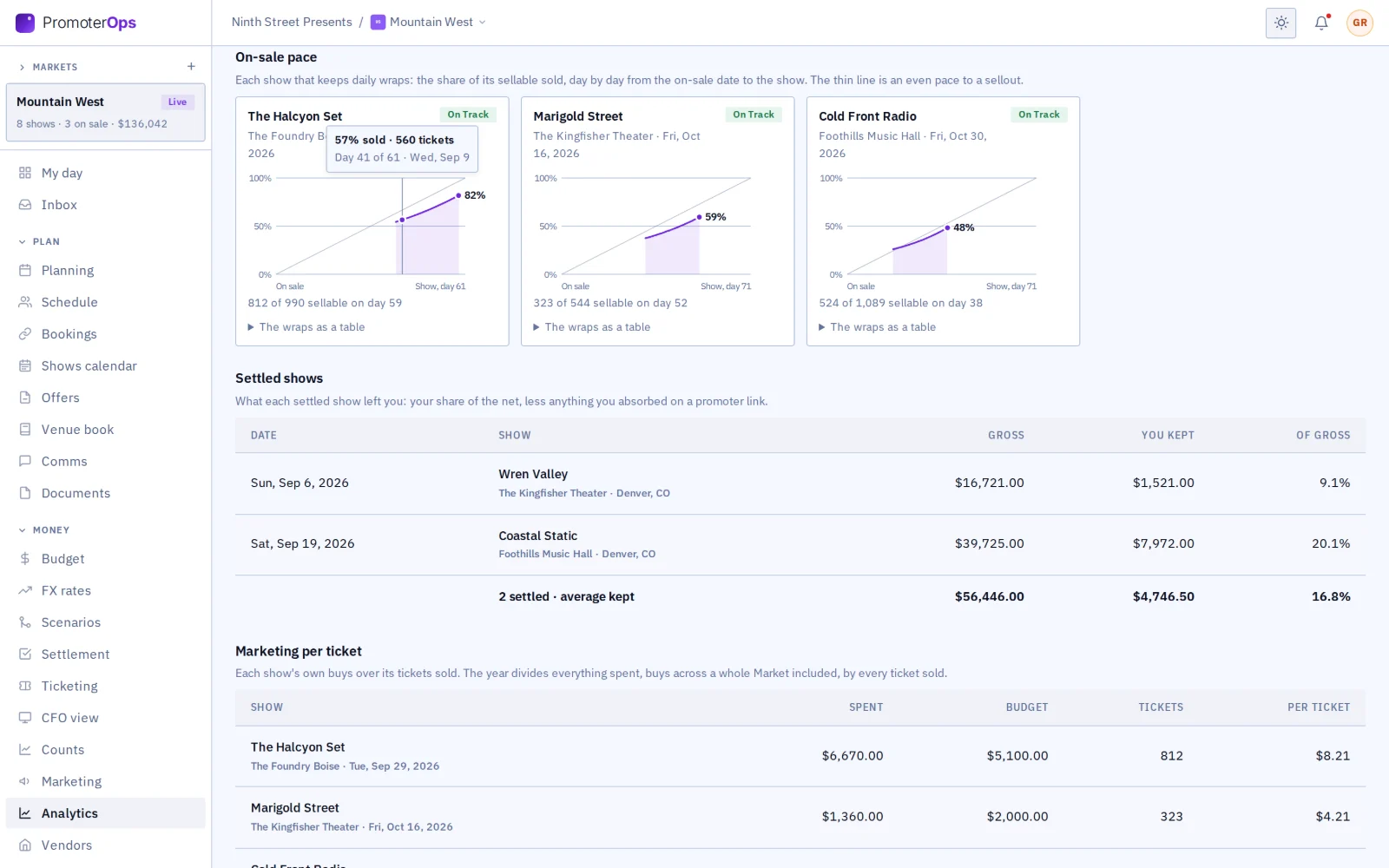
A year of the book on one sheet: sell-through by room, genre and market, what each settled show left the promoter, marketing per ticket, how many offers the agents took, and each show’s on-sale pace as a curve against an even pace to a sellout.
Invited in
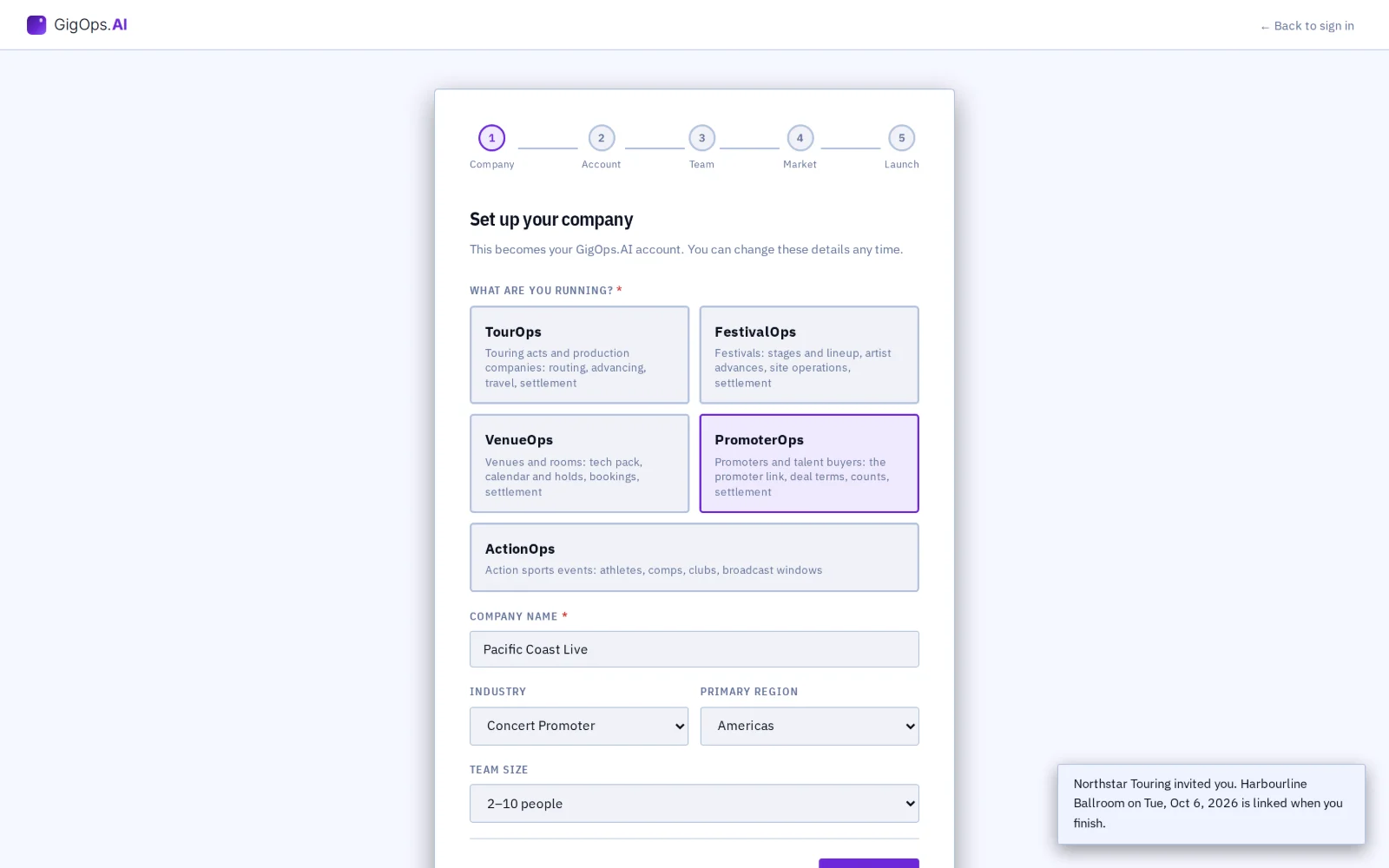
When the promoter on a tour’s date, or the promoter buying a venue’s hold, is not on GigOps, the tour or the venue invites it. The email opens the sign-up form with its details filled in, and the date is linked when it finishes.
Found by name
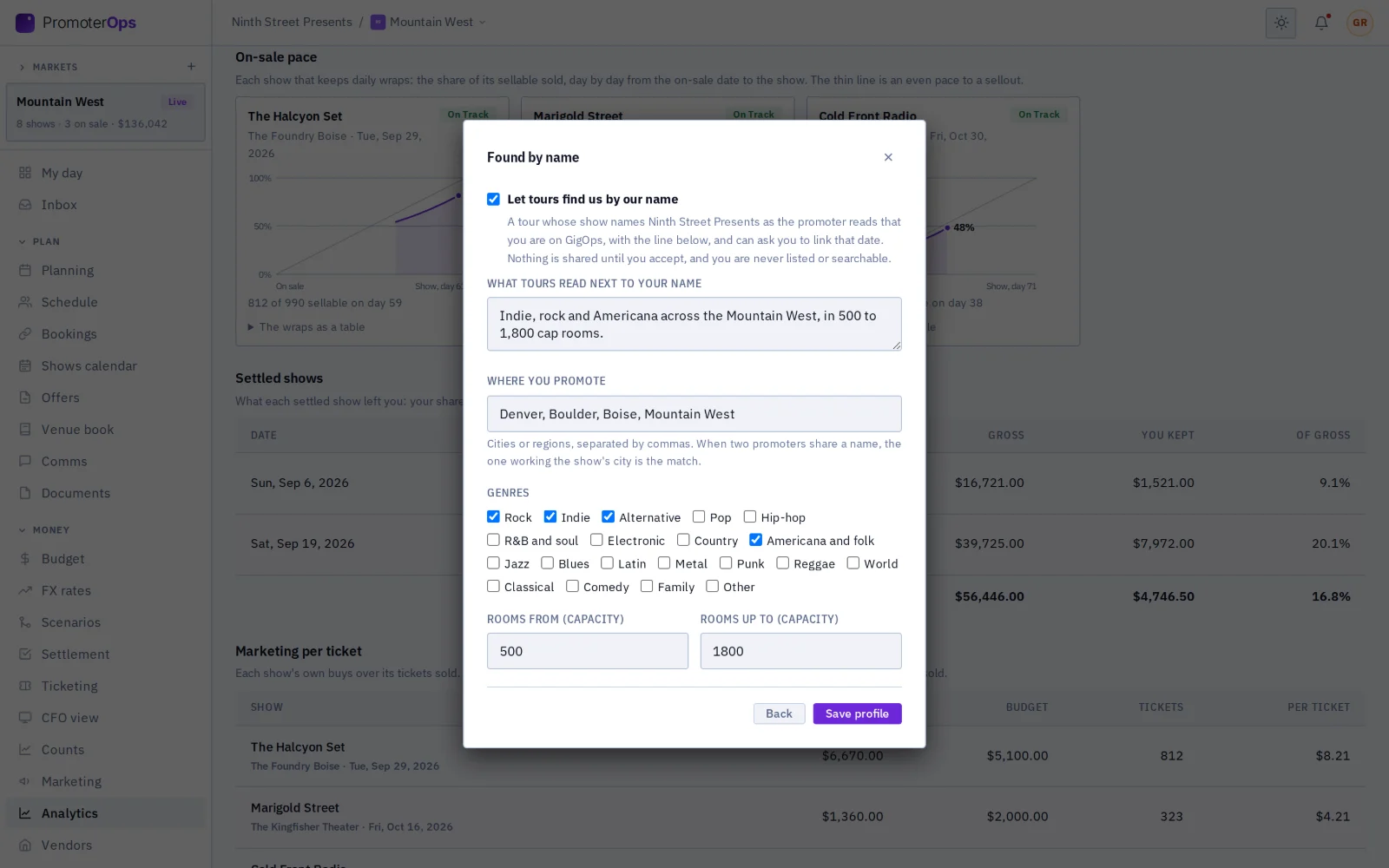
A promoter can choose to be found: a tour whose show names it reads that it is on GigOps, with a line it wrote, and asks to link. Off until the promoter turns it on.
A market in PromoterOps

From the deal to the settlement.

01 / 17

Track every offer.

Every offer out in one list, with what the artist makes at a sellout, so you see which ones are still waiting on an agent.

Offers in every state, with the artist’s share at a sellout
02 / 17

Answer a counter.

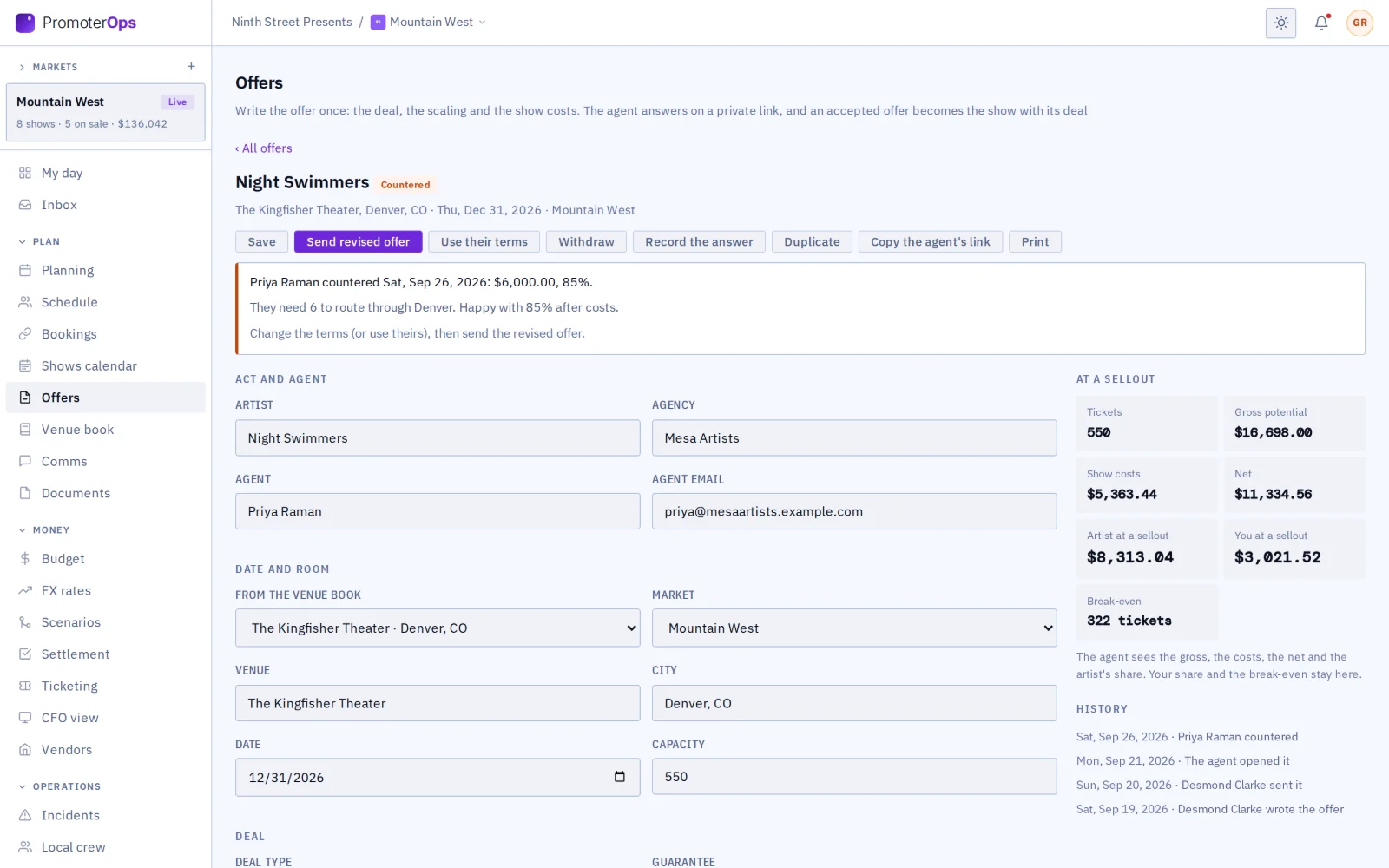
When the agent counters, their terms sit above yours. Take theirs in one click, or change yours and send the revised offer.

An offer the agent countered, with the sellout figures
03 / 17

What the agent sees.

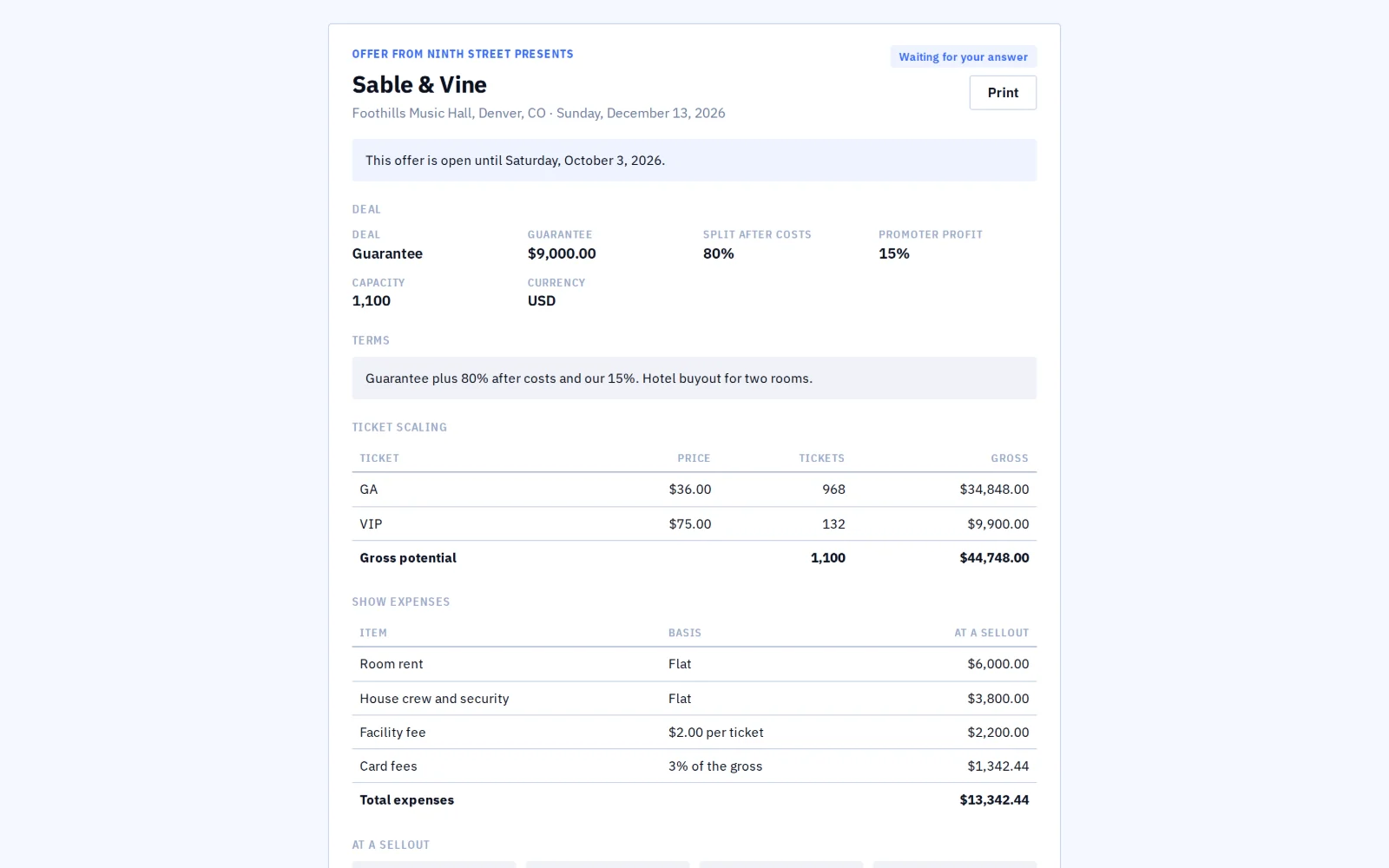
The agent reads the deal, the scaling and the costs on one private page, and answers there.

The agent’s private offer page
04 / 17

Keep your rooms in one book.

Each room’s costs are ready when you write an offer, and the rooms that share their calendars show their open dates.

Venue book: rooms, cost defaults, a venue on GigOps
05 / 17

Buy the room.

Your booking at the venue shows its full tech pack while you wait for it to accept.

The promoter’s booking at a venue, as the buyer
06 / 17

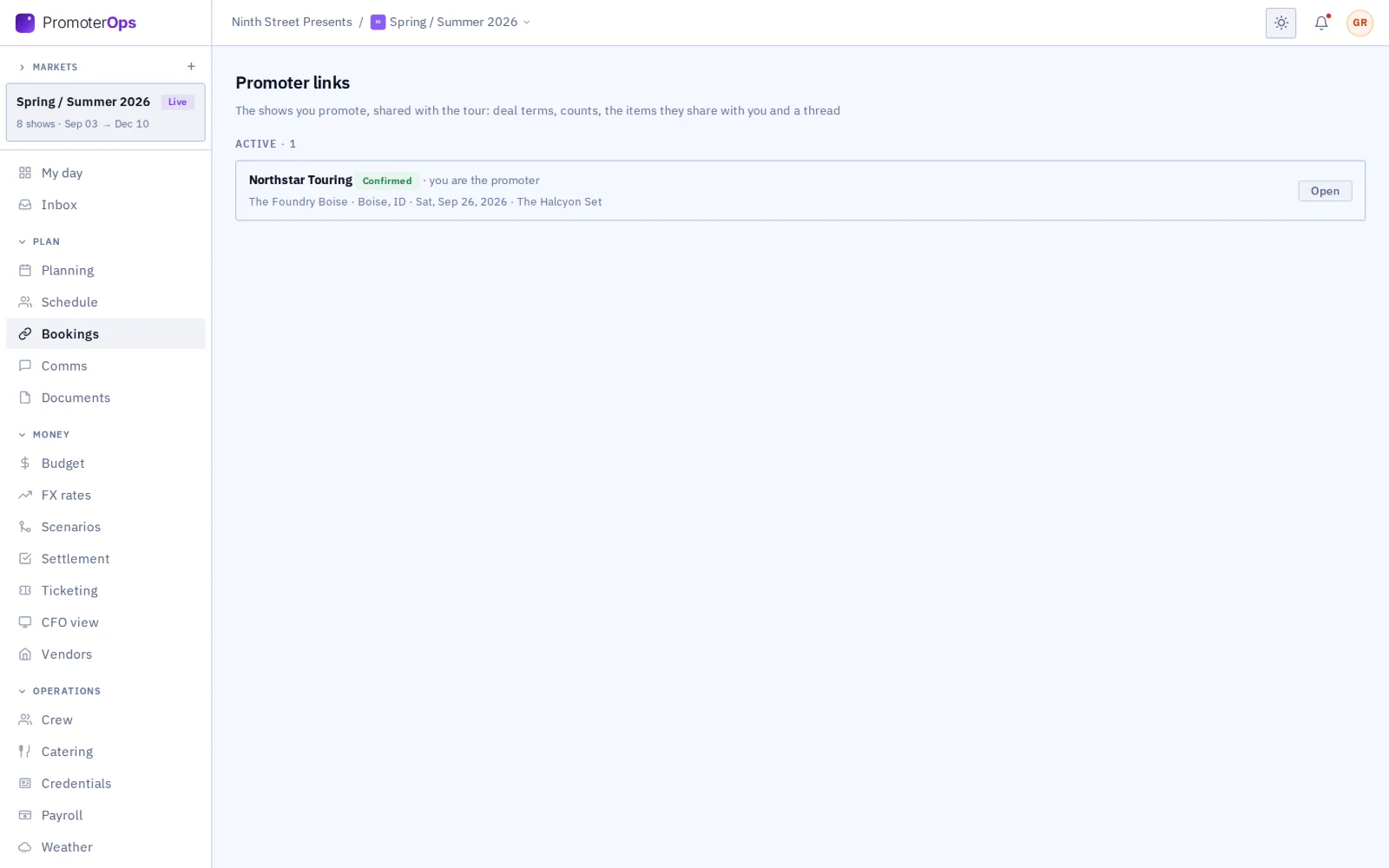
See every link.

Every show you share with a tour, in one list, whichever side started it.

Promoter links list
07 / 17

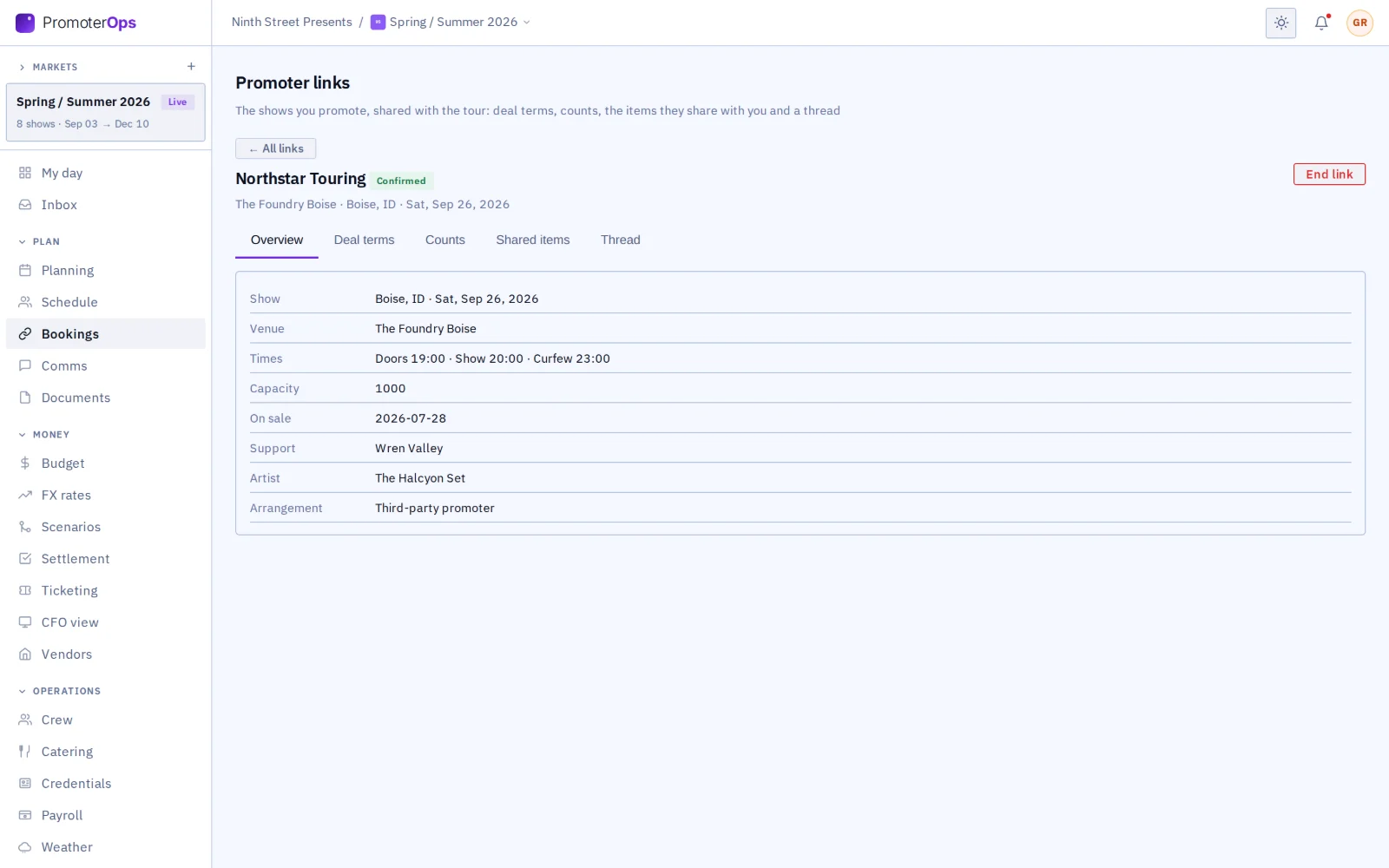
Open the show.

The date, room, times, capacity and on-sale, read from the tour’s own page, so nobody keeps a second copy.

A promoter link: the show
08 / 17

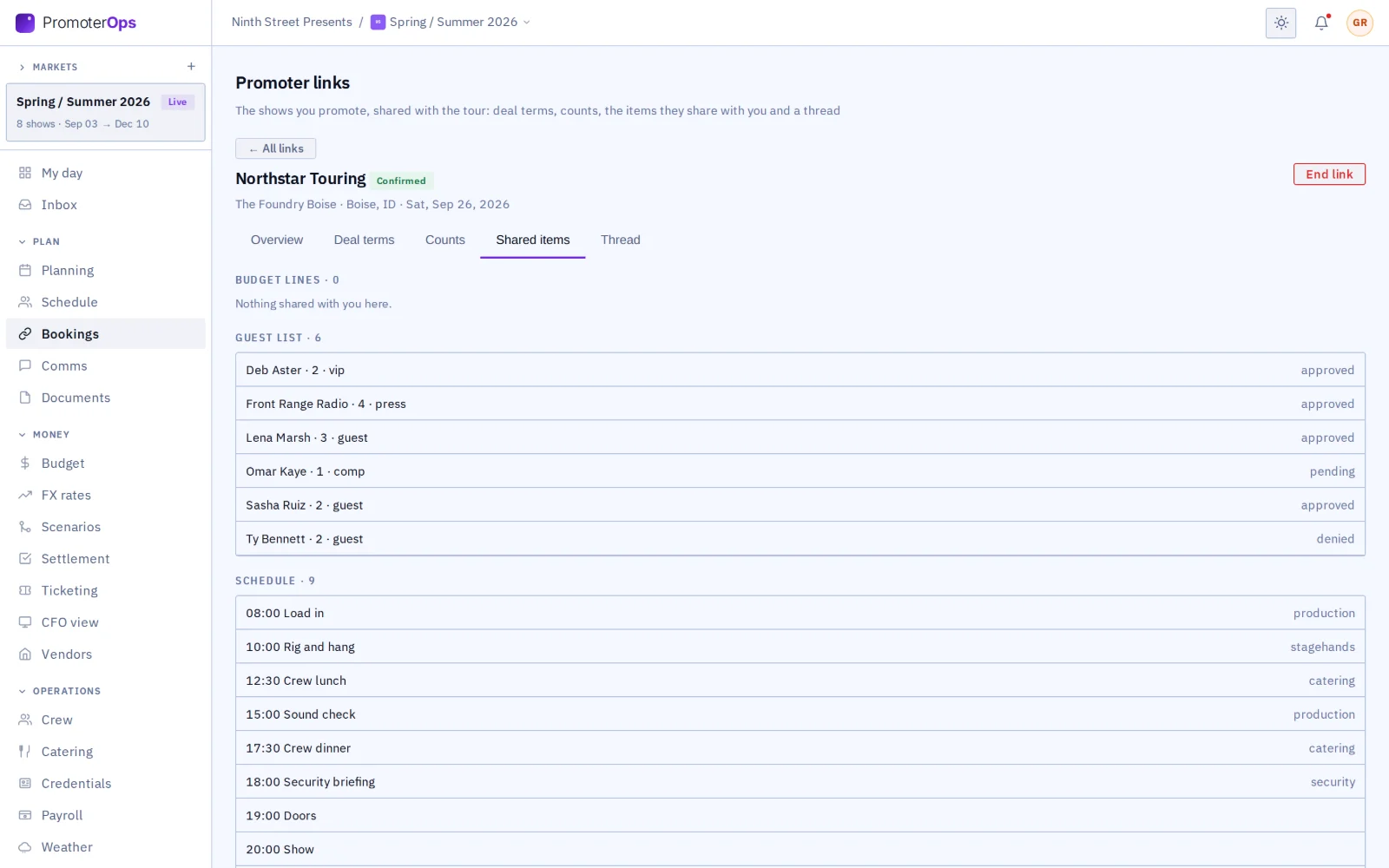
See what the tour shares.

Only the lines the tour shares appear here, so you know you are looking at what it meant you to see.

What the tour shared with the promoter
09 / 17

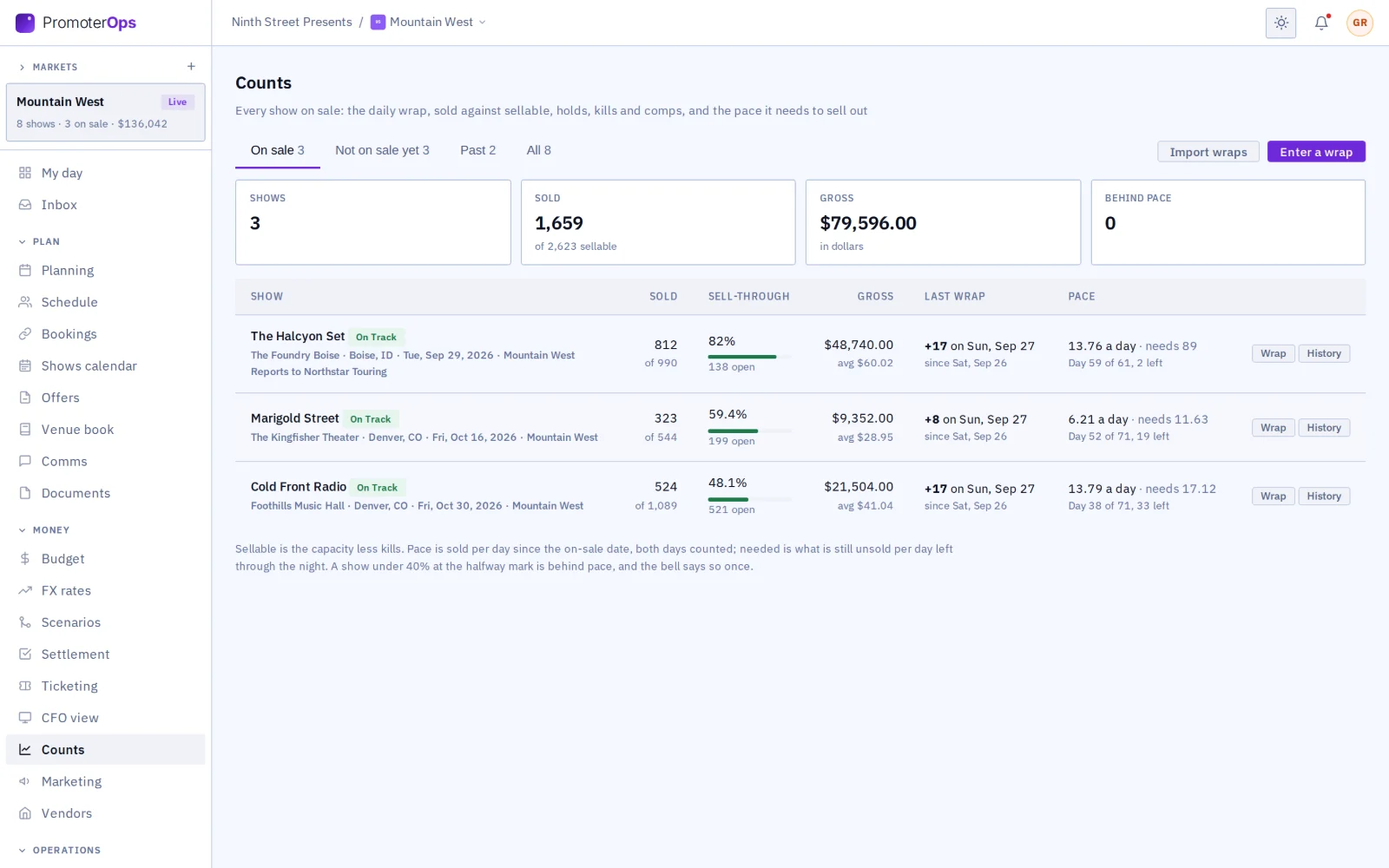
Read the daily wrap.

Every show on sale in one table, with how many tickets a day it needs from here.

Counts: every show on sale with its daily wrap, sell-through and pace
10 / 17

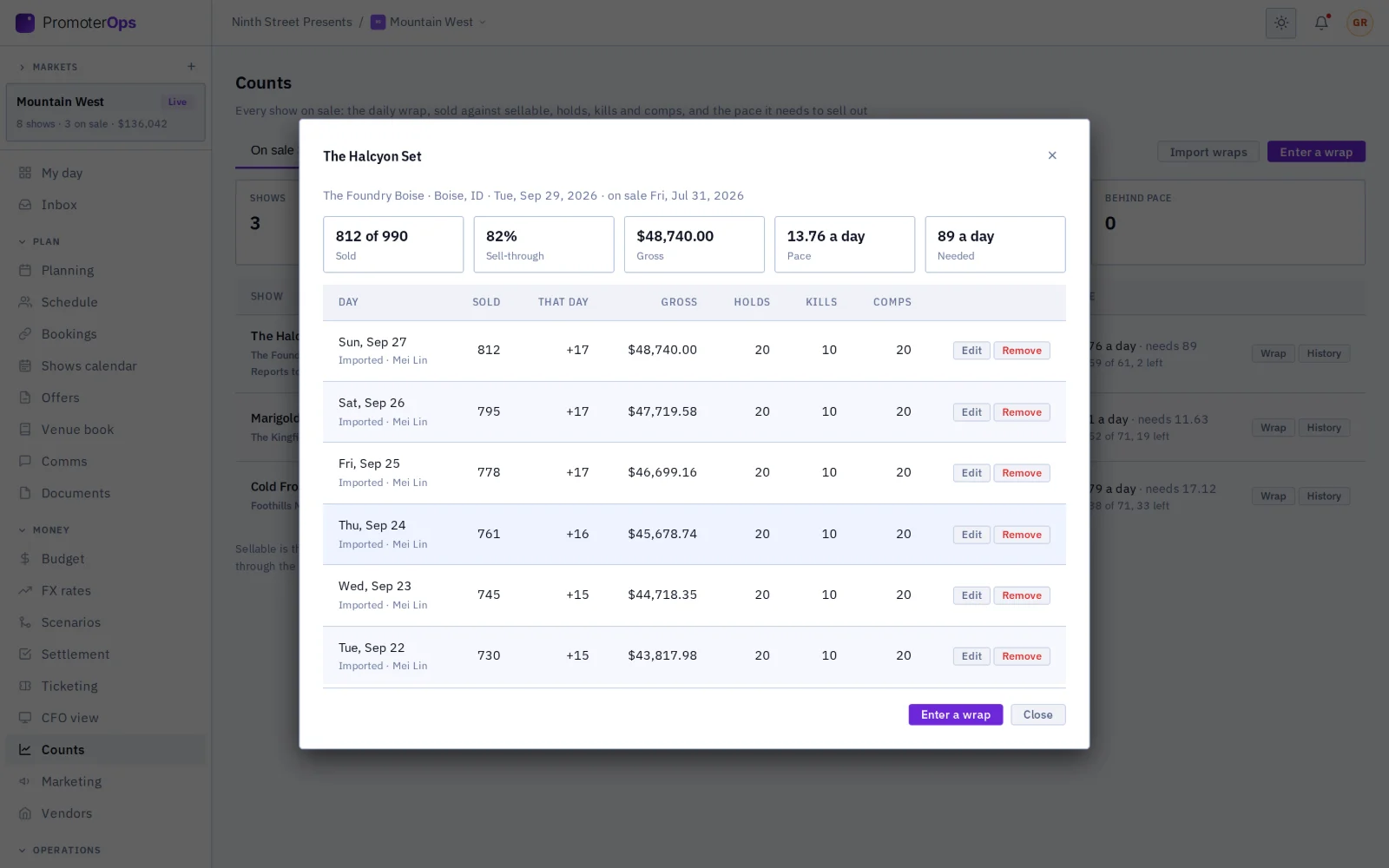
Go back through the wraps.

Each day’s count for a show, with who entered it, so a bad number is easy to find.

One show’s daily wraps, with each day’s sales
11 / 17

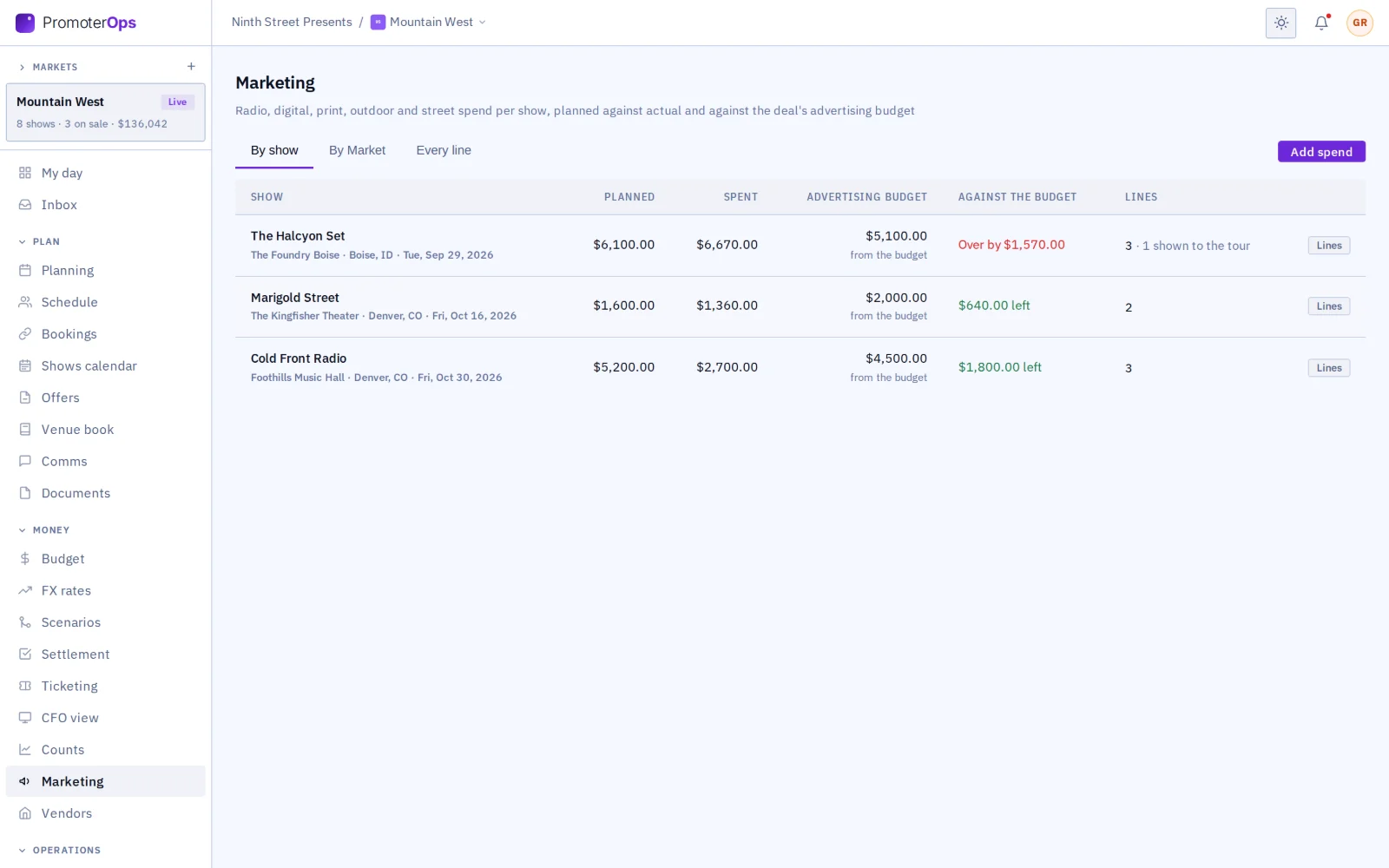
Watch the ad spend.

Each show’s spend sits next to the budget agreed in the offer, so you see an overspend before the settlement.

Marketing spend by show against the advertising budget
12 / 17

Settle on the link.

Your lines, the tour’s lines and the totals on one page, with your internal lines kept to your side.

The settlement on the promoter link, the promoter’s side
13 / 17

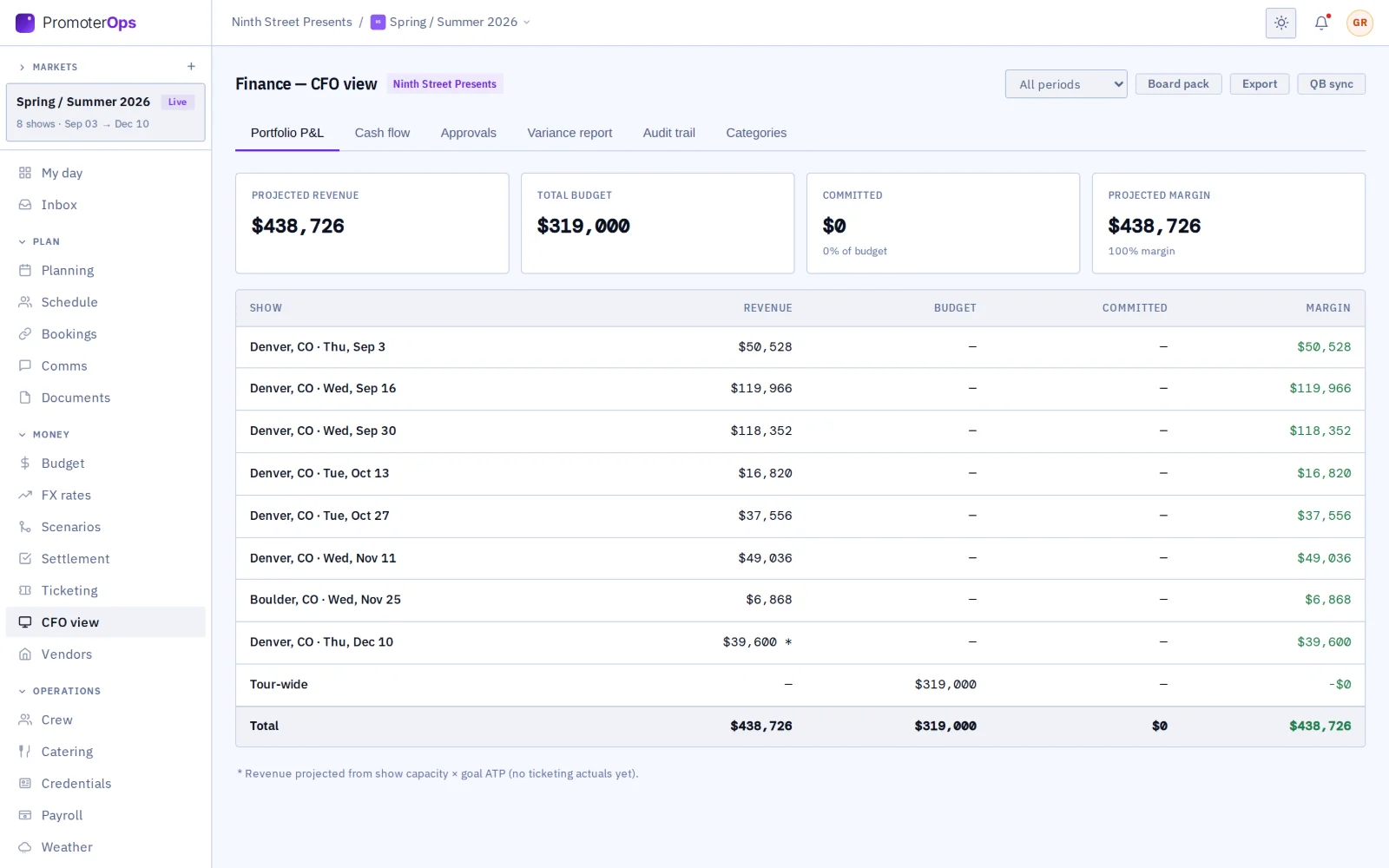
Read the finance summary.

The finance summary (the screen is called CFO view) shows profit and loss for each market.

Finance summary (CFO view) per market
14 / 17

Read the year.

Sell-through by room, what each settled show left you and how many offers the agents took, on one sheet.

Analytics: the year’s tiles, sell-through by room and the on-sale pace curves
15 / 17

Compare the on-sale curves.

Each show’s sales are plotted day by day against an even pace to a sellout.

The on-sale pace curves, settled shows and marketing per ticket
16 / 17

Choose to be found.

Write the line tours read next to your name, and say where you promote. Nothing is shared until you accept a link.

Found by name: the promoter’s opt-in profile
17 / 17

Join from an invitation.

A promoter invited by a tour starts sign-up with its details filled in, and the date is linked when it finishes.

The sign-up form opened from a tour’s invitation, filled in

More from PromoterOps

Deal terms on a promoter link: deal type, guarantee, versus, after-cost split and promoter fee
Deal terms on a promoter link: the deal type, guarantee, versus percentage, split and fee, proposed for the other side to accept.
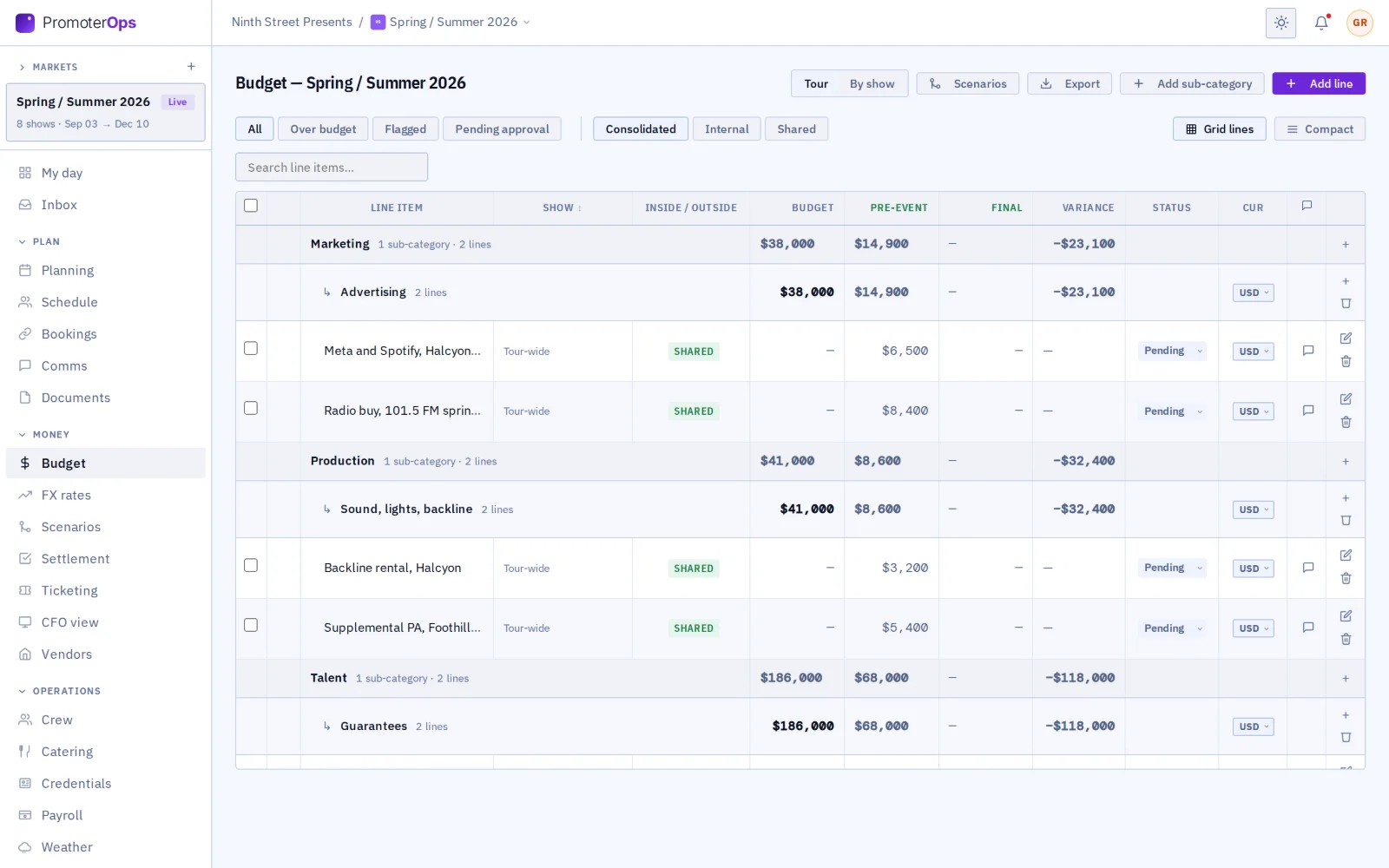
A market’s budget with marketing and production lines, some marked Shared
The market’s budget, with the lines you share with the tour marked Shared.
Ticketing across the market: each show’s counts, sell-through and gross
Ticketing across the market: each show’s counts by date, with sell-through and gross.
A show’s settlement: ticket revenue by performance, locked
Settlement for one show: ticket revenue by performance, then the costs, the deal and the totals.
Works with the rest of GigOps

The tour picks exactly what you see.

TourOps
  • The promoter link: one shared page with the tour for each show.
  • The tour picks exactly what you see.
  • Your counts go back to the tour’s ticketing, marked as reported by the promoter.
  • The date settles on the link, signed by both.
VenueOps
  • When the venue is the promoter, one tick sets up the link.
  • Book a venue on GigOps as the buyer: the tech pack, the advance and the room settlement are one shared page, and your deal with the act stays your own.
See how it connects →
Also included

The shared core

  • My day
  • Planning and tasks
  • Crew and payroll
  • Catering and meal check-in
  • Credentials and gate scanning
  • Guest list and will-call
  • Budget and finance
  • Documents
  • Signatures (GigOps Sign)
  • Comms and alerts
  • Logistics and dispatch
  • Weather
  • CAD
And the apps

Crew are always free.

GigOps Crew
The free crew app: badge, schedule, tasks and travel on the phone.
GigOps Company
The office on your phone, for Company Users.
GigOps Scan
The gate scanner: verify credentials online or offline, and log every scan.
See the apps →

Put your markets on PromoterOps.

7-day free trial. Company Users are $39 per user / month. View only seats are $0. Crew are always free.

Start free trial
Book a demo

Book a demo.

Leave your name and email, and we'll reply the same week to set up a walkthrough of the product that fits.
$39 per user / month · View only $0 · 7-day free trial

Your name, company and email go to a Google Sheet through Google Apps Script, where only the GigOps team reads them.