{{ menuLabel }} How it connects Apps Pricing Sign in Start free trial
{{ f.tagline }}
Included in every product

Signed on a phone. Checked by anyone.

Contracts go out as attachments and come back as photos of a printout, and nobody is sure which copy is final. GigOps Sign sends the document, the signer signs on their phone, and everyone keeps one sealed PDF that anyone can check.

Start free trial Book a demo

Signers need no account and pay nothing.
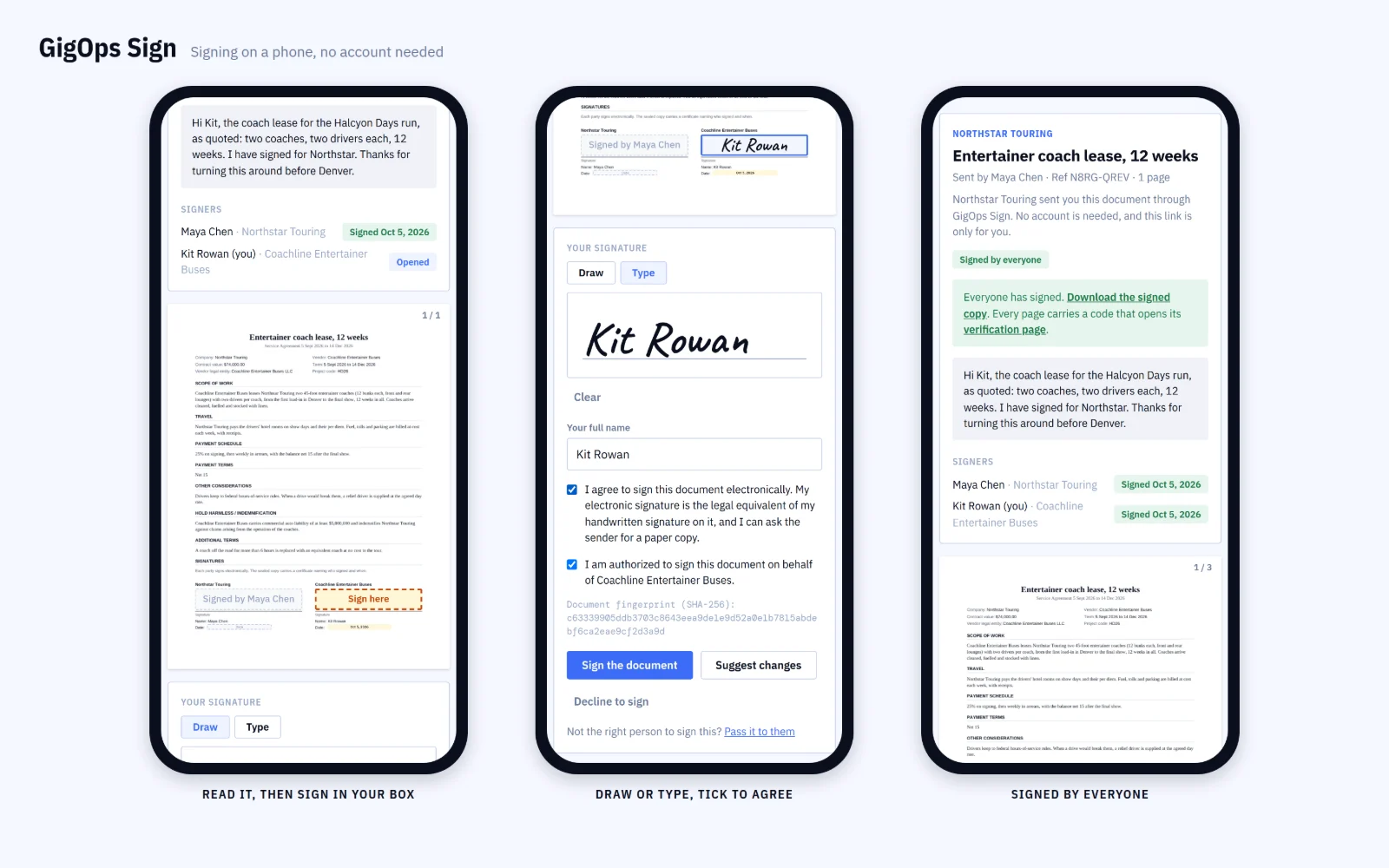
GigOps Sign on three phones: the Sign here box, a typed signature with consent and authority ticked, and signed by everyone
Where you use it

The paperwork a show already runs on.

{{ c.title }}

{{ c.body }}

How it works

From sending it to checking a copy years later.

{{ r.num }}

{{ r.title }}

{{ r.body }}

{{ r.img }}

Also in GigOps Sign

{{ a.title }}
{{ a.body }}

GigOps Company, the office app for Company Users, lists your documents, sends reminders and answers suggested changes. Placing fields stays on the web.

Questions

Before you send.

{{ q.q }}
{{ q.a }}
What kind of e-signature is it?
Simple electronic signatures, in eIDAS terms, verified by QR code. Section 5A of the Terms says what they are and are not for.

Send the next contract with GigOps Sign.

It comes with every product. 7-day free trial. Company Users are $39 per user / month. View only seats are $0. Crew are always free.

Start free trial Book a demo
Book a demo

Book a demo.

Leave your name and email, and we'll reply the same week to set up a walkthrough of the product that fits.
{{ accLabel }}
{{ accLabel }}
{{ accLabel }}
Could not send. Please email hello@gigops.ai directly.

$39 per user / month · View only $0 · 7-day free trial

Your name, company and email go to a Google Sheet through Google Apps Script, where only the GigOps team reads them.

GigOps Sign
Included in every product

Signed on a phone. Checked by anyone.

Contracts go out as attachments and come back as photos of a printout, and nobody is sure which copy is final. GigOps Sign sends the document, the signer signs on their phone, and everyone keeps one sealed PDF that anyone can check.

Start free trial

Signers need no account and pay nothing.

GigOps Sign on three phones: the Sign here box, a typed signature with consent and authority ticked, and signed by everyone
Where you use it

The paperwork a show already runs on.

Deal memos

Terms both sides agree in GigOps are sealed as a signed memo. With a promoter or venue that is not on GigOps, send the memo from the show’s deal terms.

Settlements

A settlement two companies lock in GigOps is sealed on the figures they signed. A show that settles on its own goes out for signature from Settlement.

Vendor contracts

Send a vendor’s contract from Vendors. When both sides have signed, the sealed copy is filed as the signed contract.

Rental contracts

In VenueOps, the contract for a room rental is drawn from the rental and the proposal the client accepted. Once the venue and the client sign, the rental is contracted.

Accepted offers

When an agent accepts a promoter’s offer on its private link, the offer is sealed, so the promoter and the agent hold the same copy.

Any PDF

Upload a PDF, or send one from Documents: a room block agreement, a release, a rider. You place the signature, date, initials and text fields.

How it works

From sending it to checking a copy years later.

01 / 07

Send it, and follow it.

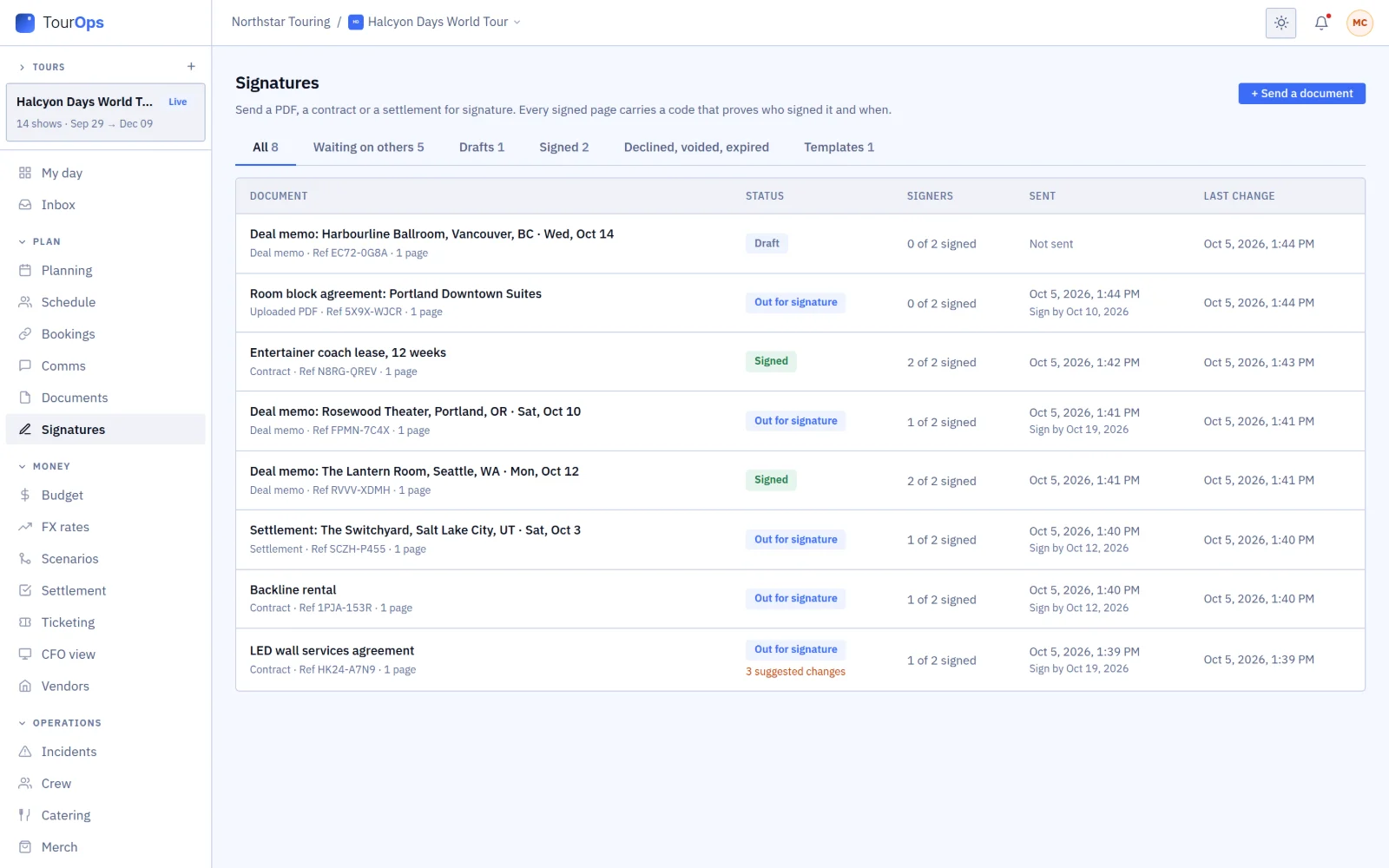
Add the signers and drop each one’s fields on the pages, in a signing order if you need one. The list shows what is out, signed, still a draft, or waiting on changes.

Signatures: contracts, deal memos and a settlement, out, signed and draft, one with 3 suggested changes
02 / 07

Get suggestions, not a refusal.

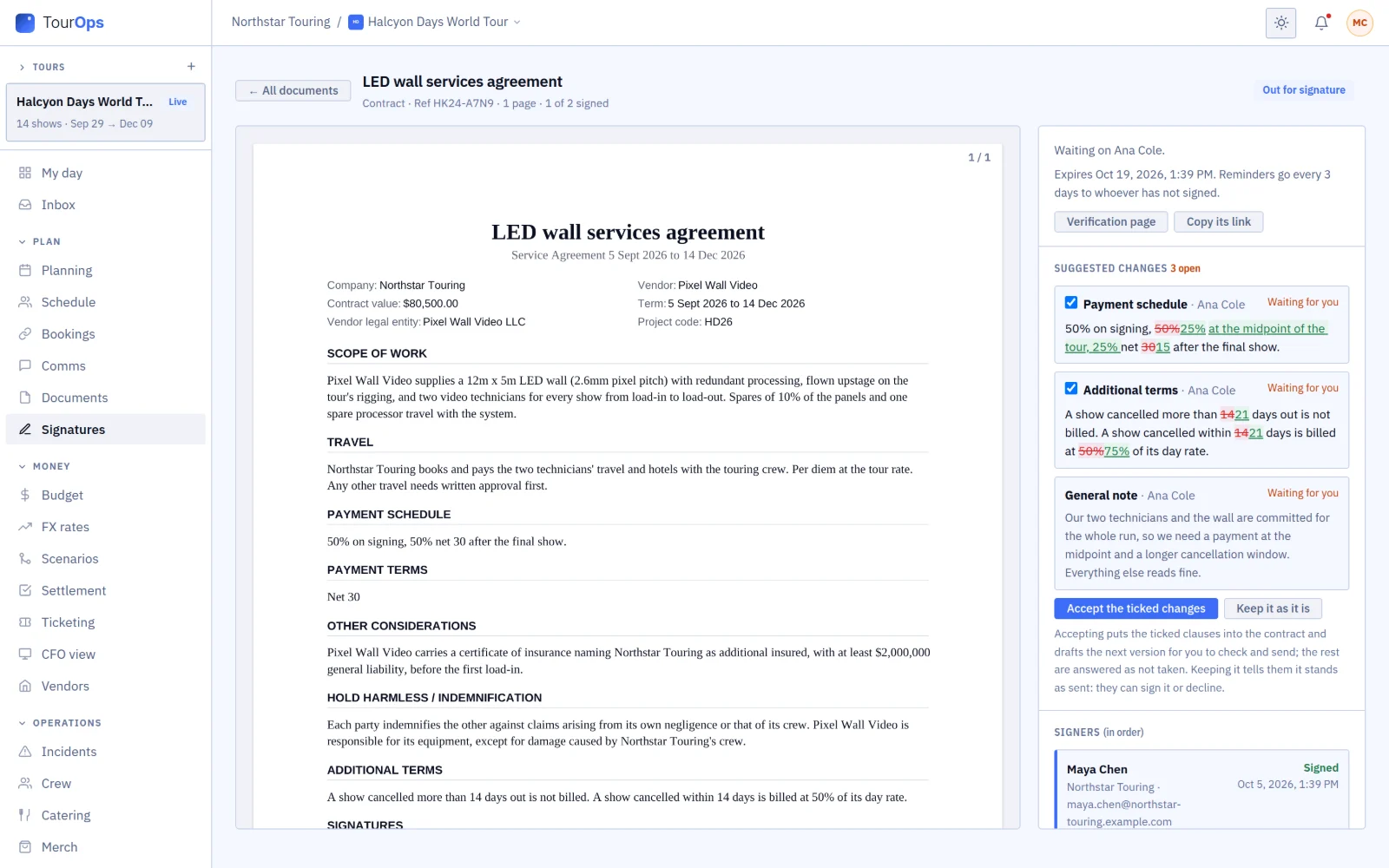
A signer can rewrite a clause or pin a note to a page. You see each change as a redline, accept the ones you agree with, and send the next version.

A vendor’s suggested clause changes as redlines, with Accept the ticked changes and Keep it as it is
03 / 07

Keep one sealed copy.

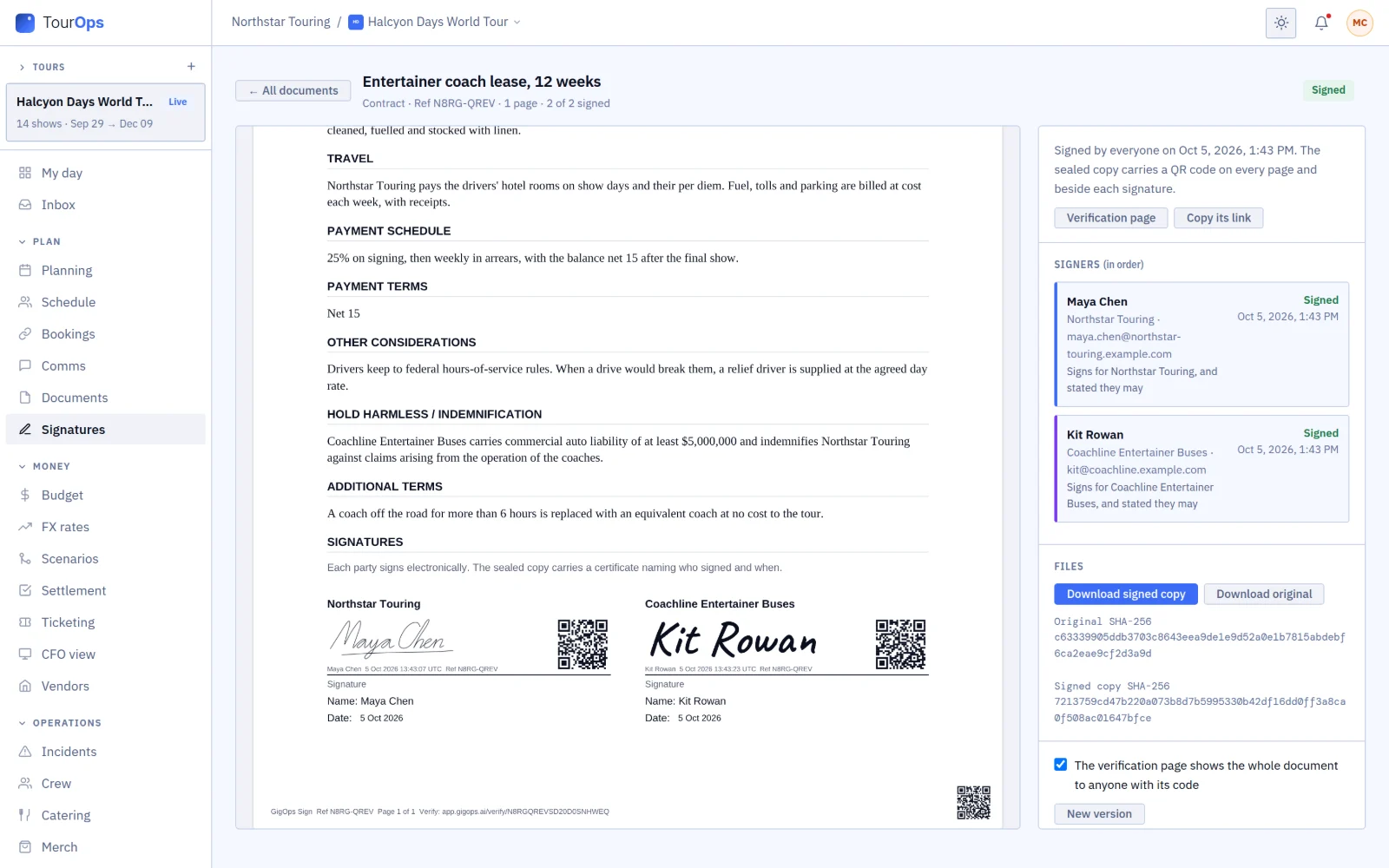
When the last person signs, the PDF is sealed. Every page gets a reference and a QR code, every signature gets its own QR code, and a certificate lists who signed and when.

A sealed contract with a QR code beside each signature, the page footer with its reference, and the signers
04 / 07

Scan any code.

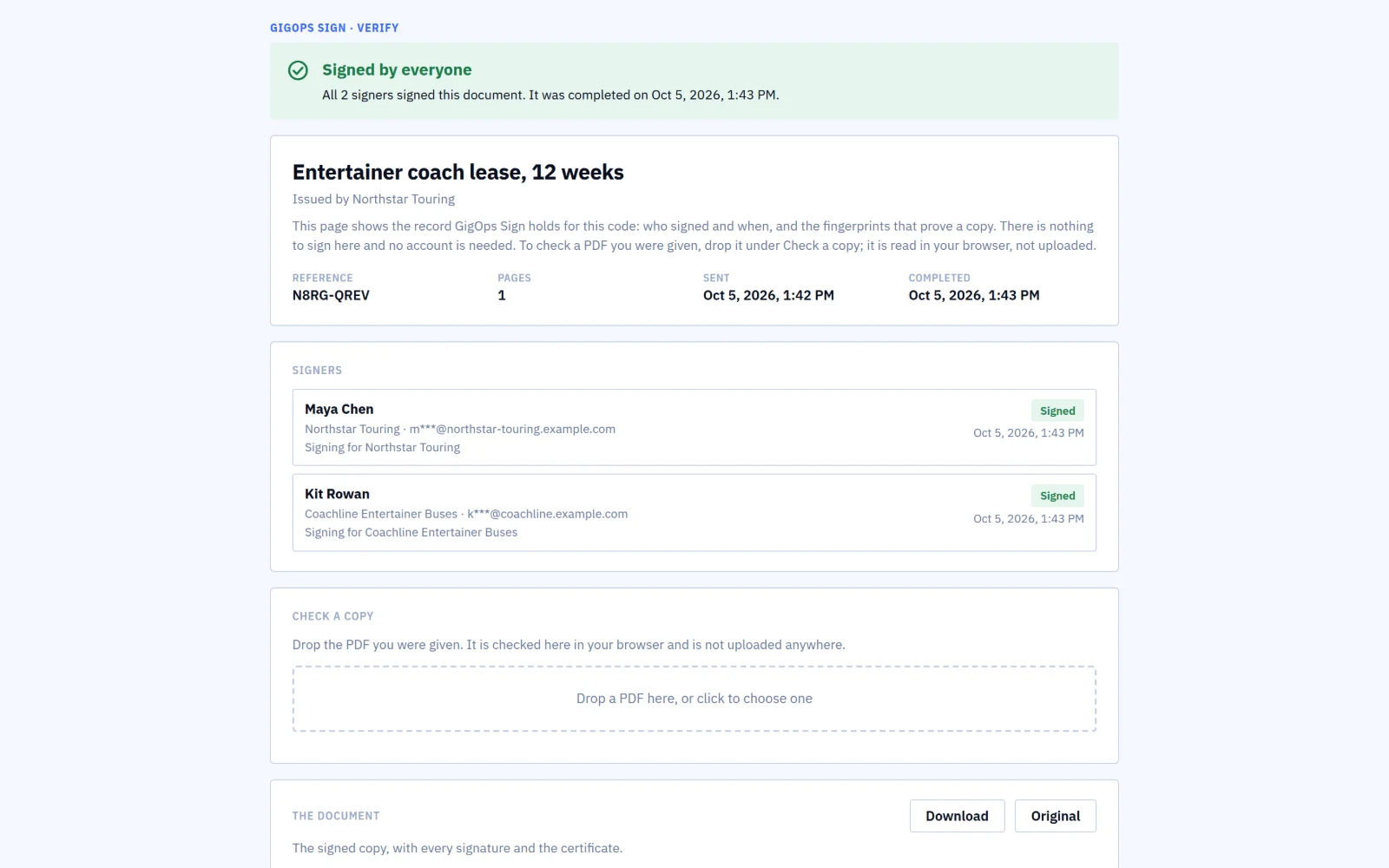
Each QR code opens the document’s verification page: whether everyone has signed, who signed and when, with their email addresses partly hidden.

The public verification page: signed by everyone, the reference and dates, the signers, and Check a copy
05 / 07

Check the copy you were handed.

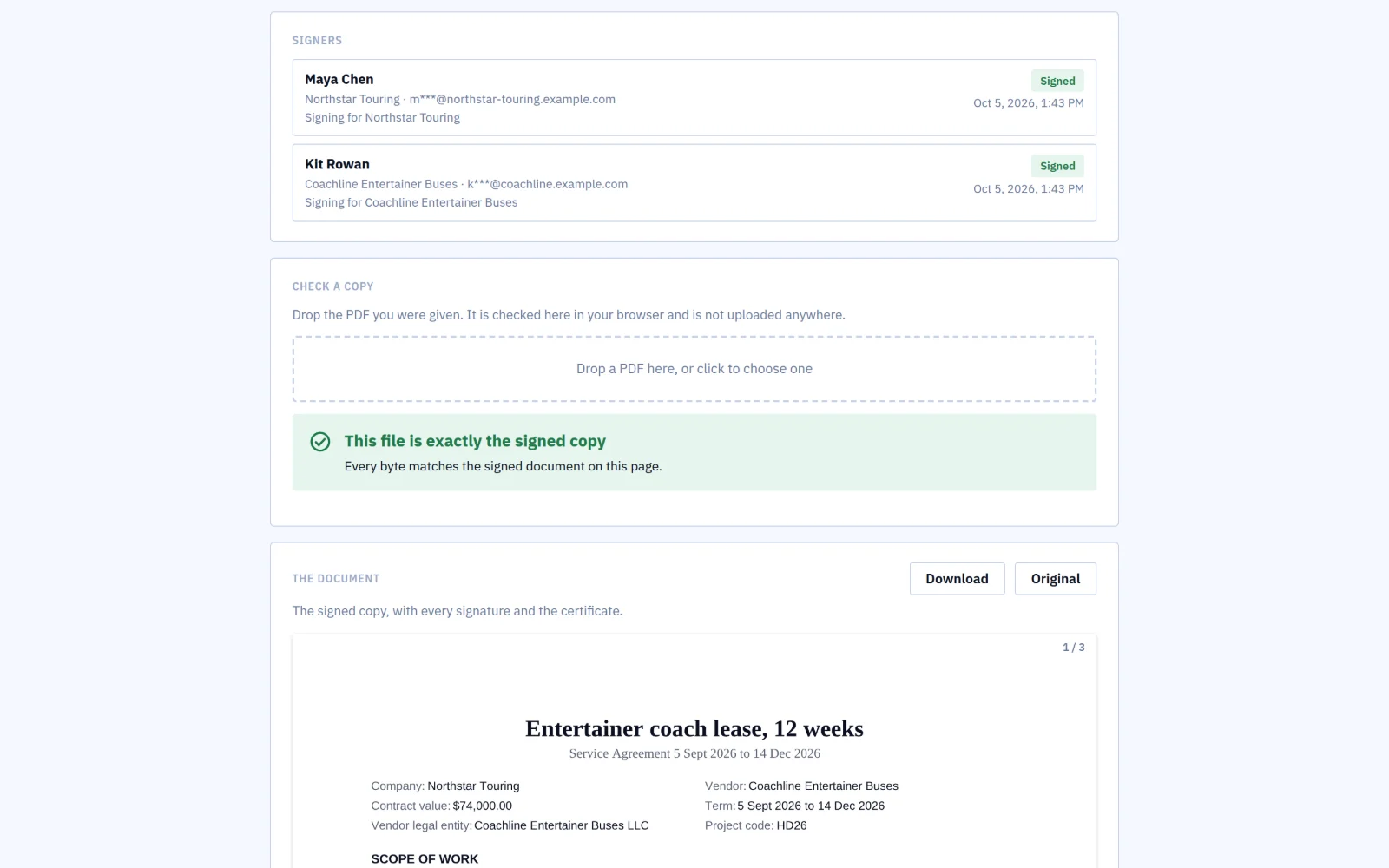
Drop a PDF on the verification page. It is checked in your browser and never uploaded, and a page that differs from the signed copy is named.

The verification page after a copy is dropped on it: this file is exactly the signed copy
06 / 07

See every step.

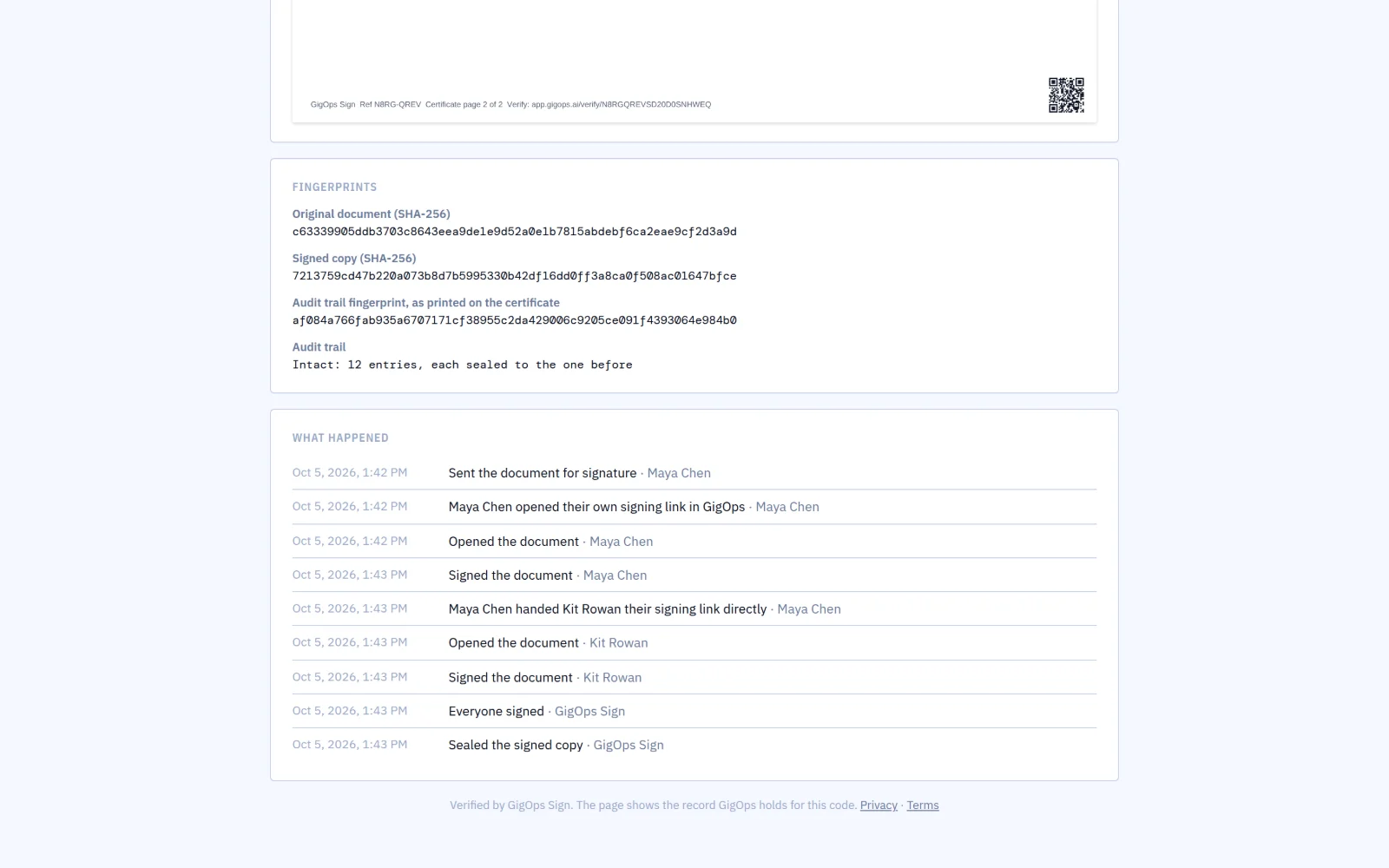
Each step in the record is sealed to the one before, so an entry changed or removed later shows. The certificate every signer keeps carries the record’s fingerprint.

The fingerprints of the original and the signed copy, the record intact at 12 entries, and the timeline of what happened
07 / 07

Signed between companies.

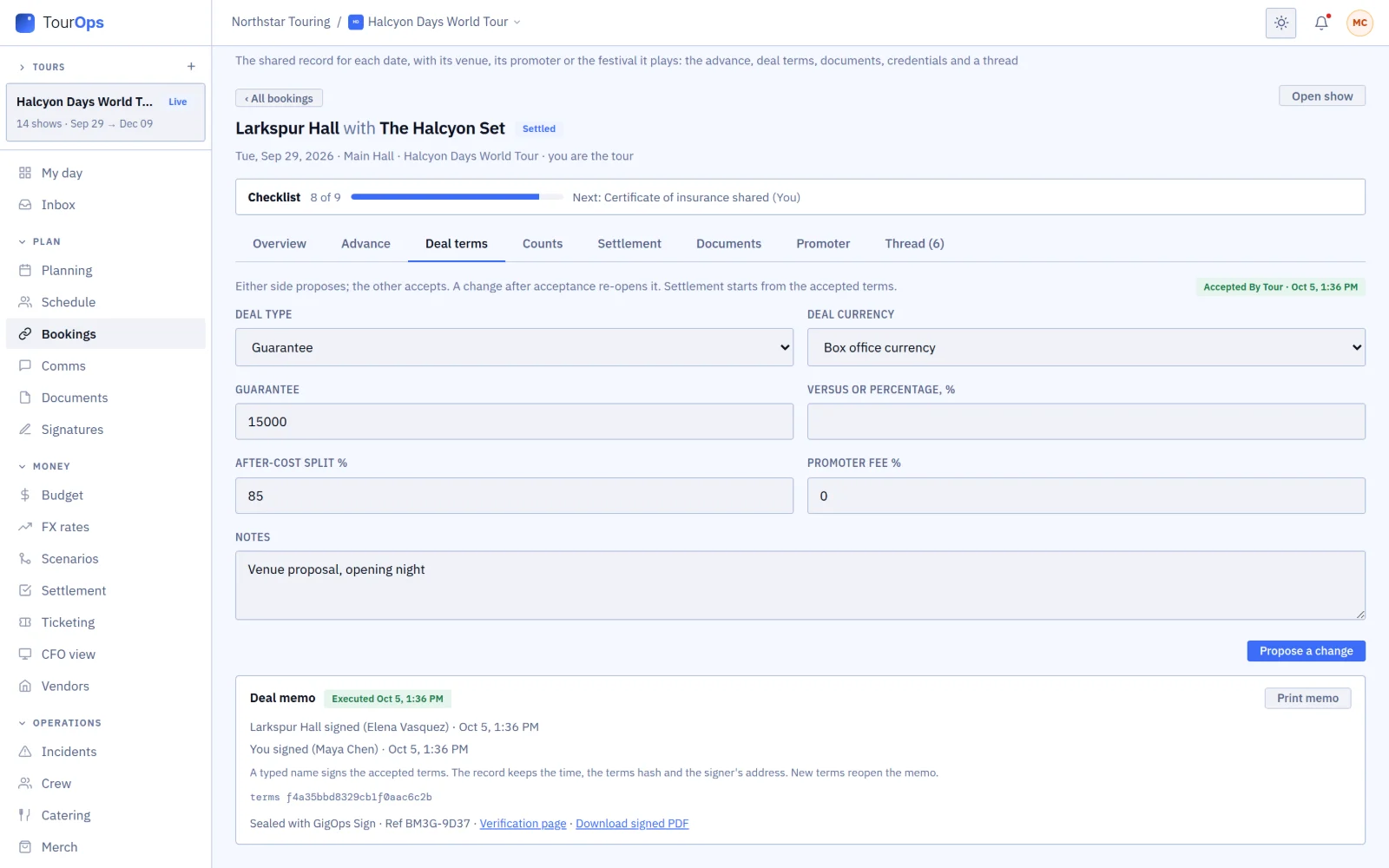
When two companies on GigOps sign a deal memo or a settlement, each reads the same sealed copy from its own side, with links to the verification page and the PDF.

A booking’s executed deal memo, sealed with GigOps Sign, with its reference, verification page and signed PDF

Also in GigOps Sign

Draw or type
The signer draws with a finger or types their name, ticks the consent and, when they sign for a company, that they are allowed to.
Confirm who signs
Ask a signer for a code sent by email or text before they see the document, or for an access code you give them in person.
Pass it to the right person
A signer who should not sign can pass their place to the person who should, with a note. You are told, and can change a signer yourself.
Deadlines and reminders
Give a document 3 to 90 days, and remind whoever has not signed every 1, 2, 3 or 7 days.
Templates
Save a PDF you send often with its signers by role and its fields in place, and start the next one from it.
The signed copy by email
Everyone gets the sealed PDF when the last person signs, attached when it is 10 MB or less, and their link still downloads it.
Records that outlast an account
If the sender closes its GigOps account, the verification page and the signed copy are kept for 7 years.

GigOps Company, the office app for Company Users, lists your documents, sends reminders and answers suggested changes. Placing fields stays on the web.

Questions

Before you send.

What does it cost?
Nothing extra. GigOps Sign comes with every product. Company Users on a paid seat send documents, View only seats read them, and the people who sign pay nothing.
Do signers need a GigOps account?
No. Each signer gets their own link by email and signs in the browser, on a phone or a computer.
Can a signer change the document?
They can suggest changes. Nothing changes until you accept a suggestion and send a new version for everyone to sign.
Does Adobe Acrobat show the signatures as valid?
No. Acrobat’s signature panel does not recognize them. Check a copy on its verification page instead.
Which names print on the certificate?
Names in Latin, Greek and Cyrillic scripts print as typed. Chinese, Japanese, Korean, Hebrew and Arabic names show in the signature image, but not in the printed text.
What kind of e-signature is it?
Simple electronic signatures, in eIDAS terms, verified by QR code. Section 5A of the Terms says what they are and are not for.

Send the next contract with GigOps Sign.

It comes with every product. 7-day free trial. Company Users are $39 per user / month. View only seats are $0. Crew are always free.

Start free trial
Book a demo

Book a demo.

Leave your name and email, and we'll reply the same week to set up a walkthrough of the product that fits.
$39 per user / month · View only $0 · 7-day free trial

Your name, company and email go to a Google Sheet through Google Apps Script, where only the GigOps team reads them.