{{ menuLabel }} How it connects Apps Pricing Sign in Start free trial
{{ f.tagline }}
by GigOps

Run the house.

Enter your tech pack once, and every tour that books you sees it. Hold dates in order, share open dates with the tours you choose, and work each booking with the tour on one shared page.
Start free trial Book a demo
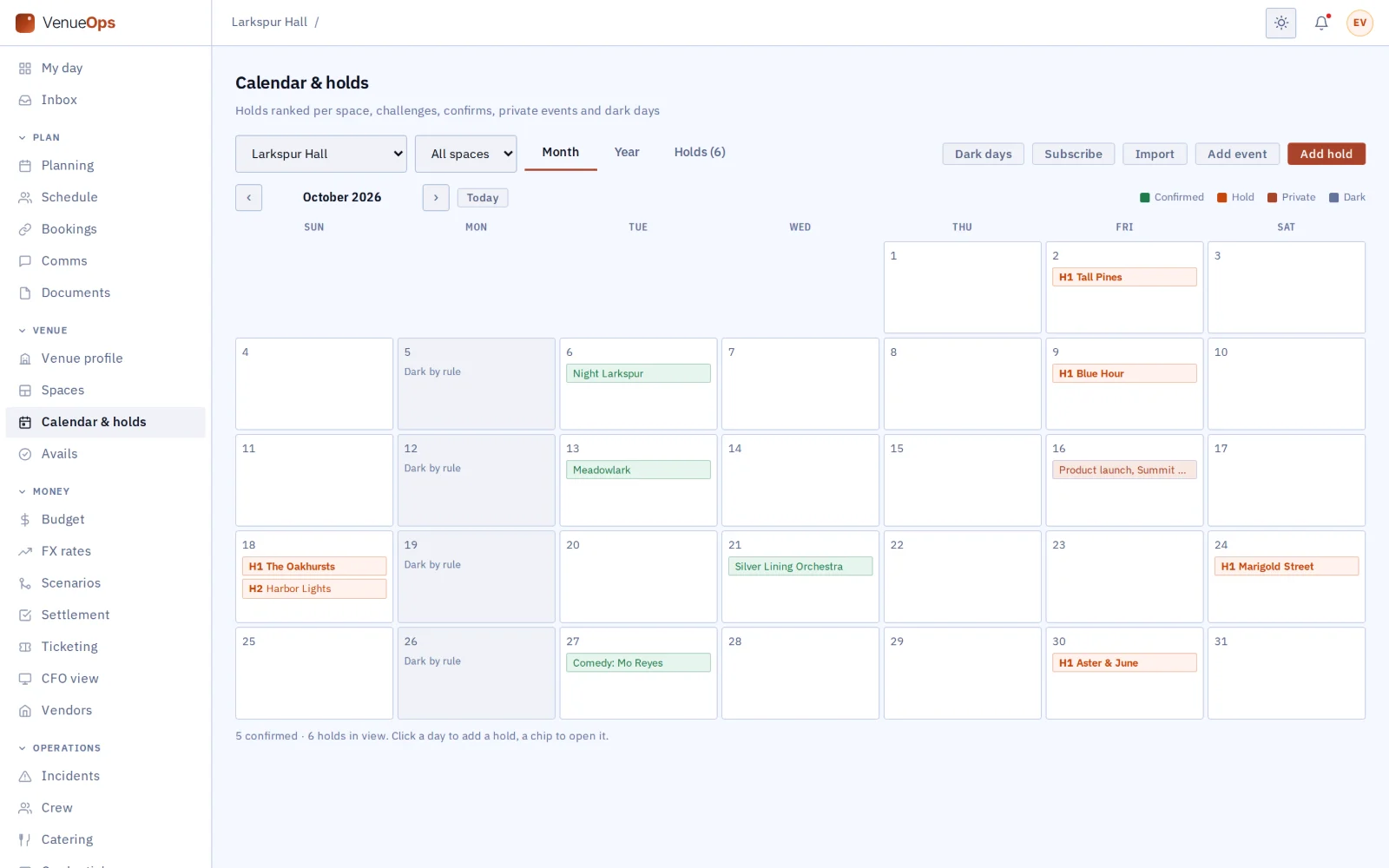
Calendar with H1 chips, confirmed shows, dark days
What you get

Everything the house runs on, in one place.

{{ c.title }}

{{ c.body }}

Also in VenueOps

{{ a.title }}
{{ a.body }}
House crew

Schedule the house crew, and know who is in.

The weekly schedule lives in a spreadsheet, swaps are agreed by text and hours go on paper. VenueOps runs your house crew from the same calendar as your shows. House crew are Crew seats, so they are free, and they use the GigOps Crew app.

{{ c.title }}

{{ c.body }}

{{ crewMain.img }}
{{ crewMain.caption }}
{{ s.img }}
{{ s.caption }}
Room rentals

Rent your rooms for weddings, galas and conferences.

Private events tend to live in a separate inbox, a proposal in Word and an invoicing tool. The Rentals screen keeps the client, the proposal, the contract and the money in VenueOps, and the booking on the same calendar as your shows.

{{ c.title }}

{{ c.body }}

Clients pay you the way they do today: online card payment on an invoice is not switched on yet.

{{ rentMain.img }}
{{ rentMain.caption }}
{{ s.img }}
{{ s.caption }}
See how GigOps Sign works →
A season in VenueOps

From the tech pack to the settlement.

{{ r.num }}

{{ r.title }}

{{ r.body }}

{{ r.img }}
Works with the rest of GigOps

Every tour and festival that books you works on one shared page with you.

{{ w.title }}

  • {{ i }}
See how it connects →
Also included

The shared core

  • {{ c }}
And the apps

Crew are always free.

{{ a.name }}
{{ a.line }}
See the apps →

Put the house on VenueOps.

7-day free trial. Company Users are $39 per user / month. View only seats are $0. Crew are always free.

Start free trial Book a demo
Book a demo

Book a demo.

Leave your name and email, and we'll reply the same week to set up a walkthrough of the product that fits.
{{ accLabel }}
{{ accLabel }}
{{ accLabel }}
Could not send. Please email hello@gigops.ai directly.

$39 per user / month · View only $0 · 7-day free trial

Your name, company and email go to a Google Sheet through Google Apps Script, where only the GigOps team reads them.

VenueOps
by GigOps

Run the house.

Enter your tech pack once, and every tour that books you sees it. Hold dates in order, share open dates with the tours you choose, and work each booking with the tour on one shared page.

Start free trial
Calendar with H1 chips, confirmed shows, dark days
What you get

Everything the house runs on, in one place.

Tech pack, entered once

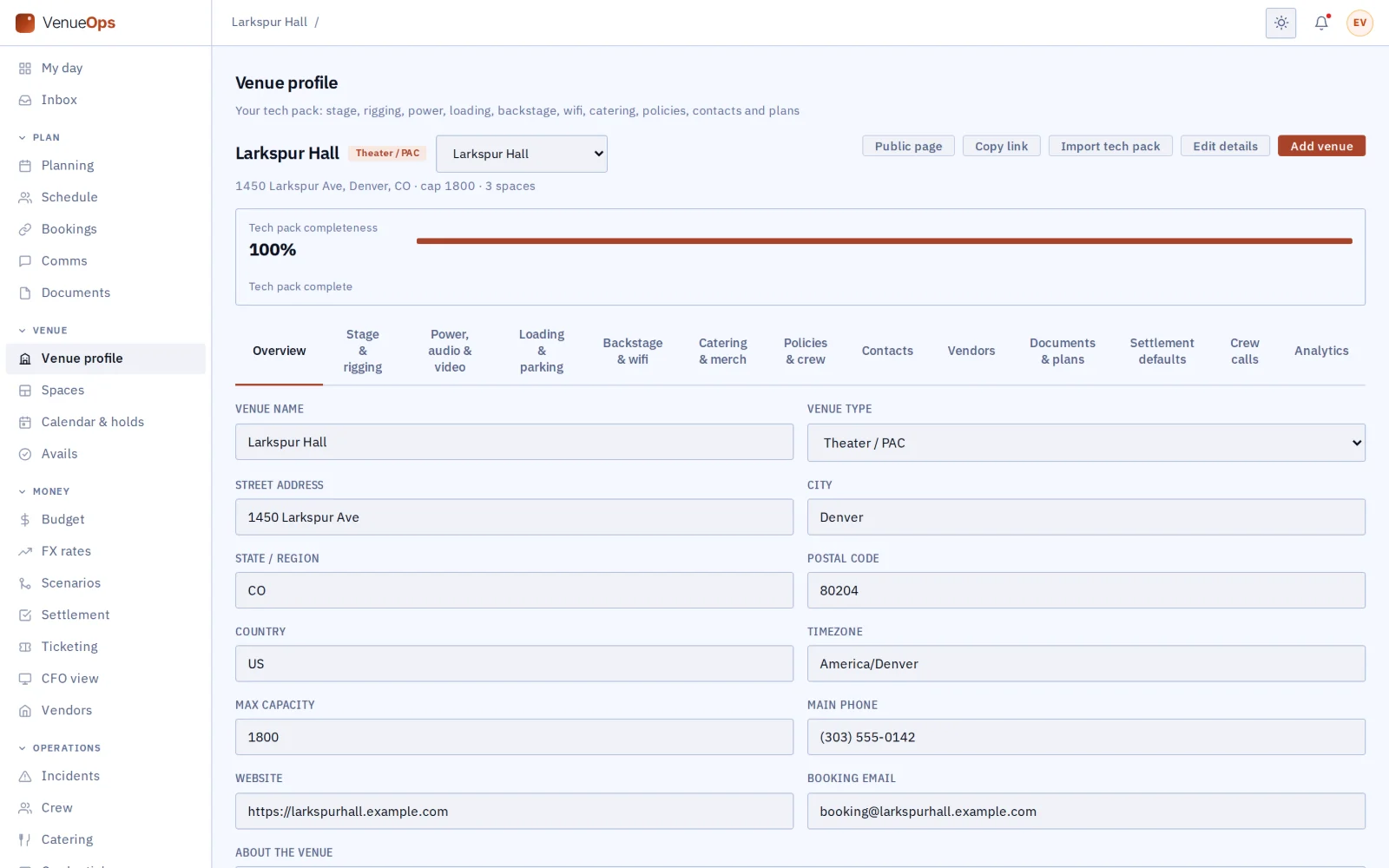
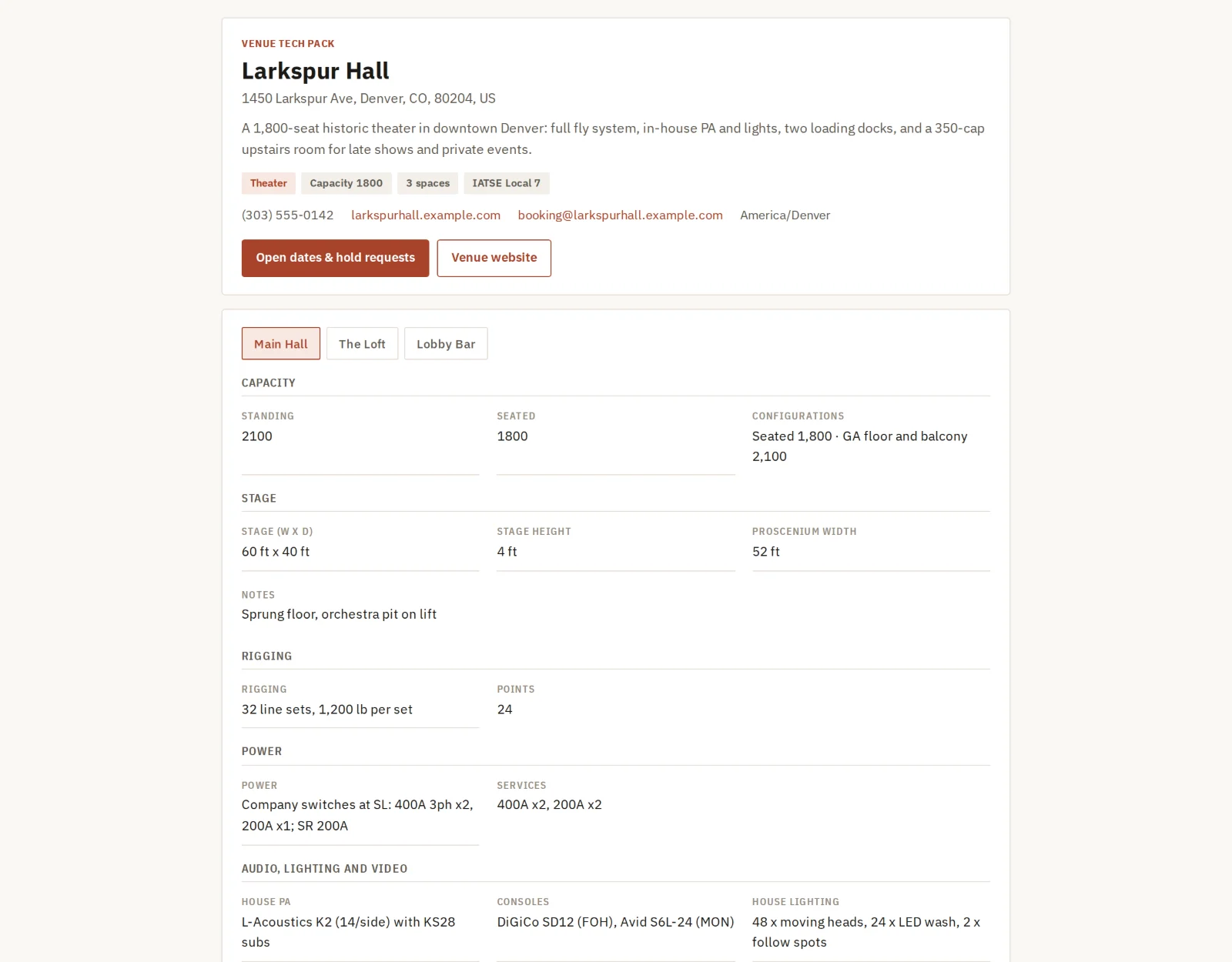
Keep the whole tech pack in one venue profile, with photos for each room and a meter showing what is still missing. Import the tech pack you already have, and AI fills in the profile for you to check. A tour coming back sees what changed since its last date.

Spaces

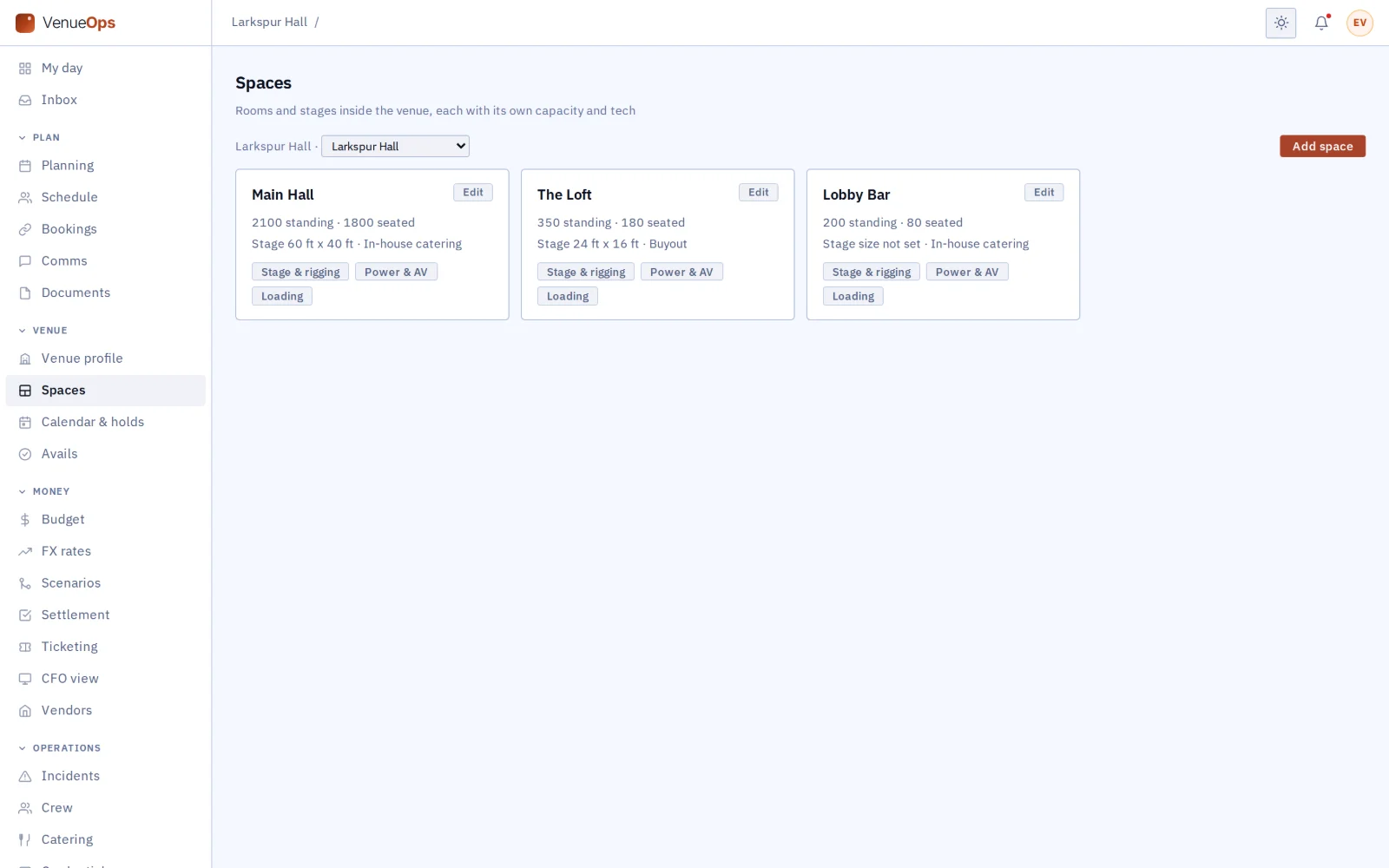
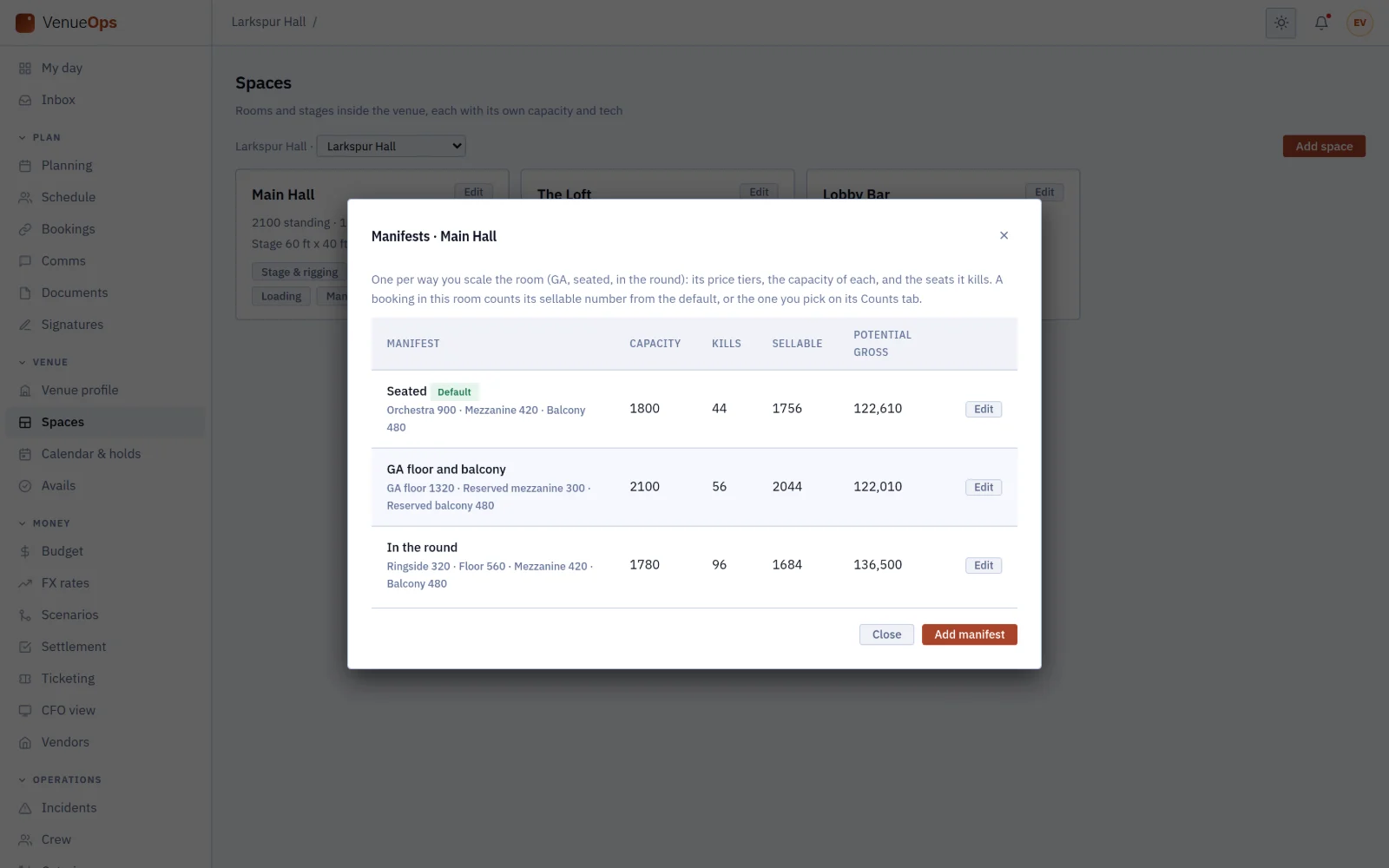
Add any number of rooms, each with its own capacity, tech, photos and seating layouts (GA, seated, in the round), with price levels and seats taken out of sale.

Calendar with a real hold ladder

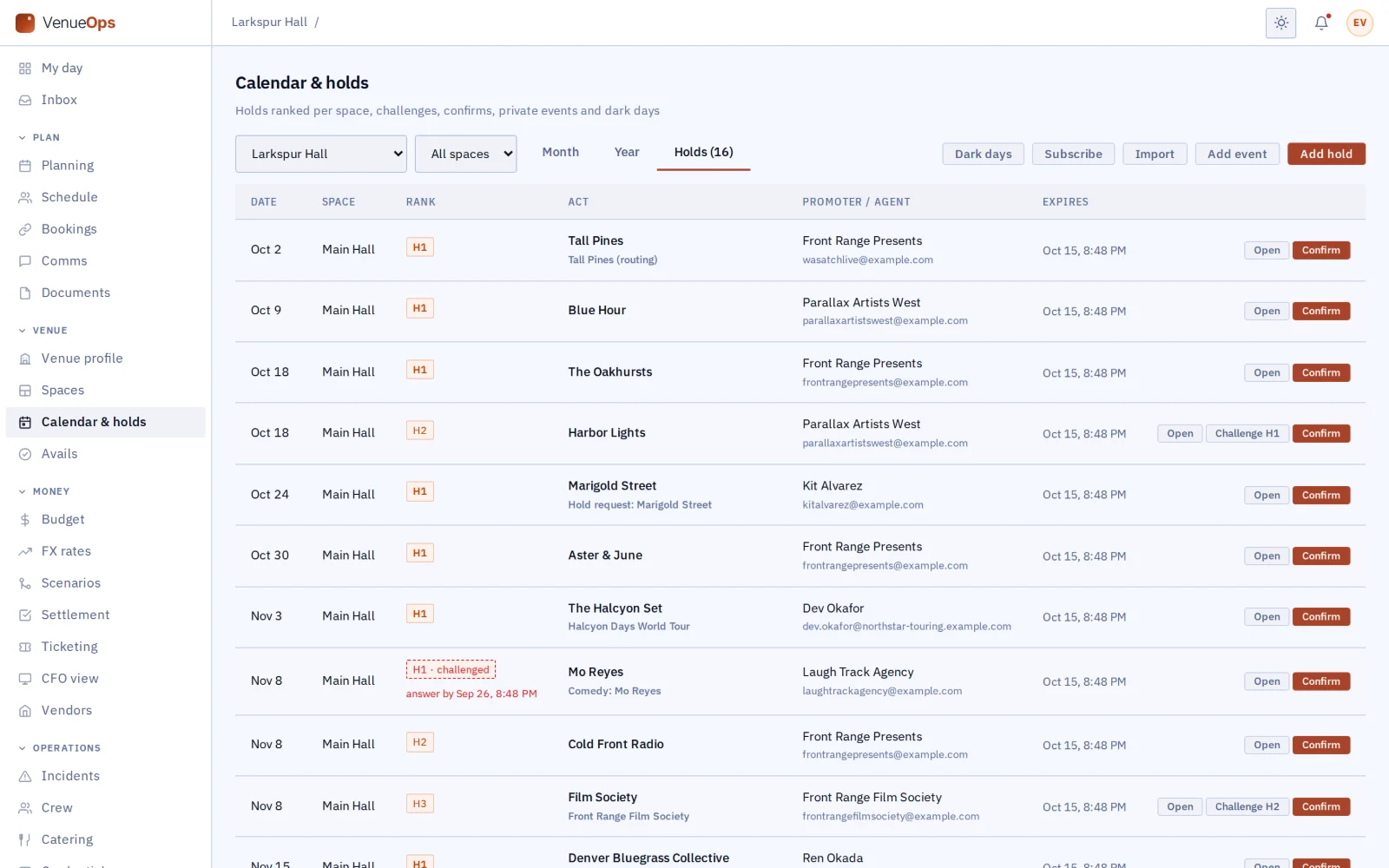
Hold dates as H1, H2 and H3, set expiry dates and dark days, and challenge a hold with a deadline. Private events sit on the same calendar, and confirming a hold makes it a show.

Avails sharing

Share your open dates with everyone, or only with the companies you pick, and put them on your own website.

Public venue page

Your page at app.gigops.ai/v/your-venue shows the tech pack, room photos, preferred vendors and open dates. Anyone can ask for a hold there, and you can add a rough cost calculator.

Bookings with a checklist

Every booking shows what is done and who owes the next step: date, deal, memo, rider, insurance certificate, advance, deposit, counts and settlement.

Ticket counts and settlement with the tours that book

Type counts in, import the box office’s CSV, or paste its count email and check what AI reads from it before it is saved. Settle with your usual terms filled in, keep your own private lines beside the shared ones, and send a post-show report.

Deal memos, signed by both

Either side proposes the terms and the other accepts. Both sign by typing their name, and any change after that reopens the terms for both. The signed memo is sealed with GigOps Sign, and anyone holding it can check it by its QR code.

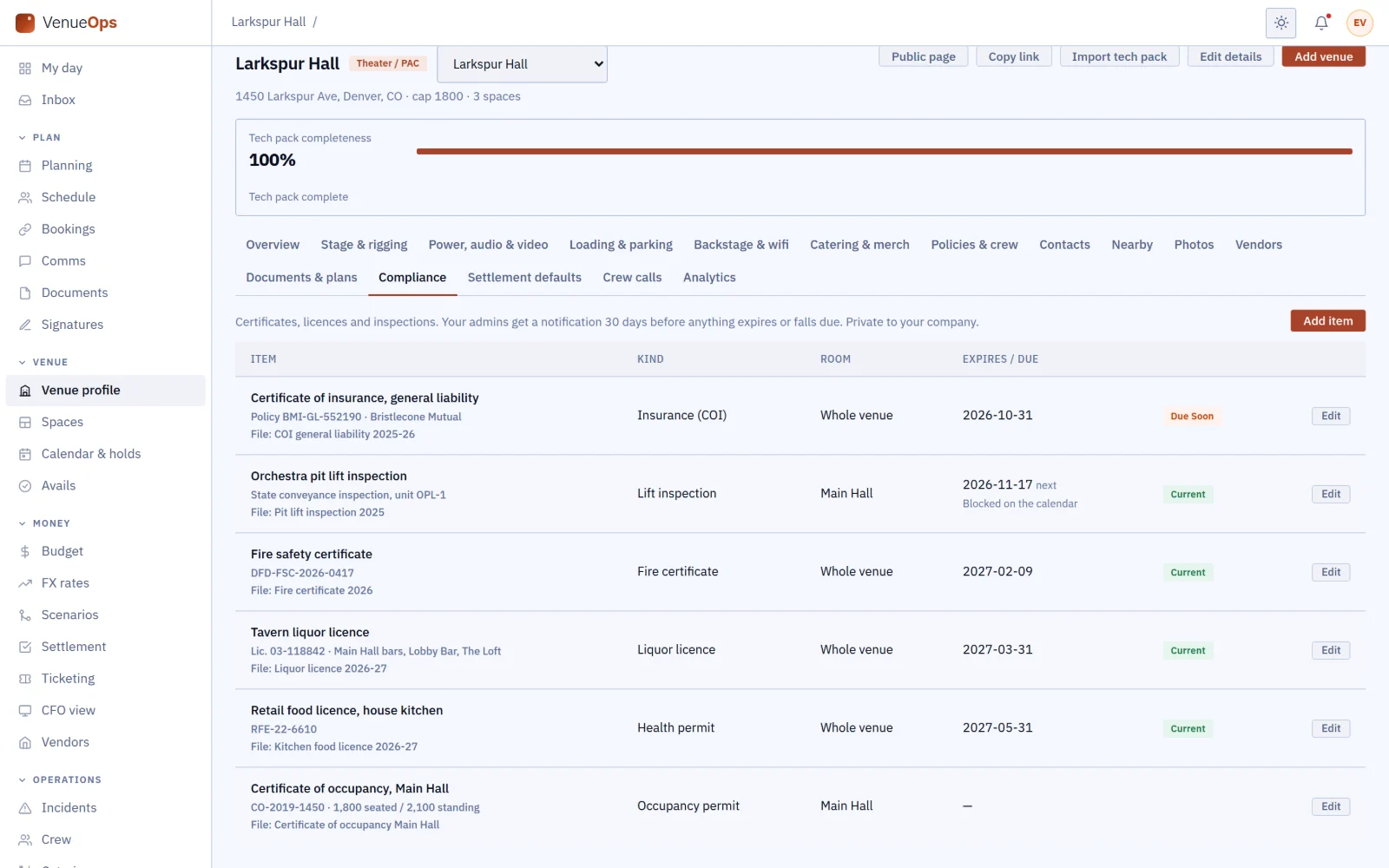
Compliance vault

File insurance, fire and occupancy certificates, licences and inspections with their documents, and get a reminder 30 days before each one expires. An inspection can block its room on the calendar.

Also in VenueOps

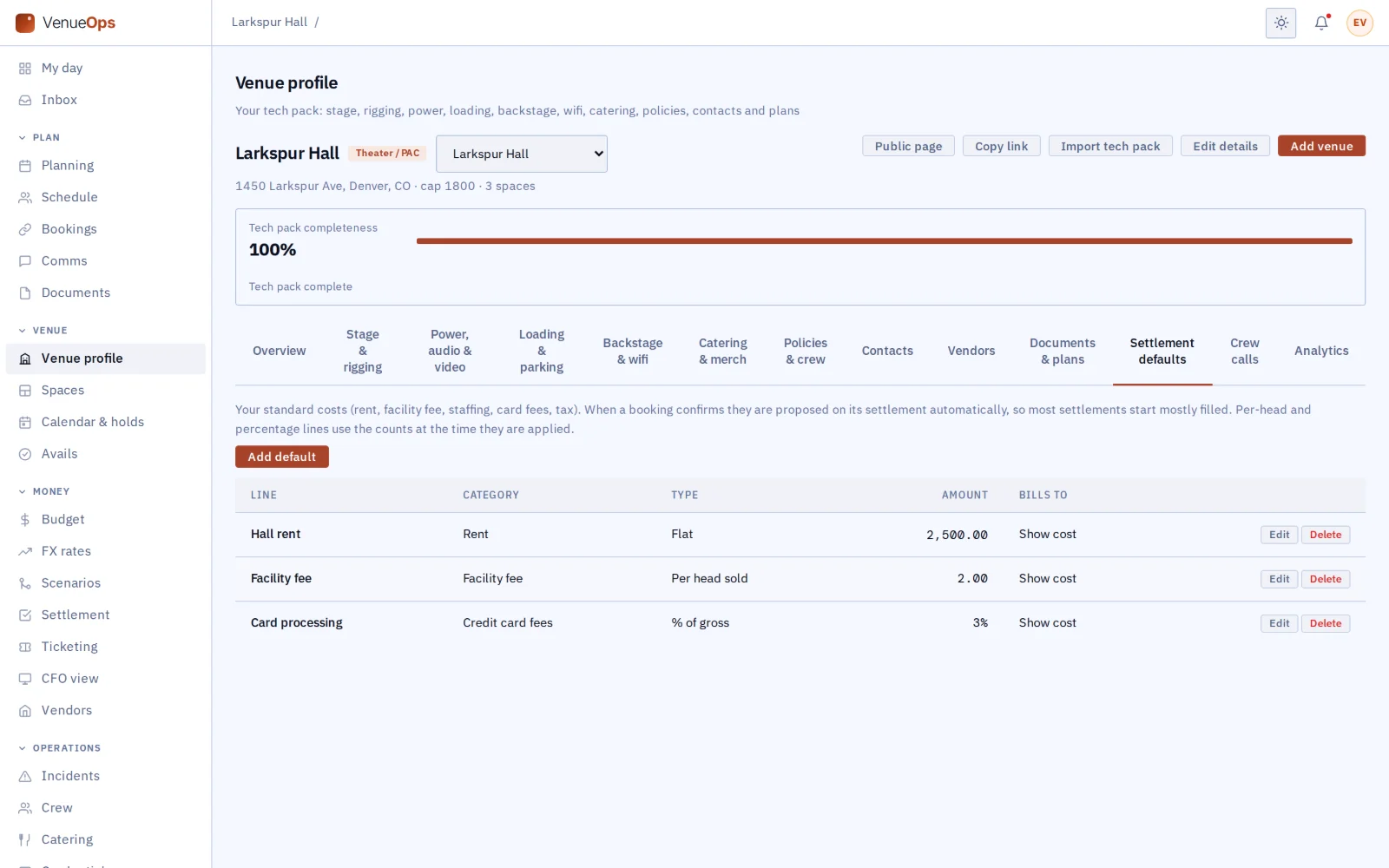
Settlement defaults
Set your rent, fees and charges once for each kind of deal (four-wall, flat rent and the rest), and they fill in every settlement.
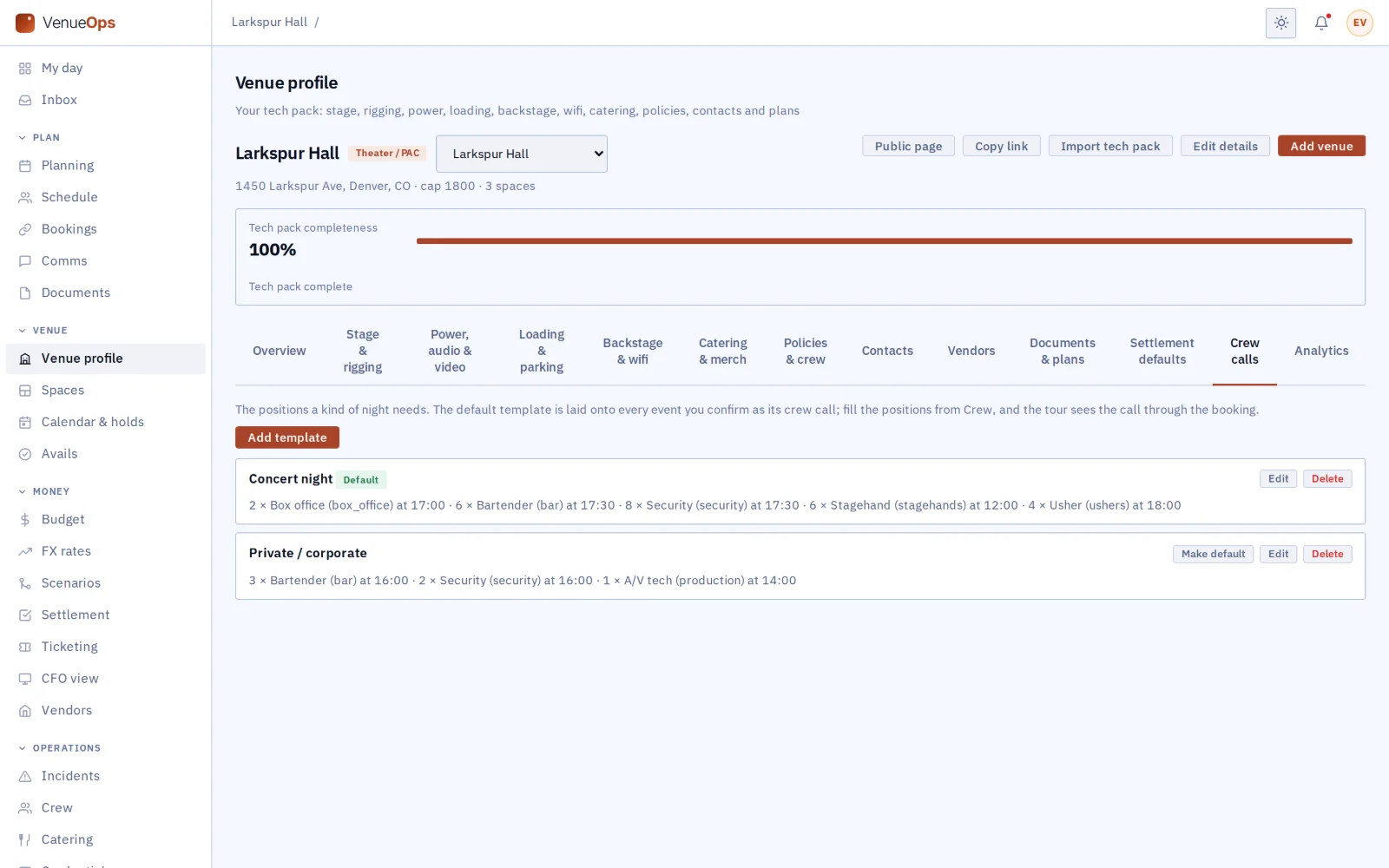
Crew call templates and curfew warnings
Set your house crew call once and it is added to every confirmed event. The act’s contact gets a text 30 and 10 minutes before curfew.
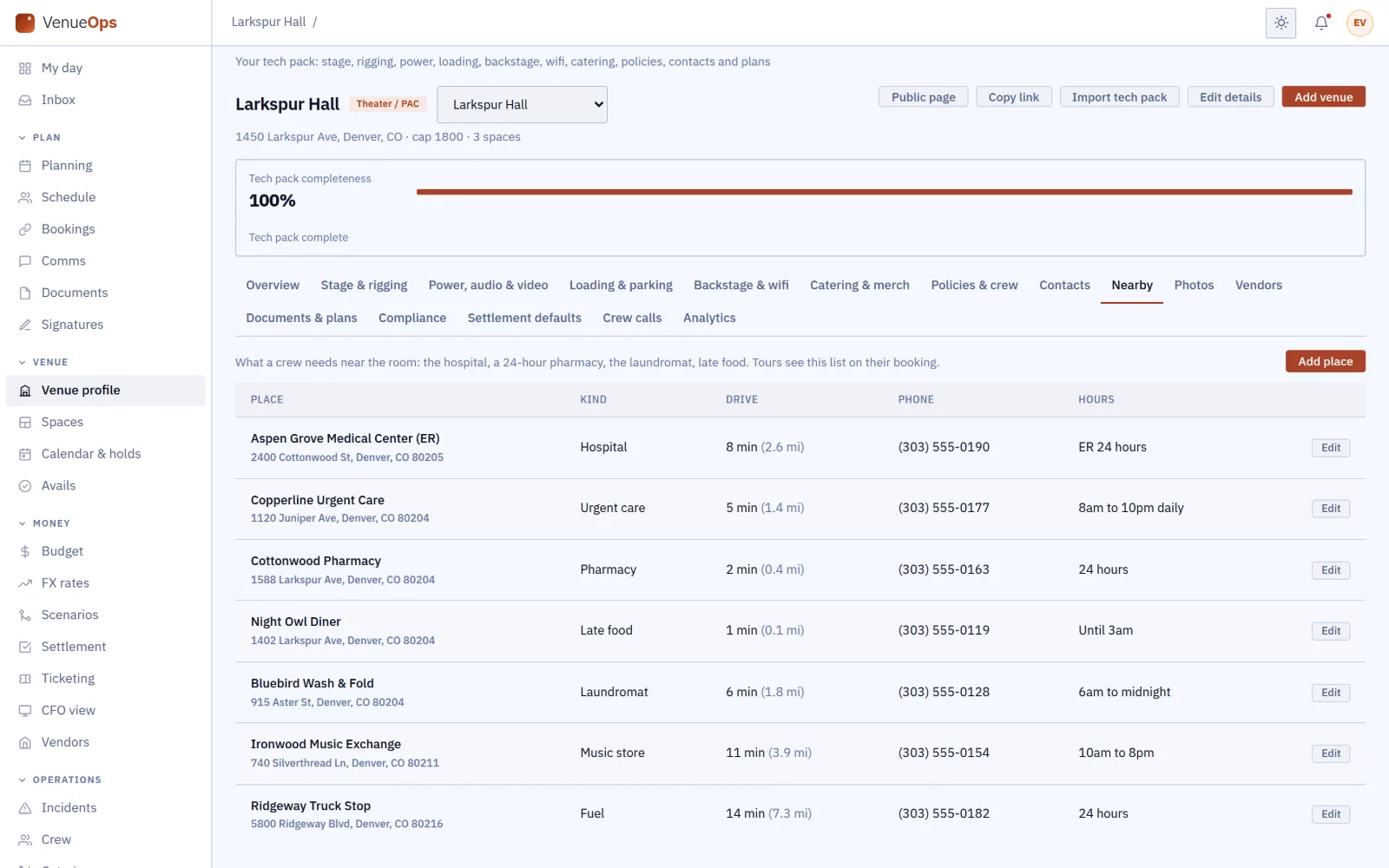
Nearby
Every booking lists the nearest hospital, urgent care, pharmacy, laundromat and the rest, with drive times from the venue.
Calendar sync both ways
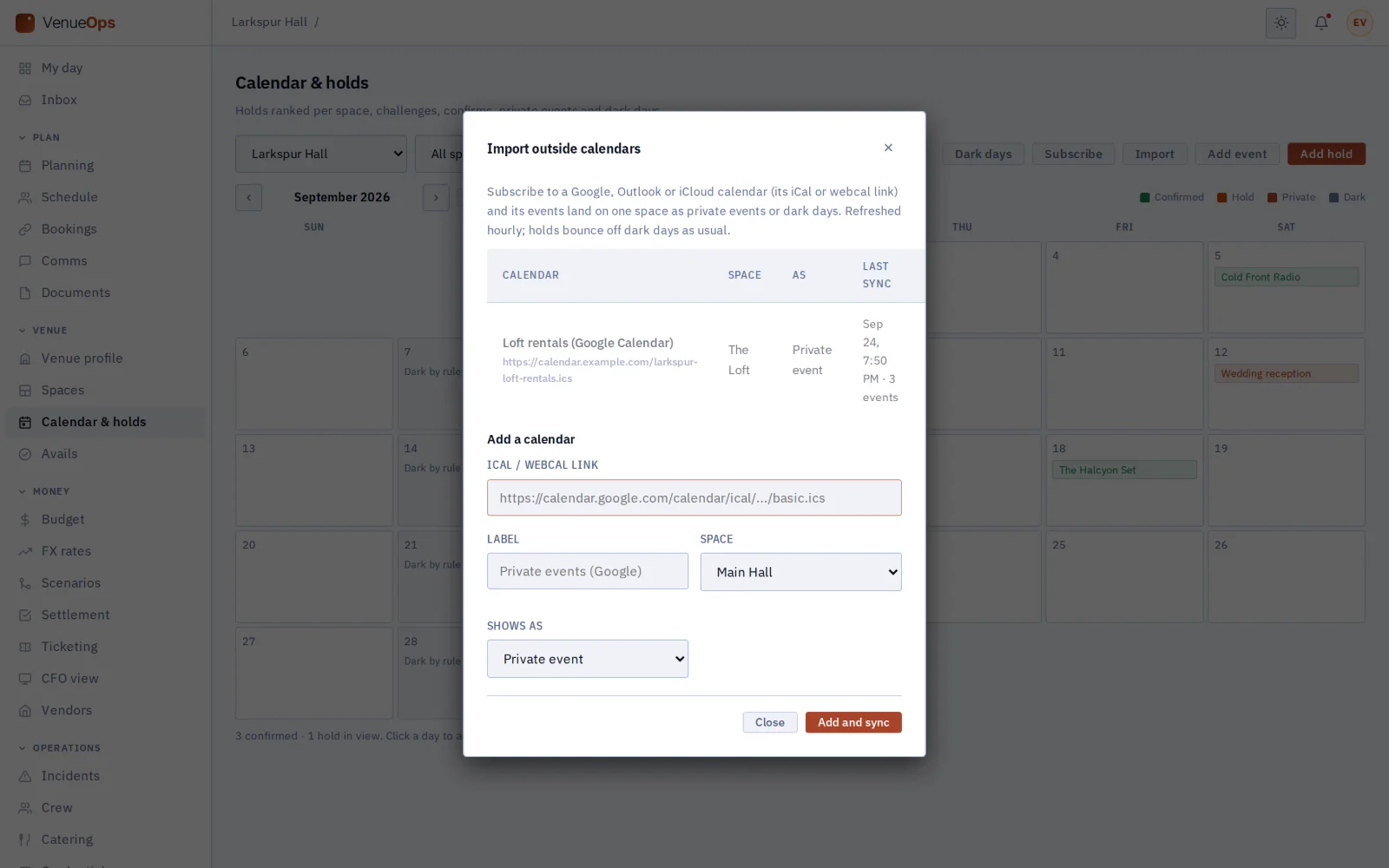
A private calendar feed link puts your GigOps calendar in Google, Outlook or Apple Calendar. Outside calendars come in the same way, as private events or dark days on the room they belong to.
Groups and analytics
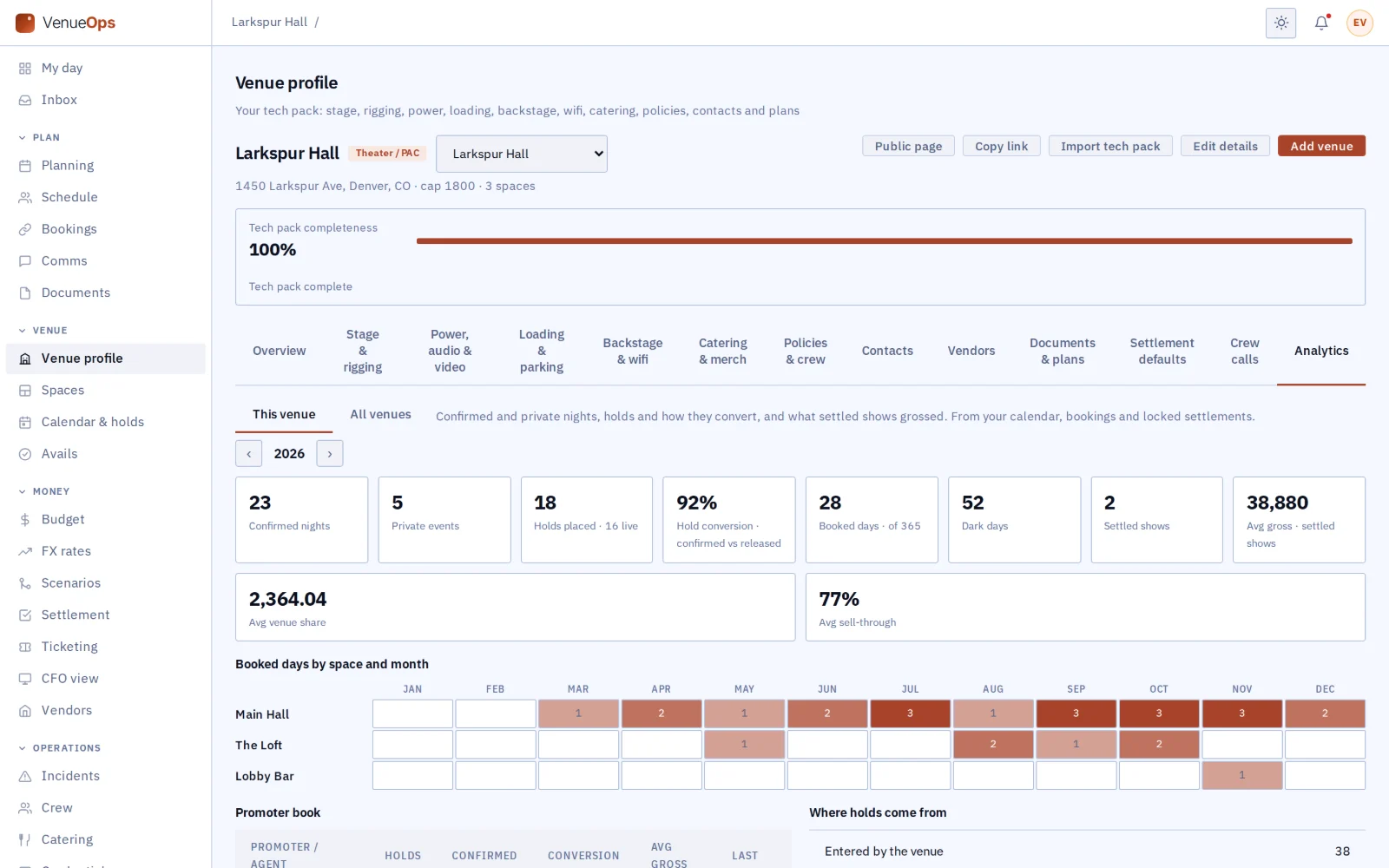
See every room on one calendar, and read the year: days booked, how many holds become shows, where holds come from, settled gross, how fast each promoter settles, a season plan with monthly targets, and bar, food and parking takings per head.
Private ratings
After both sides sign the settlement, each rates the other’s timeliness and accuracy, and only it can read its rating. There are no public reviews.
Event sheet
Print the night’s plan with the house’s doors, show, curfew and crew call. A copy is saved on the device, so it opens without signal.
House crew

Schedule the house crew, and know who is in.

The weekly schedule lives in a spreadsheet, swaps are agreed by text and hours go on paper. VenueOps runs your house crew from the same calendar as your shows. House crew are Crew seats, so they are free, and they use the GigOps Crew app.

A weekly schedule by department

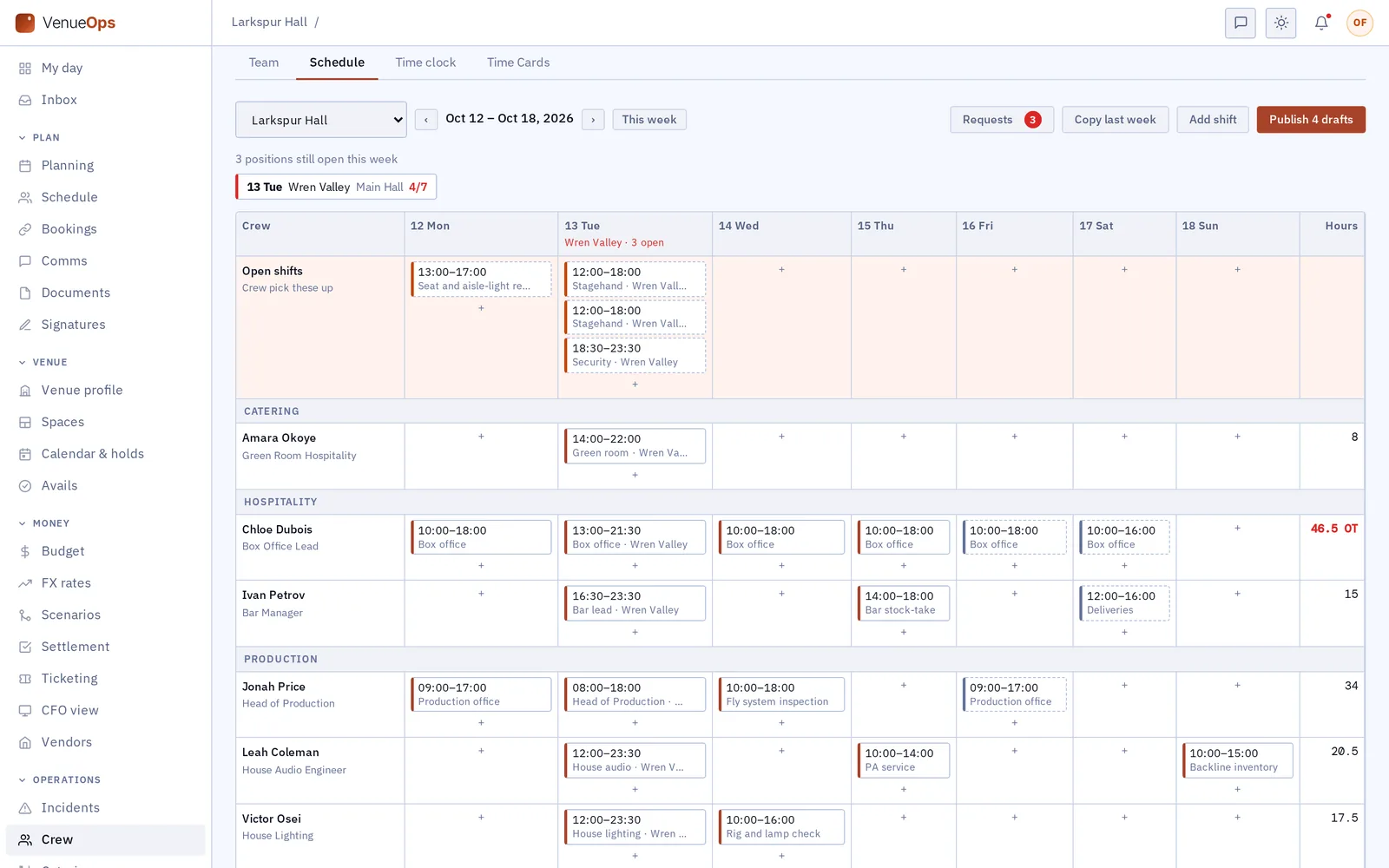
Build the week for box office, bar, security, front of house and production, with each person’s hours. A confirmed show adds its positions from your crew call, and nobody sees a shift until you publish it.

A time clock that knows the shift

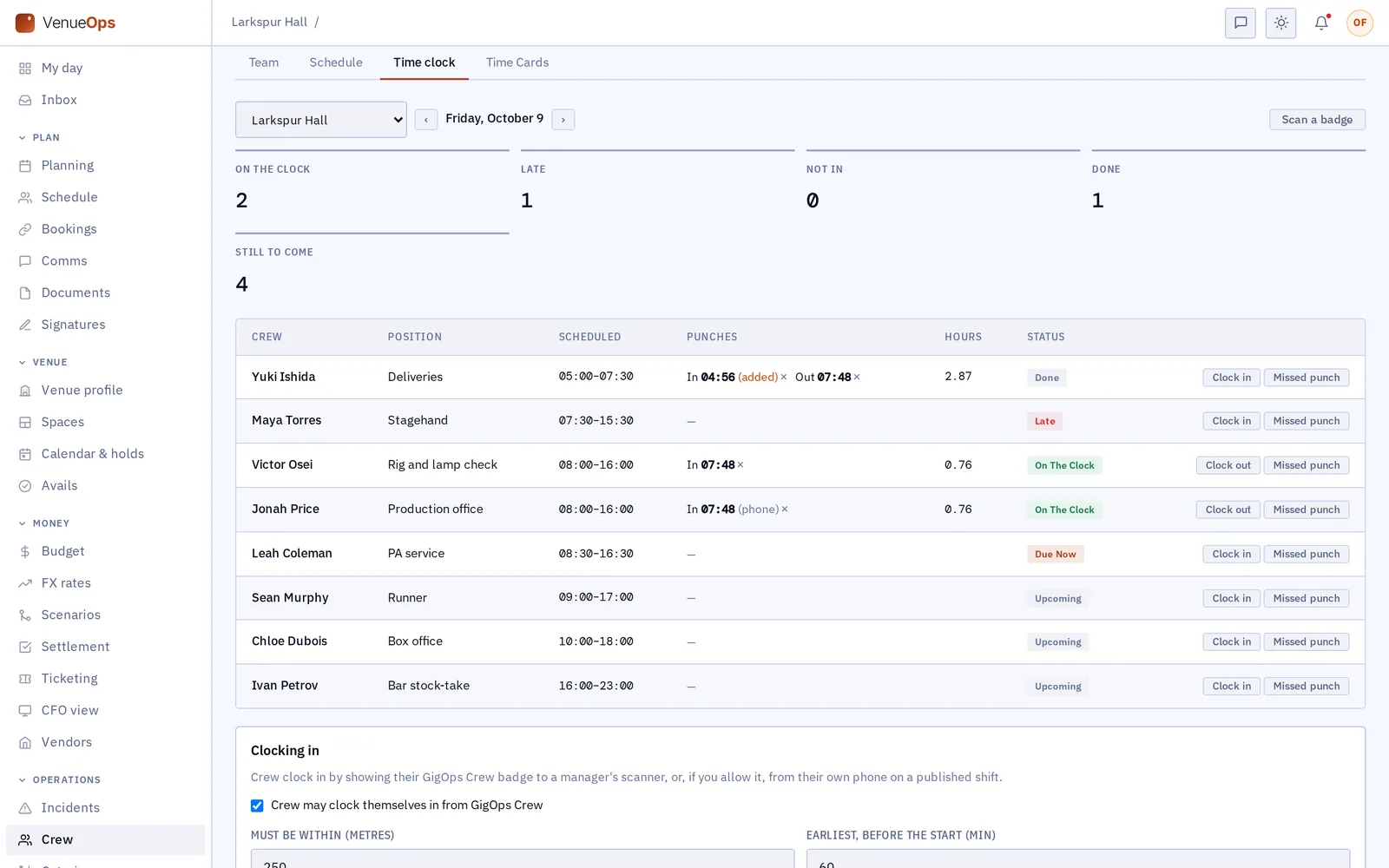
Crew clock in by showing their badge to a manager, or on their phone. A phone clock-in works only on their own shift, close to its start, and within the distance you set from the venue. The board shows who is on the clock, late or not in.

Open shifts and swaps, approved by a manager

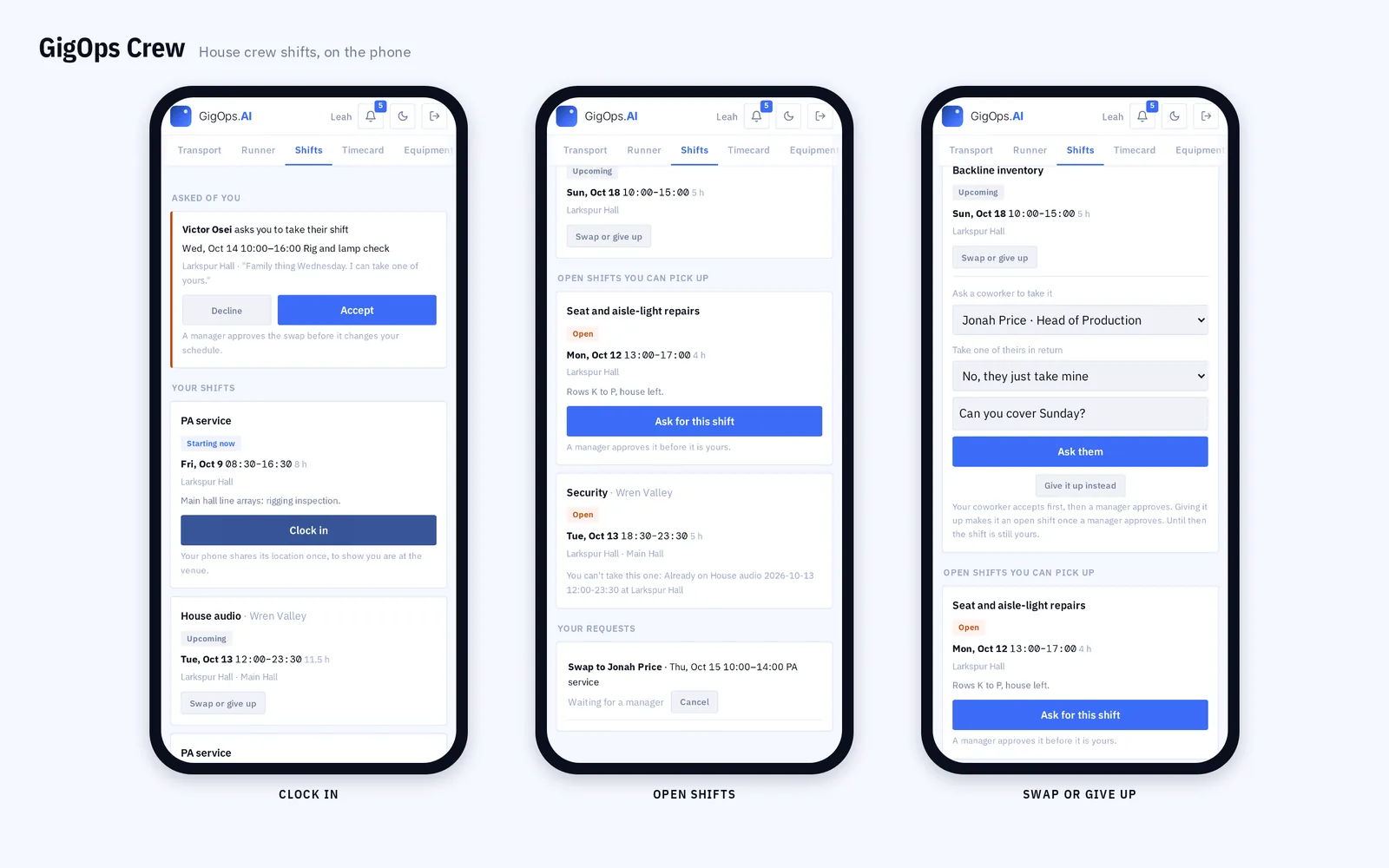
Post a shift nobody has yet, and the crew who are free that day hear about it. Crew ask a coworker to swap, or give a shift up, in the app. The coworker accepts first, then a manager approves.

Overtime, when you pay it

Overtime is off until you turn it on. Set the daily and weekly limits and the rates, and payroll splits the hours into straight time, overtime and double time. The schedule shows who is going past the weekly limit.

The house crew schedule for a week: open shifts, a show’s positions still to fill, drafts and hours over the overtime limit
Plan the week: open shifts for crew to pick up, the show’s positions still to fill, drafts not yet published, and three requests waiting for you.
The time clock for one day: a missed punch added with its reason, a badge scan, a phone clock-in and a late stagehand
Run the day: a missed punch added with its reason, a badge scan, a phone clock-in, and a stagehand who is late.
GigOps Crew on three phones: a swap to accept and Clock in, open shifts to pick up, and the swap form
In GigOps Crew, each crew member clocks in at the venue, picks up open shifts and asks a coworker to swap.
Room rentals

Rent your rooms for weddings, galas and conferences.

Private events tend to live in a separate inbox, a proposal in Word and an invoicing tool. The Rentals screen keeps the client, the proposal, the contract and the money in VenueOps, and the booking on the same calendar as your shows.

Clients and a pipeline

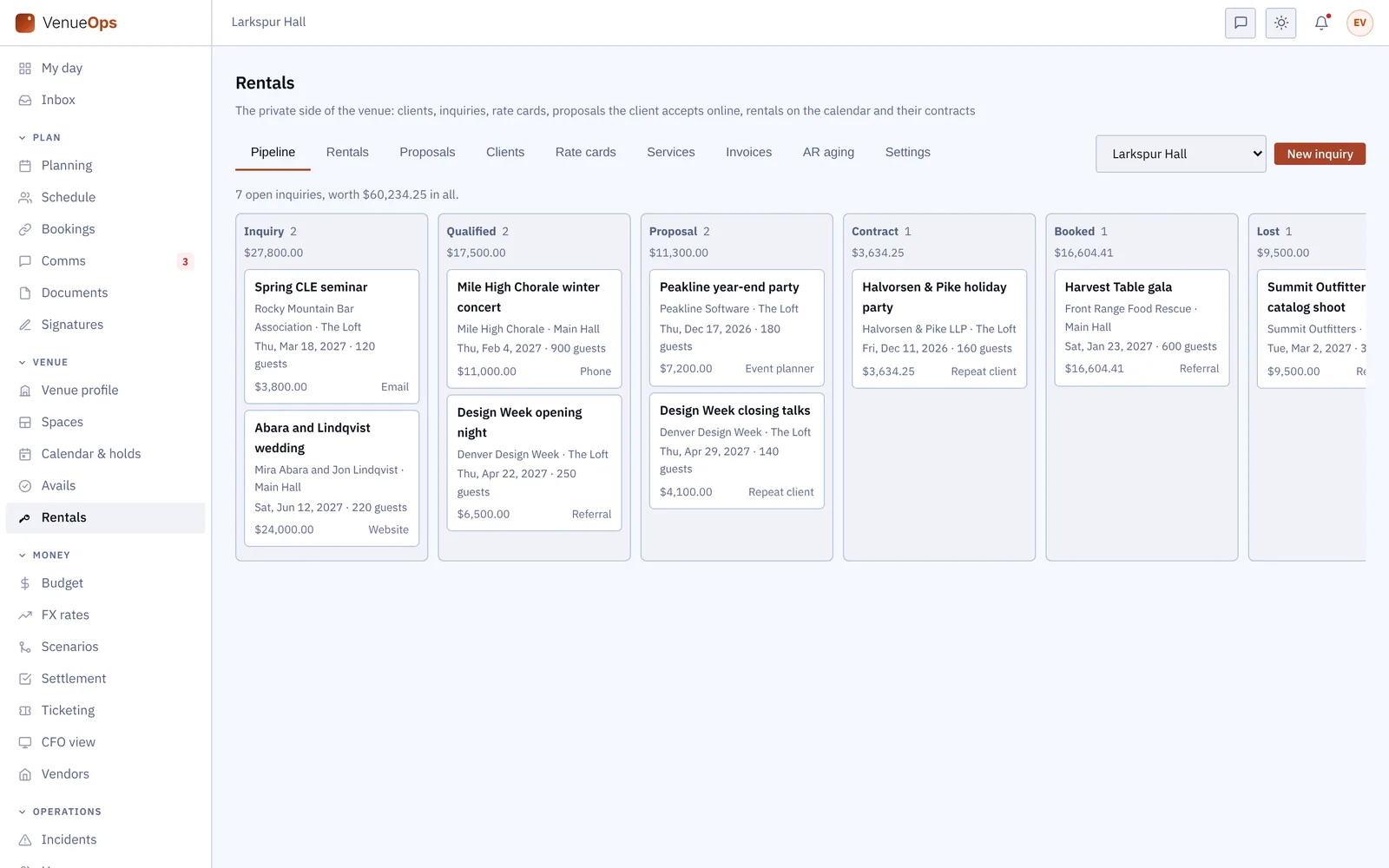
Keep each client with its contacts, inquiries, rentals, invoices and the emails you sent it. The pipeline shows every inquiry by stage, from the first call to booked, with its value.

Proposals the client accepts online

Price a proposal from each room’s rate card and your list of services, with the tax and the deposit worked out. The client reads it on a private link and accepts or declines, with no account.

Contracts through GigOps Sign

An accepted proposal becomes a rental on your calendar, and no show or hold can land on it. Its contract goes out through GigOps Sign, and both signatures mark the rental contracted.

Functions and work orders

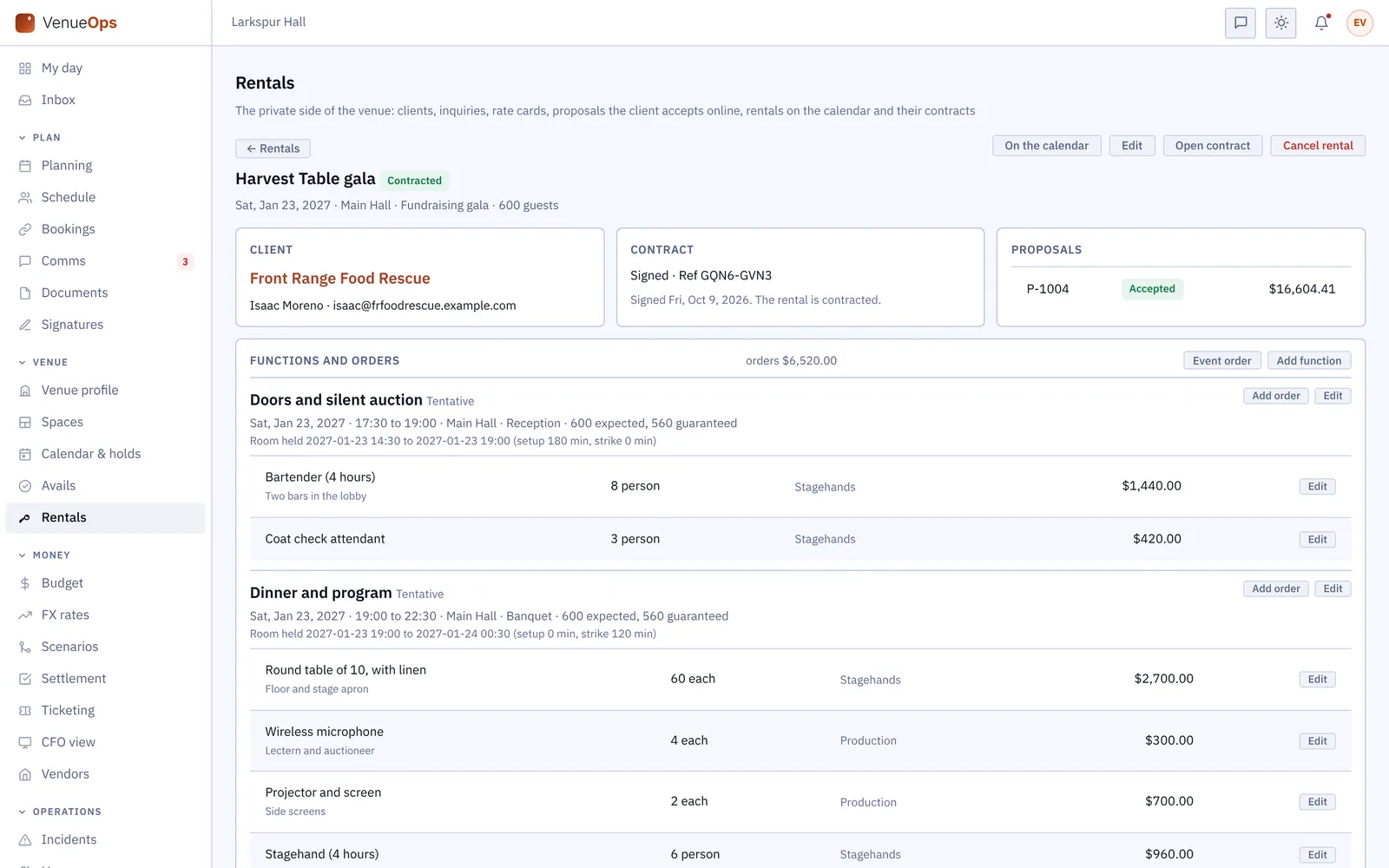
Plan each function with its room, times, setup style and guest count, and the room is held for setup and strike. Orders turn into work orders your house crew tick off in GigOps Crew on the web.

Invoices and payments

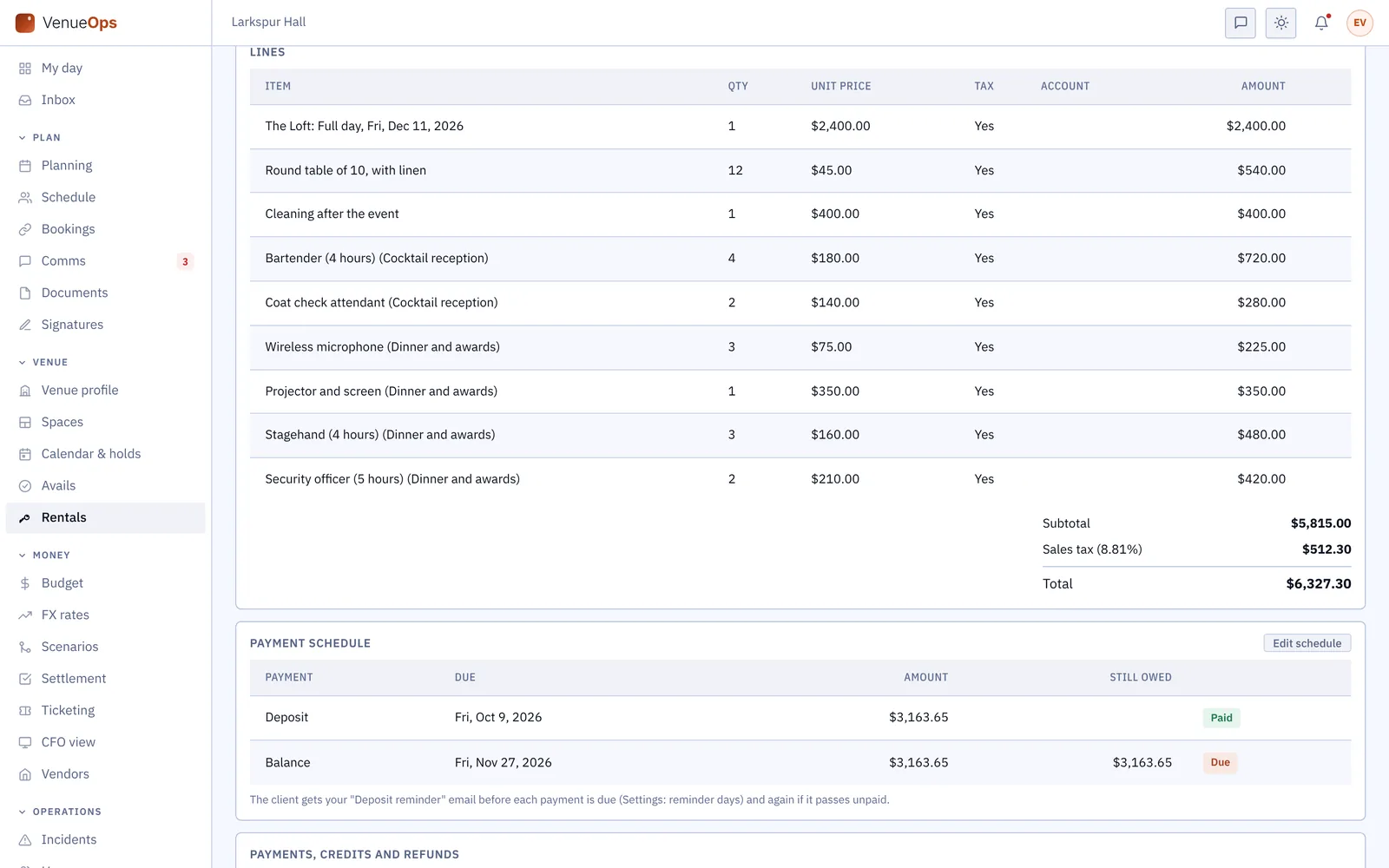
Invoice the accepted proposal and the orders, with a deposit and balance schedule and reminder emails. Record payments, credits and refunds as they come in.

What you are owed

See what each client owes by how far past due it is, and export the invoices and payments as a journal for your accountant.

Clients pay you the way they do today: online card payment on an invoice is not switched on yet.

The rentals pipeline: inquiries by stage, from inquiry to booked, each with its client, room, date, guests and value
The pipeline: every inquiry by stage, with its client, room, date, guests, value and where it came from.
A contracted gala rental: the signed contract, the accepted proposal, and two functions with their held hours and orders
A contracted rental: the signed contract, the accepted proposal, and each function with the hours the room is held and what was ordered.
A rental invoice: lines from the proposal and the orders, the sales tax, and a deposit paid with the balance due
An invoice: the proposal and the orders as lines, the deposit received, and the balance due before the event.
See how GigOps Sign works →
A season in VenueOps

From the tech pack to the settlement.

01 / 21

Enter the tech pack once.

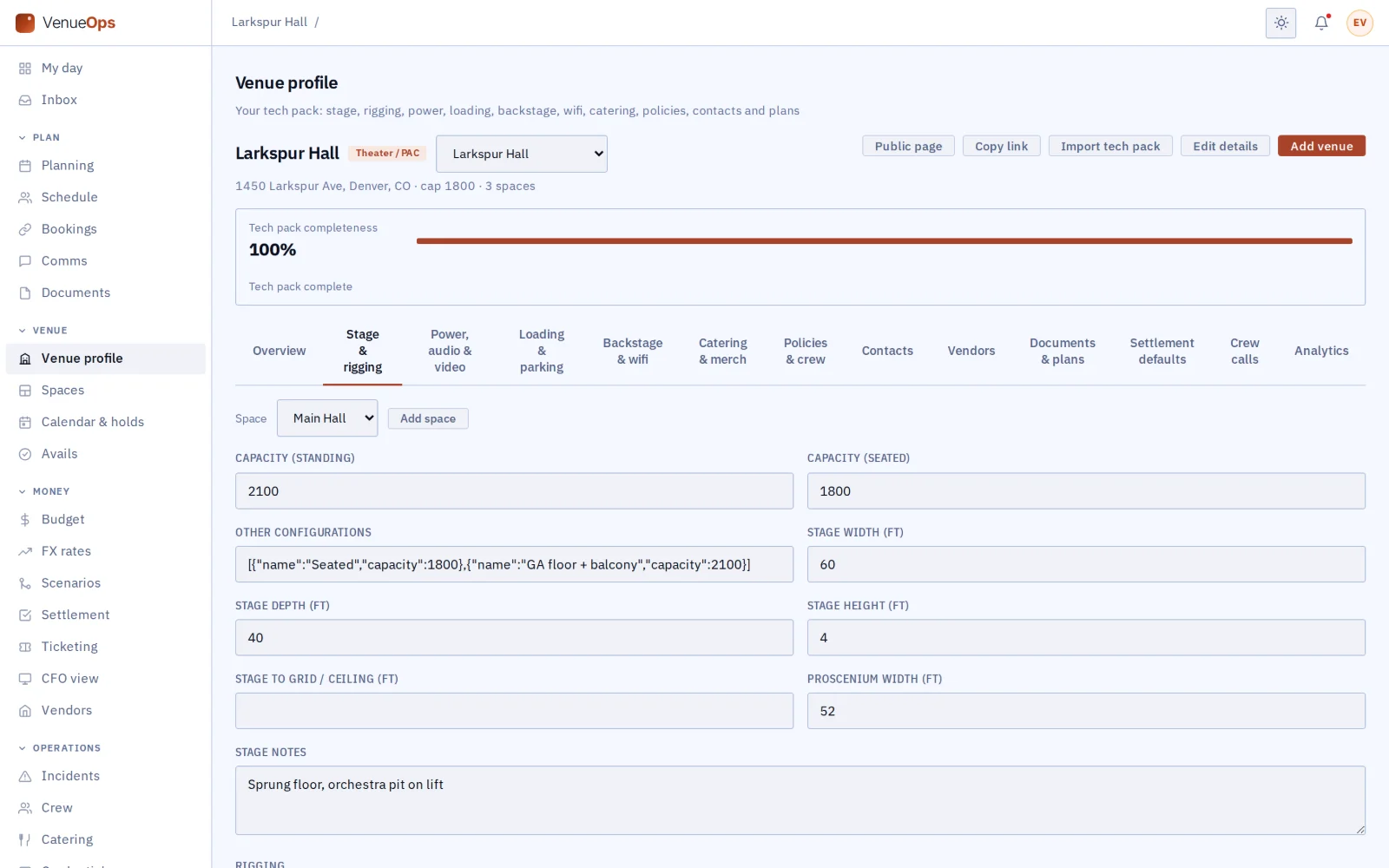
Every tour that books you reads the same answers, so you stop sending the same PDF and answering the same rigging questions.

Venue profile, tech pack 100% complete
02 / 21

Down to the rigging.

Stage size, grid height, power and the dock, set for each room, so the production manager finds the number they need.

Tech pack: stage and rigging tab
03 / 21

Add every room.

The main hall, the loft and the bar each keep their own capacity and tech.

Spaces (rooms)
04 / 21

Scale the room.

Keep a seating layout for each way you sell the room, so every booking counts against what that night can sell.

Manifests for the Main Hall: seated, GA floor and balcony, and in the round
05 / 21

Hold the ladder.

See every hold in order for each room, with the date each one runs out.

Holds list with a live challenge
06 / 21

Challenge with a deadline.

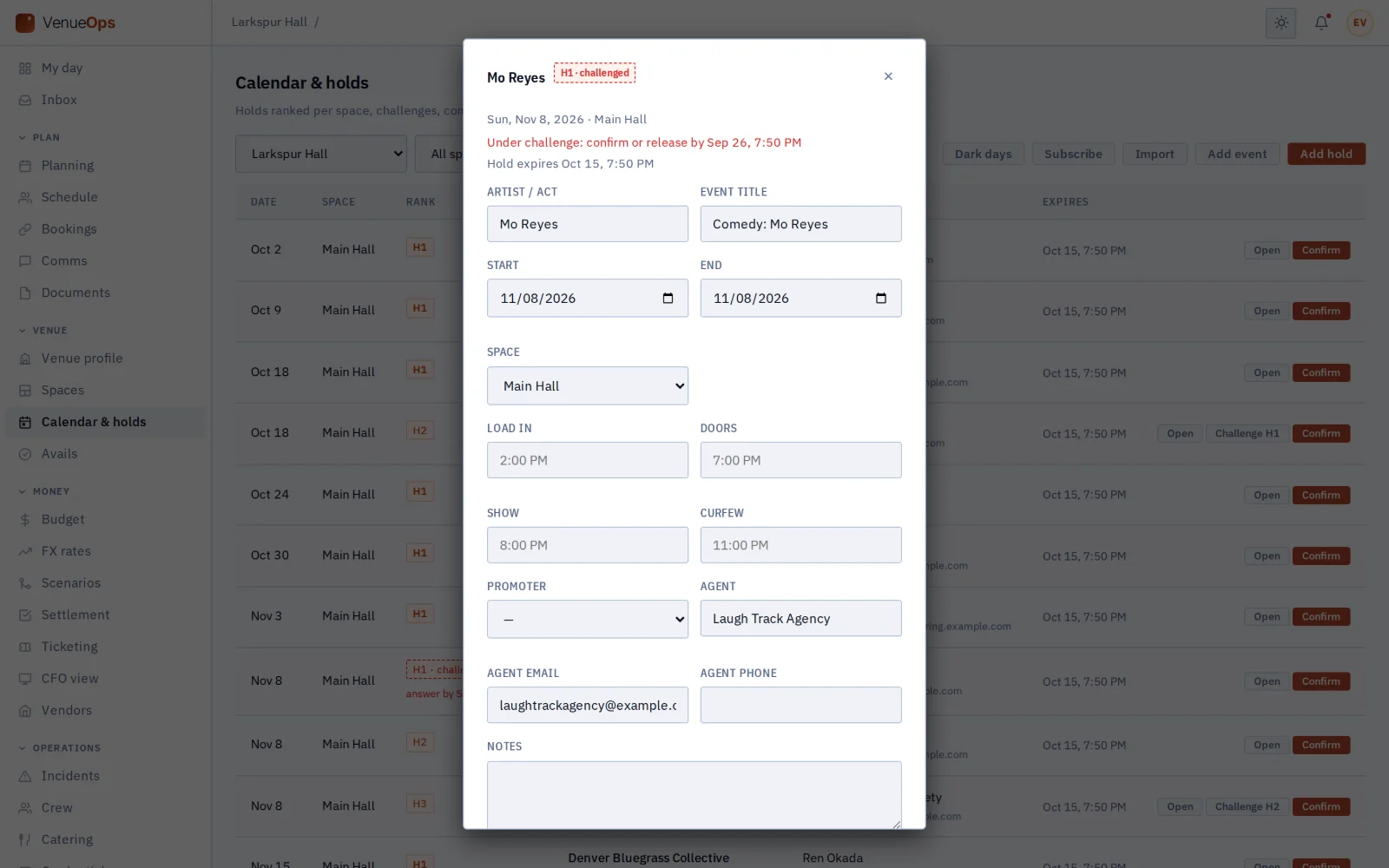
When a second hold wants the date, the first has until the deadline to confirm or let it go.

A challenged hold with its deadline
07 / 21

See the year.

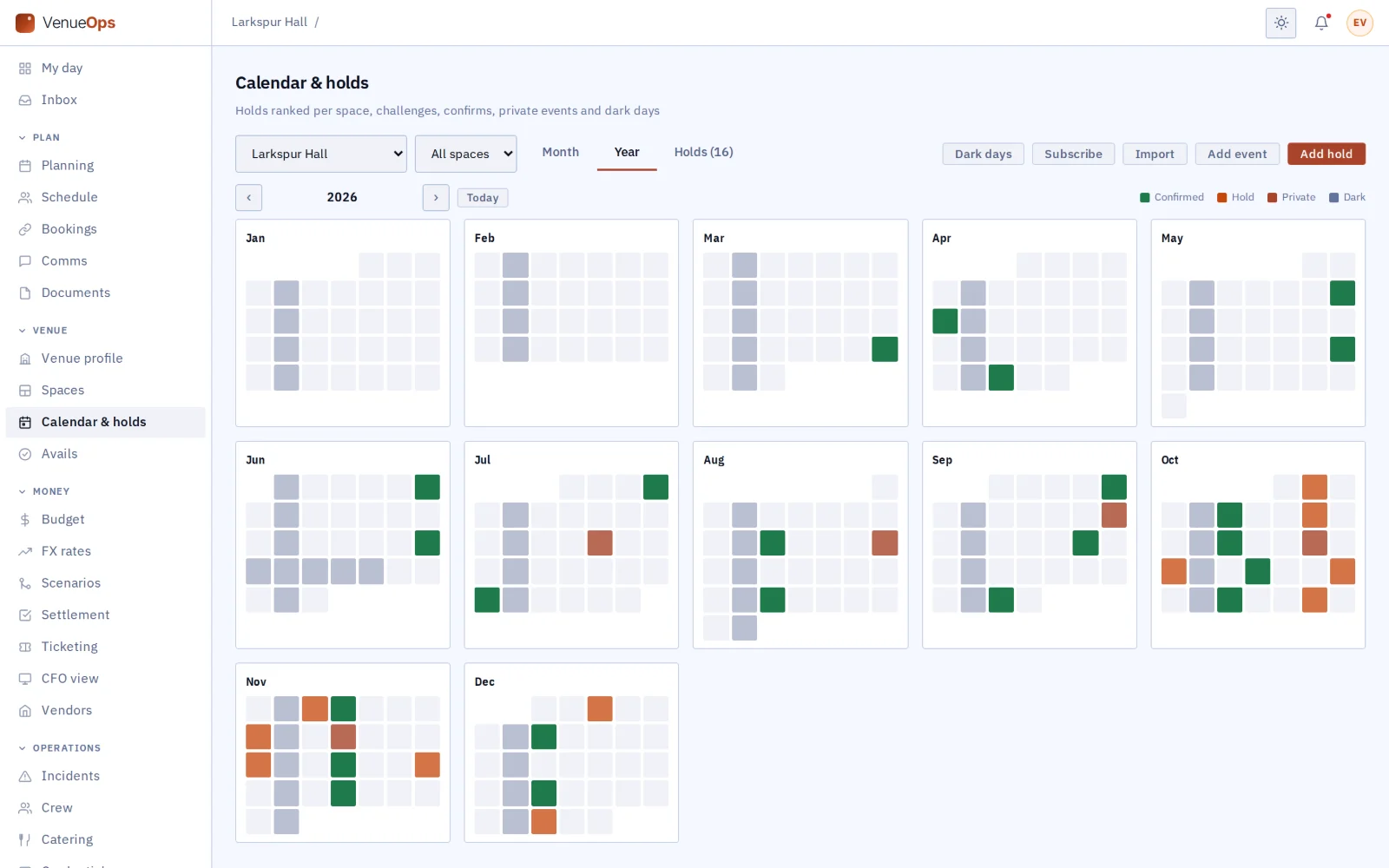
Shows, holds, private events and dark days across twelve months.

Year view
08 / 21

Choose who sees your open dates.

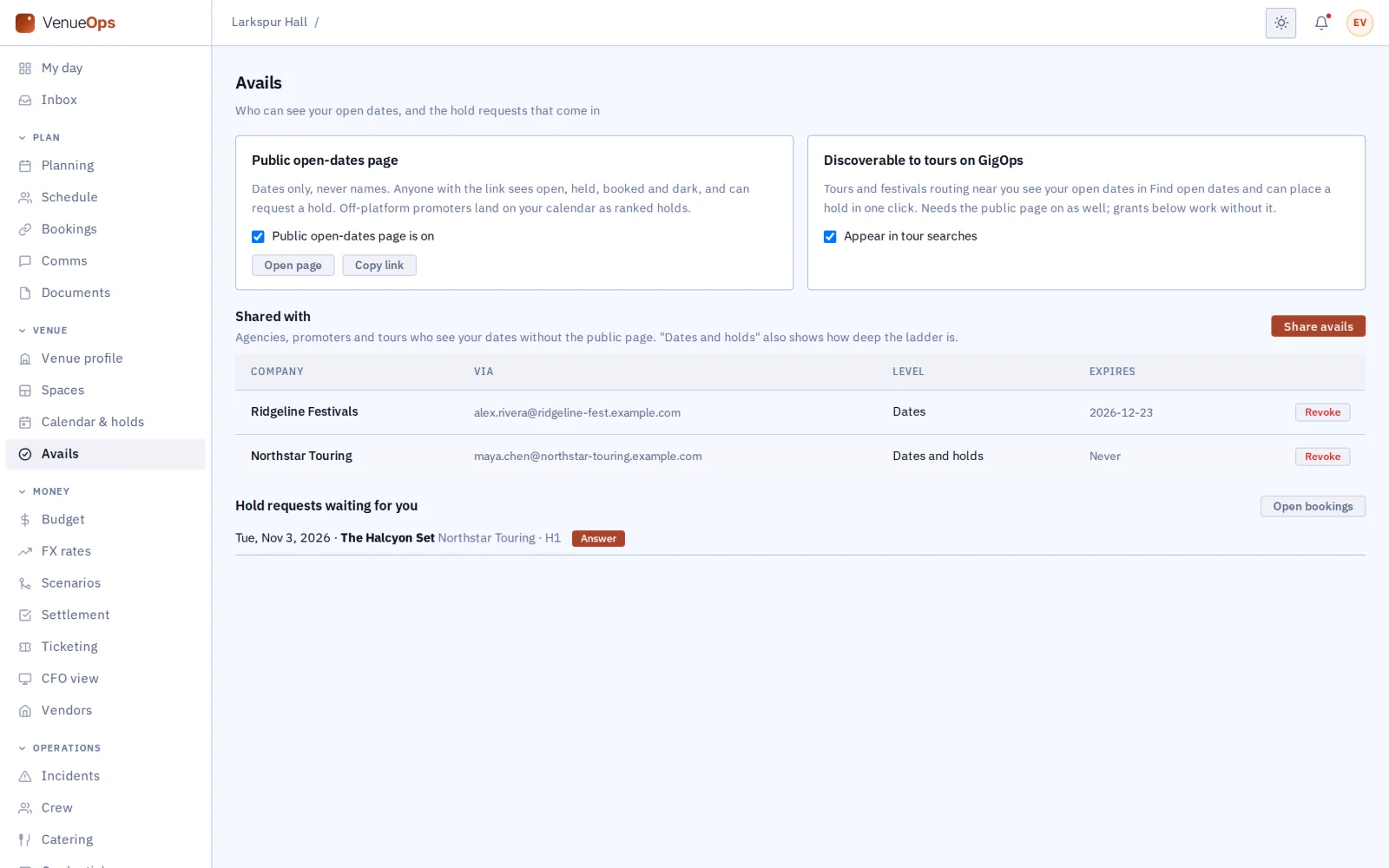
Grant your calendar to the agents and tours you work with, and keep it from everyone else.

Avails sharing and grants
09 / 21

Publish the venue page.

Send one link instead of a tech pack attachment, and let anyone ask for a hold from it.

Public venue page
10 / 21

Put open dates on your own site.

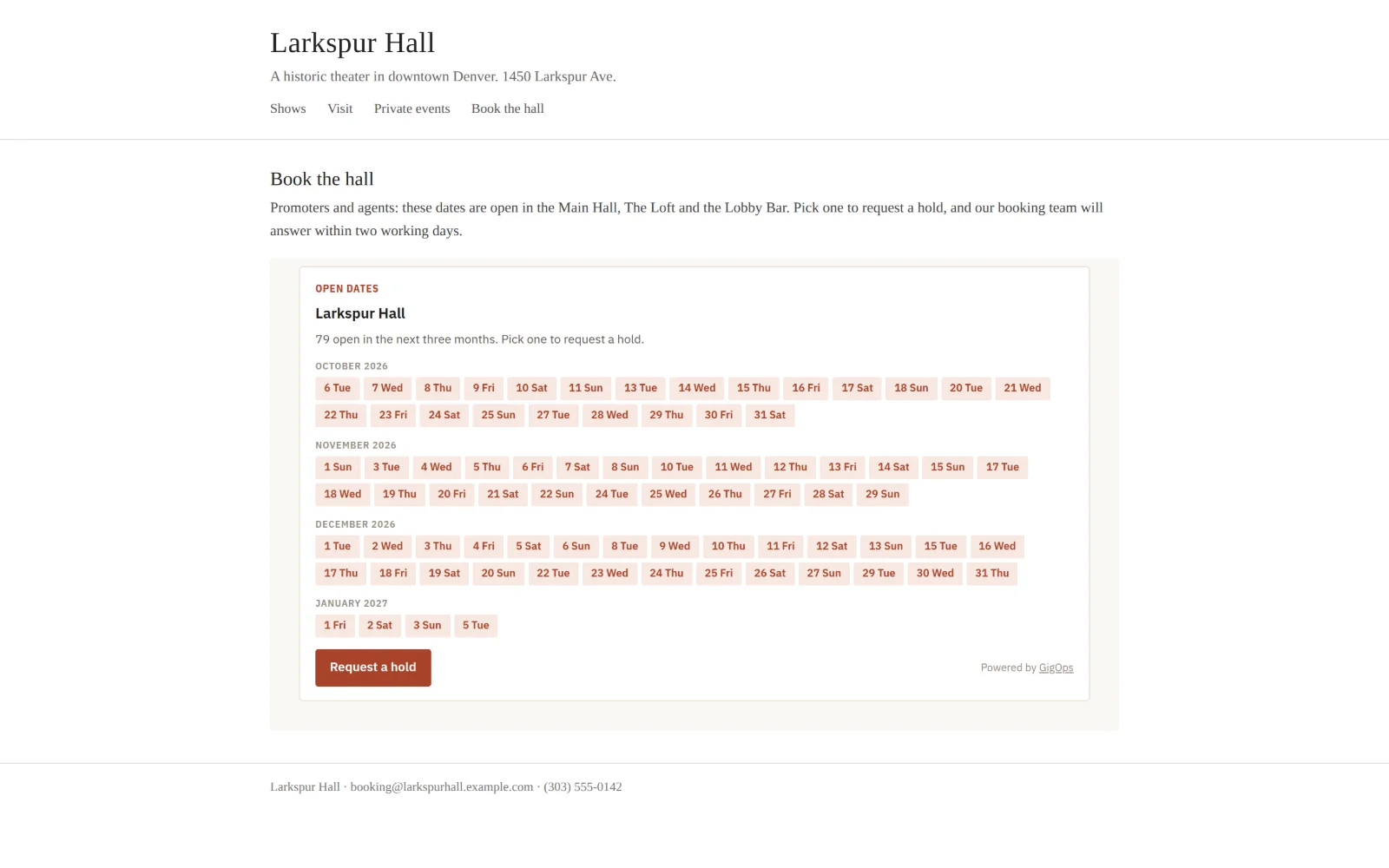
Paste one snippet into your website, and promoters pick a date there.

Open dates embedded on a venue’s own website
11 / 21

Answer the booking.

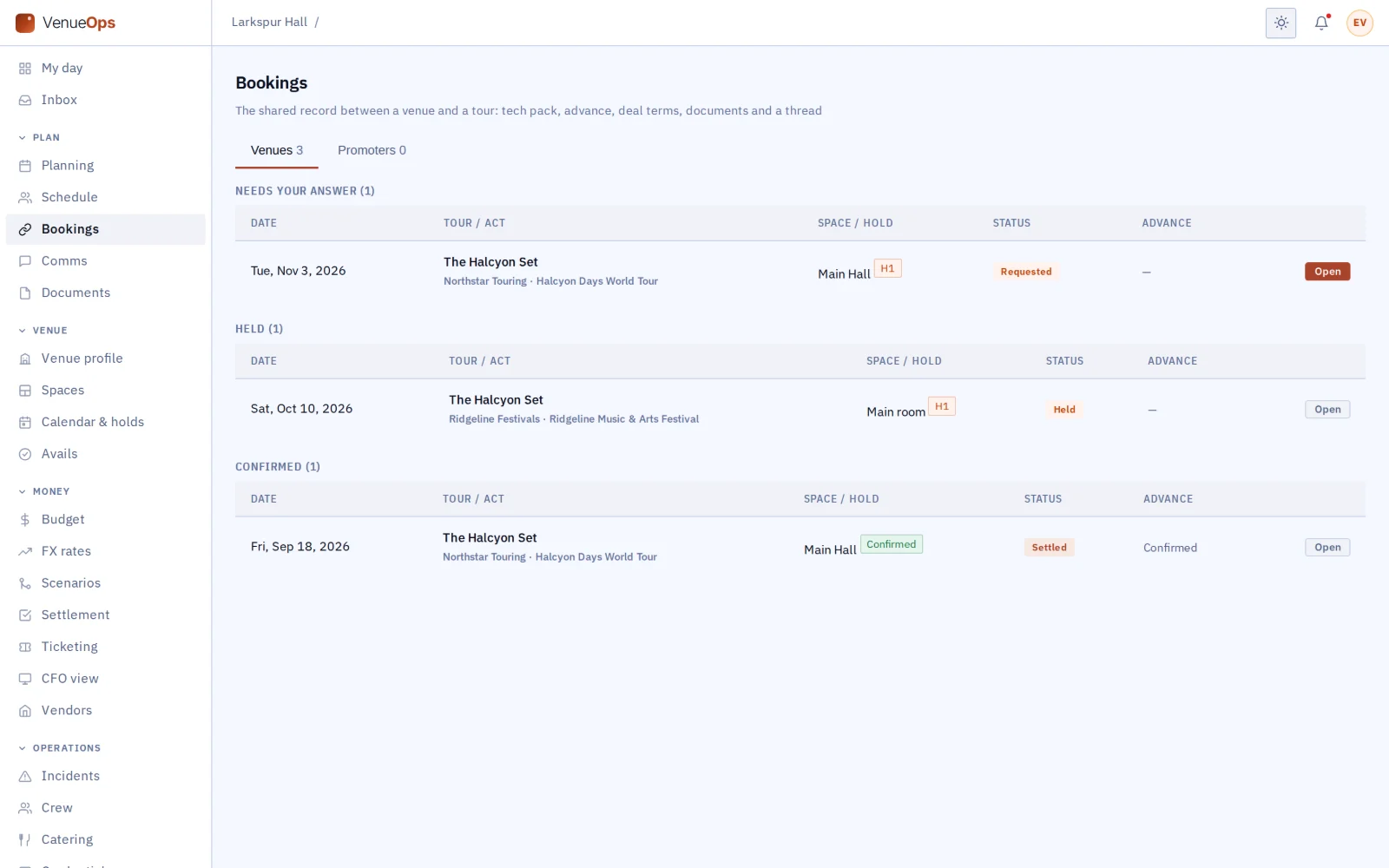
Every booking with a tour or a promoter sits in one list: held, confirmed and settled.

Bookings from the venue side
12 / 21

Know who owes the next step.

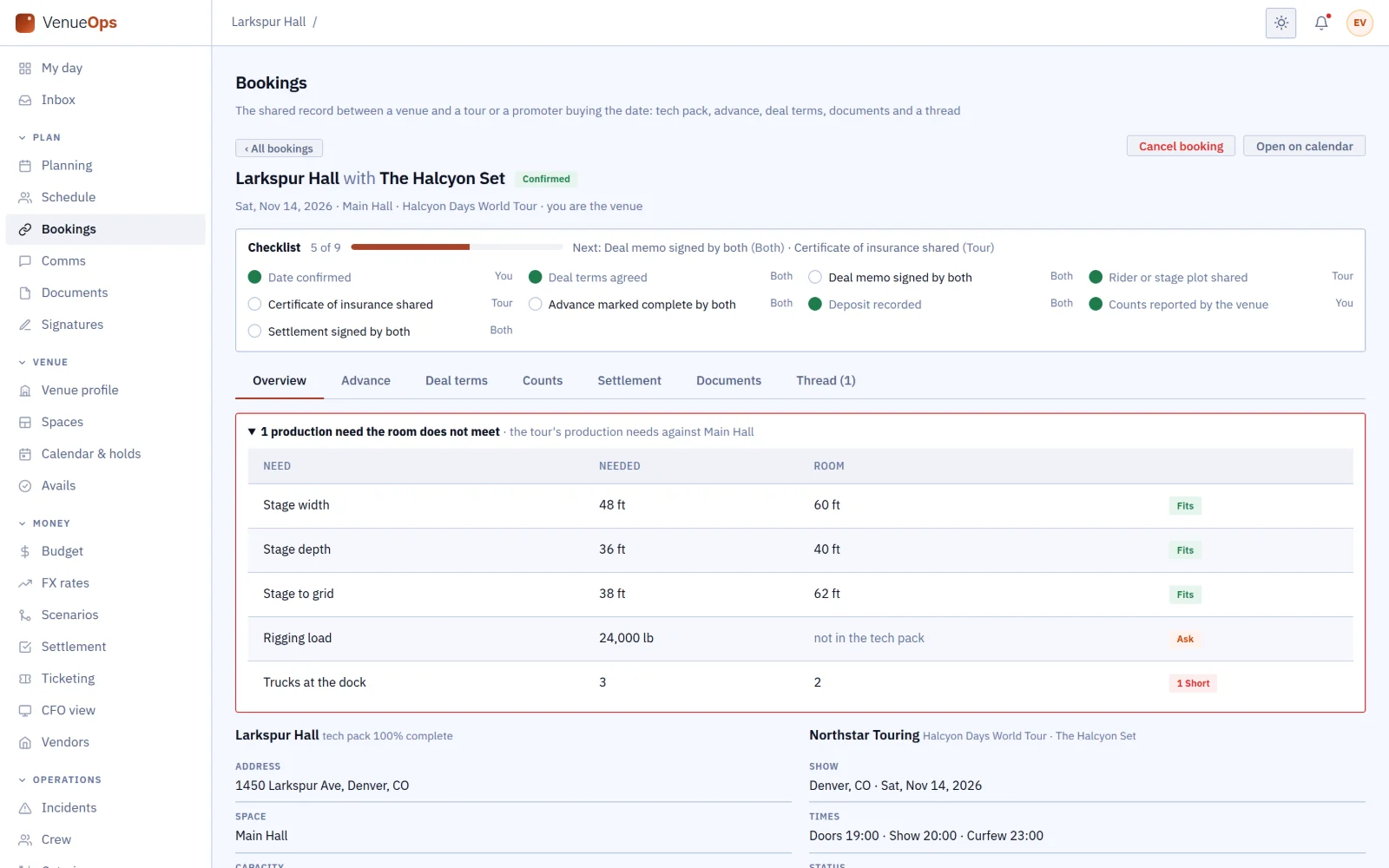
Each booking shows which of the nine steps are done, and whether you or the tour is holding it up.

A confirmed booking with its checklist, 5 of 9, each step with its owner
13 / 21

Import the box office report.

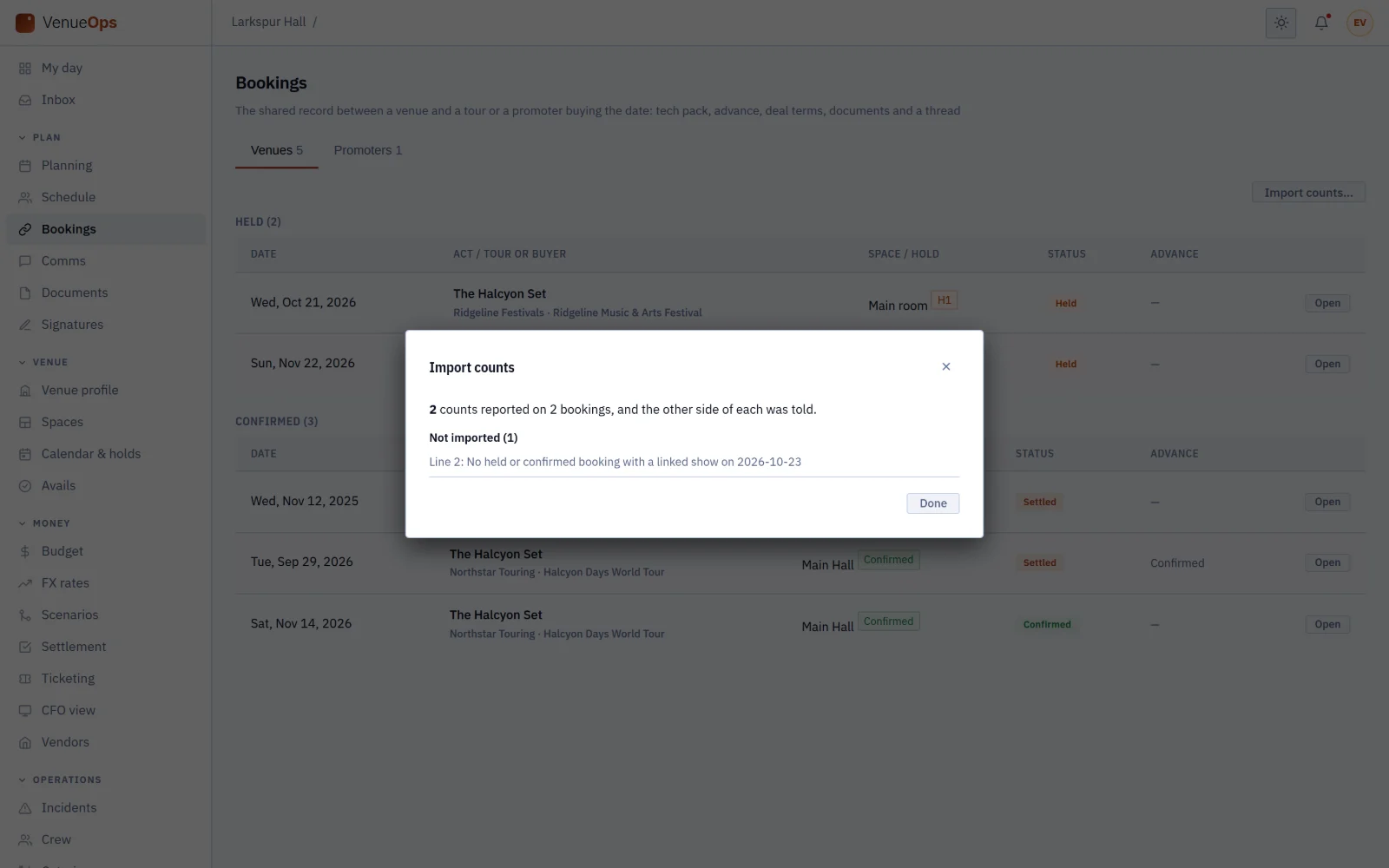
Drop in the CSV and the counts land on the right bookings, and the tour hears about it. A row that does not match tells you why.

Import counts after a box office CSV, with one row not imported and its reason
14 / 21

Keep the paperwork current.

The insurance certificate that runs out next month is flagged now, not on the night a tour asks for it.

Compliance: insurance, fire, occupancy, liquor and food licences and a lift inspection
15 / 21

Send crews to the right places.

The ER, the late diner and the laundromat, with drive times, on every booking.

Nearby: hospital, urgent care, pharmacy, late food, laundromat, music store and fuel
16 / 21

Set your terms once.

Rent, facility fee and card fees fill in when the date is confirmed.

Settlement defaults
17 / 21

Lay down the crew call.

Your house crew call goes on every confirmed event, so nobody rebuilds it each week.

House crew call templates
18 / 21

Bring your calendars in.

Keep the calendars you already use, and show GigOps dates in them.

Importing outside calendars
19 / 21

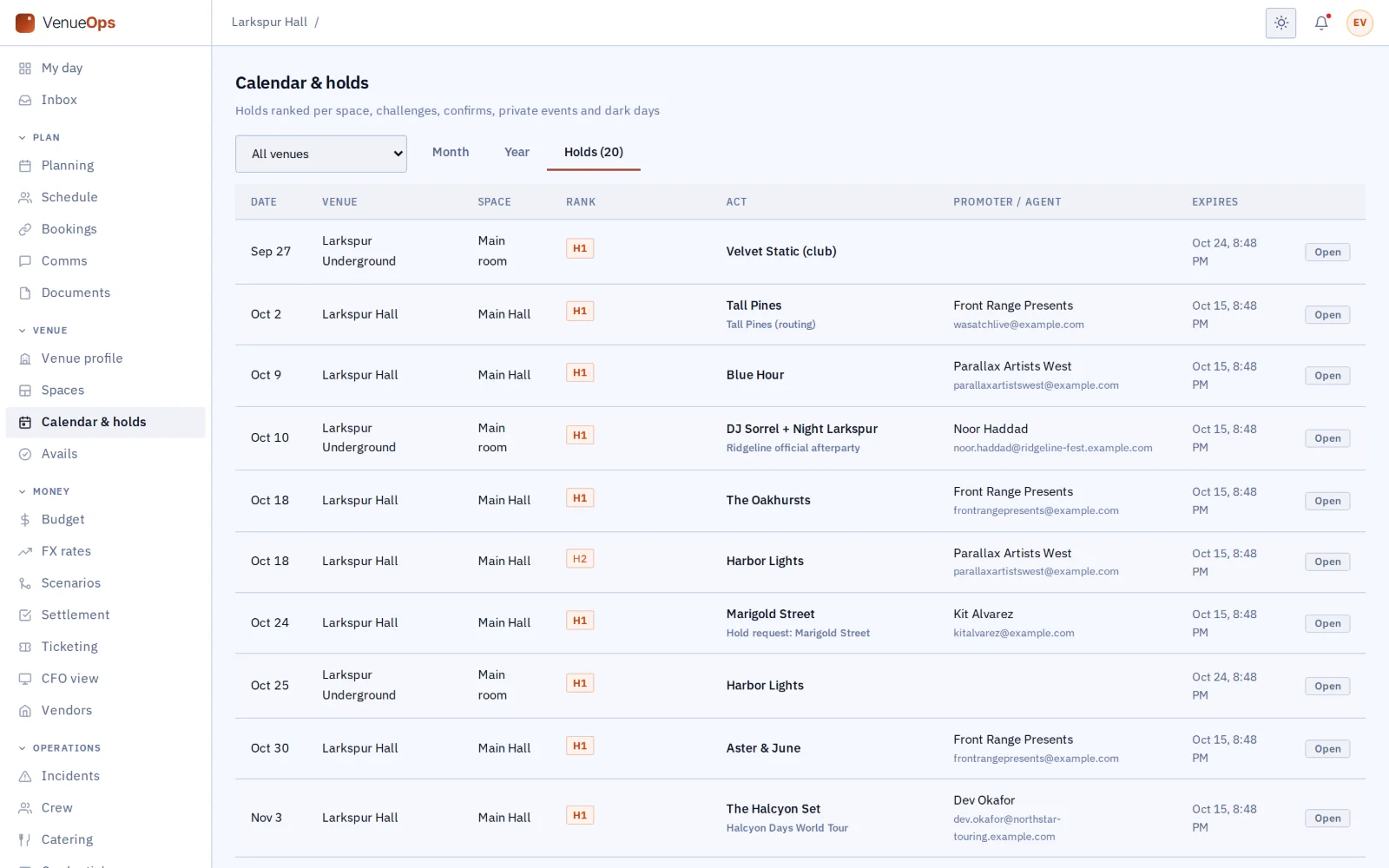
Run the group.

Every room you run, on one holds list.

All venues on one holds list
20 / 21

Read the book.

Days booked, how many holds became shows and which promoters settle fast, for the whole year.

Venue analytics and the promoter book
21 / 21

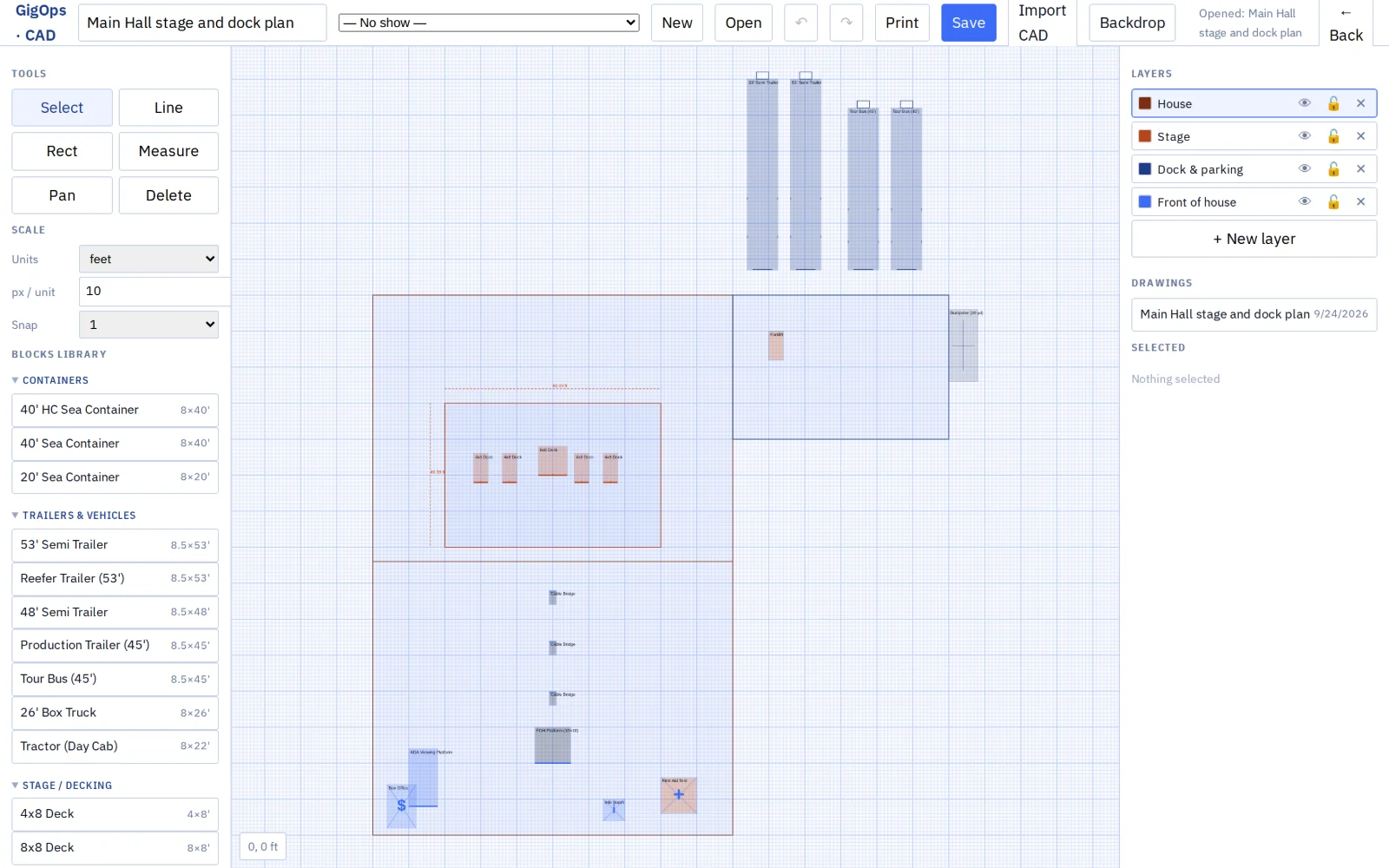
Draw the stage and dock.

Plans of the stage and the dock to real size, shared on the booking with the tours you choose.

CAD stage and dock plan
Works with the rest of GigOps

Every tour and festival that books you works on one shared page with you.

TourOps
  • Tours search your open dates and ask for holds from their routing.
  • Your tech pack is on every booking from the first request.
  • One shared advance, counts and a settlement both sides sign.
FestivalOps
  • Festivals book indoor stages and after-party rooms the way a tour does.
  • The same shared advance, counts and settlement.
PromoterOps
  • When the venue is the promoter, one tick sets up the promoter link.
  • Pick exactly which tickets, budget lines, guests, schedule items, documents and plans the other side sees.
  • A promoter can also book the room as the buyer. Your booking names the buyer, and the promoter’s deal with the act never reaches you.
See how it connects →
Also included

The shared core

  • My day
  • Planning and tasks
  • Crew and payroll
  • Catering and meal check-in
  • Credentials and gate scanning
  • Guest list and will-call
  • Budget and finance
  • Documents
  • Signatures (GigOps Sign)
  • Comms and alerts
  • Logistics and dispatch
  • Weather
  • CAD
And the apps

Crew are always free.

GigOps Crew
The free crew app: badge, schedule, tasks and travel on the phone.
GigOps Company
The office on your phone, for Company Users.
GigOps Scan
The gate scanner: verify credentials online or offline, and log every scan.
See the apps →

Put the house on VenueOps.

7-day free trial. Company Users are $39 per user / month. View only seats are $0. Crew are always free.

Start free trial
Book a demo

Book a demo.

Leave your name and email, and we'll reply the same week to set up a walkthrough of the product that fits.
$39 per user / month · View only $0 · 7-day free trial

Your name, company and email go to a Google Sheet through Google Apps Script, where only the GigOps team reads them.