Scheduling
Change it once.
It changed everywhere.
One calendar across every show on the tour: the run of show, the catering services and the travel. The day sheet is built from it rather than typed from it, so a soundcheck that moves at four o’clock has moved on the sheet, on the crew’s phones and on the public link by five past.
In every product. No module to buy.

What it replaces
The day sheet was right
when it was made.
A day sheet is a document somebody builds each night from four other places, sends as a PDF, and then chases with a text message when something moves. The chasing is the job, and it is the part that fails.
The PDF
Final, and then wrong
A sheet sent at midnight cannot know about the change at nine. Here the sheet is made from the schedule when it is opened, so the one in somebody’s hand is the current one.
The retype
Four places, one time
Doors go into the advance, the run of show, the crew call and the day sheet. Entered once here, used by all of them, so a change is a change rather than four changes.
The text message
Chasing people who already left
A time that moves gets chased by hand. Everyone assigned sees their own call on their phone and sees it change, and an alert goes to everyone on the show when it needs to.

How it works
One calendar, four ways out.
Everything, on one calendar
Month, week or day across every show on the tour, festival or event: run of show items, catering services and crew travel together, filtered to the kinds you want to see. Click anything and you are in the show it belongs to. Print it or export it when somebody wants it on paper.
The show, hour by hour
Each show carries its own run of show, built from the advance and the crew calls, beside its guest list, catering count, travel and documents. Rearrange the show page so the things you look at first are first.
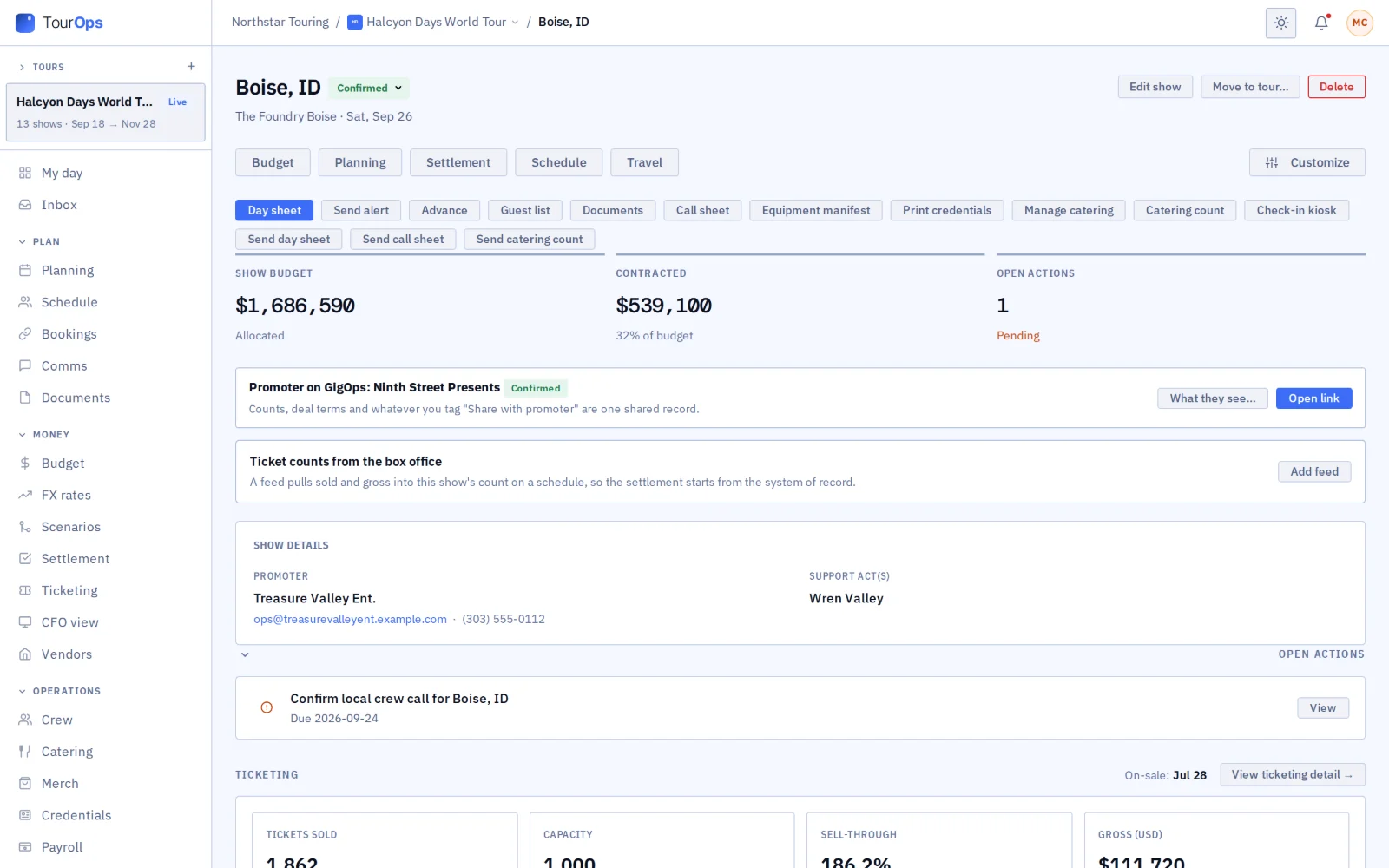
The day sheet, made not typed
The day sheet is built from the schedule: the day’s times, the venue, the crew, travel, catering and the venue forecast when the show is close enough. Print it, email it to whoever needs it, and let the crew open it on their phones, where it works without signal.
A link for people with no login
Share a public run of show with anyone you send the link to, so the local crew, the venue and the promoter read the same times without an account. Alongside it, a gate page that turns any phone into a check-in point and a gear checkout station.
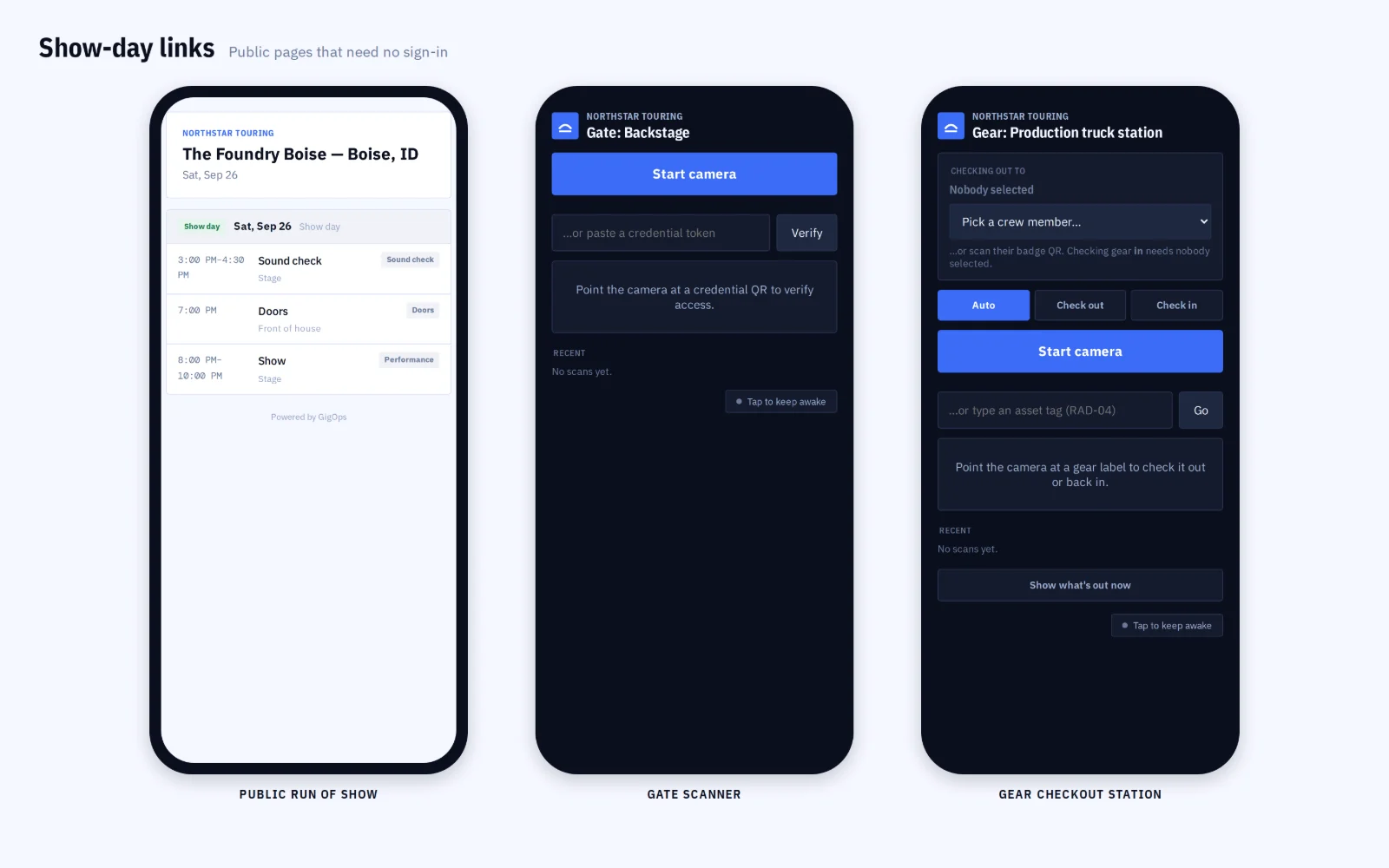
What it connects to
- It syncs to a phone calendar
- Crew can subscribe to their own schedule by iCal, so it sits in the calendar app they already look at.
- The call sheet
- The crew-facing version of the day, with who is called when, built from the same schedule.
- Alerts to everyone on a show
- Send one alert to everybody working a show when something changes enough to warrant it, rather than texting a list.
- A shows calendar for a promoter
- In PromoterOps, every show across markets on one calendar, with on-sale dates and the shape of the month.
- A group calendar for a venue
- A venue with several rooms sees them together, with holds, confirmed shows and dark days in one view.
- Drive times between shows
- The schedule knows how far apart the dates are, so a routing that cannot be driven is visible before it is booked.
- Read only by design
- The whole-tour Schedule is an overview; items are added and changed inside the show they belong to, which keeps one place for the truth.
Step by step in the help guide: the Schedule, a show, its run of show and the day sheet, share links and comms and alerts. What goes into it: Advancing.
Who it is for
Whose day it is.
TourOps
The run on one calendar, each show’s run of show, the day sheet that builds itself, and a public link for the people who have no login.
Explore TourOpsFestivalOps
Set times by stage and day, with catering and travel on the same calendar, and a public schedule the audience can read.
Explore FestivalOpsVenueOps
Every room on one calendar, with holds, confirmed shows and dark days, and the crew calls the house runs against them.
Explore VenueOpsPromoterOps
Every show across markets with its on-sale date, so the month is readable at a glance rather than reconstructed.
Explore PromoterOpsActionOps
The comp schedule: practice, inspection, heats and finals, with the broadcast windows that have to be hit.
Explore ActionOpsQuestions
What people ask about scheduling.
- Is the day sheet a document I build?
- No. It is made from the schedule each time it is opened, so it cannot be out of date the way a PDF built at midnight is. You print it, email it or let the crew open it on their phones, and it shows what the schedule says now.
- Do crew see the schedule?
- They see their own: their calls, their day sheet and their travel, in GigOps Crew or in a phone browser at /crew, which opens without signal and shows what it last loaded. They do not see everybody else’s.
- Can I send times to people without an account?
- Yes. A public run of show is a link you send to anyone, with no login. The venue, the local crew and the promoter read the same times you do, and the link stops working when you disable it.
- Where do the times come from?
- From the advance and the crew calls, which is why they are not typed twice. Load-in, soundcheck, doors, set and curfew are entered once and the run of show, the day sheet and the crew call all read them.
- Does it work for a festival or a comp?
- Yes. There the calendar covers days rather than shows, with set times by stage on a festival and the comp schedule with practice, inspection and heats on an ActionOps event.
- Can it go into my own calendar app?
- Yes, by iCal in both directions. There is no OAuth sync with Google Calendar or Outlook; the feed is the route.
Put the next run on one calendar.
Scheduling comes with every product. 7-day free trial. Company Users are $39 per user / month. View only seats are $0. Crew are always free.
Book a demo.
Tell us about the show you are planning, and we will walk you through the product that fits it, on your own dates. We reply within 48 hours.