Travel
Everyone lands.
Everyone has a bed.
Flights, trains and drives, hotels and rooming, rental cars, shuttles and per diem, held per person and per show. Add a flight by its number and GigOps watches its arrival time. Each crew member sees their own travel on their phone, and nobody else’s.
In TourOps, FestivalOps and ActionOps. No module to buy.

What it replaces
The rooming list was final
two hotels ago.
Travel is three spreadsheets and an inbox: a rooming list that somebody renames v4, a flight sheet that does not know about the delay, and a per diem tab nobody reconciles until the run is over.
The rooming list
Final, until it is not
A room change means a new version of the file, an email to the hotel and a text to the person whose roommate just changed. Here the change is in one place and the export is made from it when you need it.
The flight sheet
Right when it was typed
A sheet of flight numbers and times tells you nothing on the morning the flight slips. Add the flight by its number and GigOps checks the arrival time itself.
The per diem tab
Worked out twice, at the end
Per diem gets counted up after the run, from the schedule, by hand, and the catering days get missed. Here the rates and dates sit on the person and the net figure is there as you go.

How it works
Booked, in the room, and on the phone.
Add the flight, not the flight times
Type the flight number and the date and GigOps fills in the airports and the times, and keeps watching the arrival time after that. A flight with several stops comes back as its legs. Paste a confirmation email and it reads the flights out of it. Trains, drives and other ground legs go in the same way.
One hotel, everybody in a room
Set up the hotel for the show, then put crew in it: room type, roommate and the nights each person is there. Change one person without rebuilding the list. Export the rooming list as a CSV or a PDF when the hotel asks for it. For a comp, hold room blocks for the whole event.
On their phone, their own only
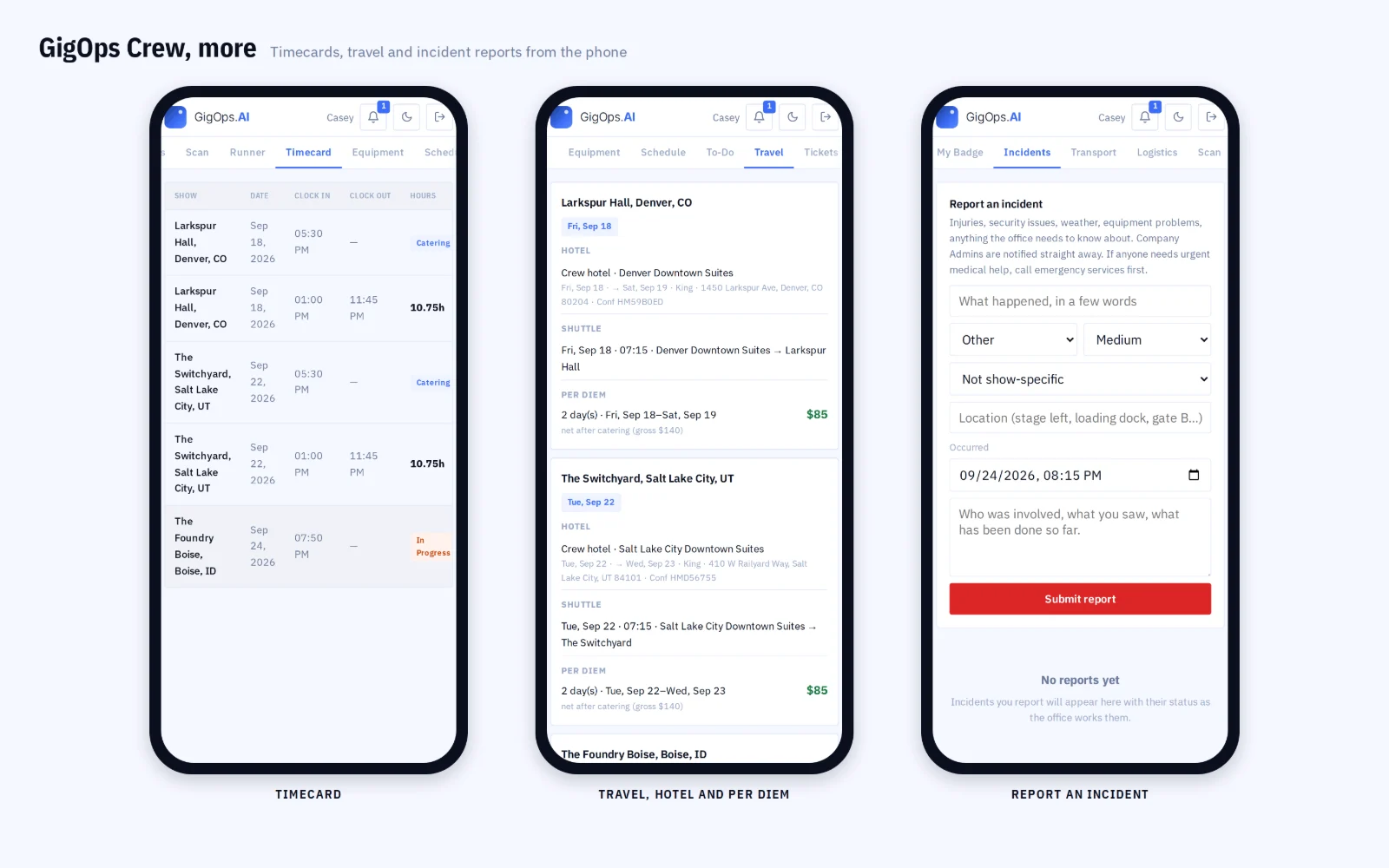
Every crew member sees their flights, their hotel and room, their car and shuttle, and their per diem, in GigOps Crew and on the day sheet. They see their own and nobody else’s. The day briefing puts the day’s flights and their live status in front of whoever is running the day.
What it connects to
- Per diem that works itself out
- Rates and dates sit on the person, catering comes off the gross, and the net is there as you go. Push the total to the budget as a line.
- Airport pickups from the flights
- GigOps groups arrivals into vans by landing time and terminal, so the shuttle is planned from the flights rather than from a list somebody typed.
- When a flight slips
- A delayed or cancelled flight is seen on the day briefing, and the airport van it belongs to can be rebuilt around the new time.
- Rental cars and shuttles
- Both sit on the person for the show, alongside the flight and the hotel, so one row says how somebody gets there and gets around.
- Travel proposals from teams
- In ActionOps a team can propose its own travel and you accept it into the event roster instead of retyping it.
- It costs what it costs
- Hotel cost and per diem roll into the show and into the budget, so travel is in the number before the run rather than after it.
- Who can see it
- Company Admins and Manager, Ops and Coordinator seats edit travel. Finance, Legal and View only read it. Crew see their own.
Step by step in the help guide: travel, hotels and per diem, shuttles and airport pickups, crew and the budget. The crew’s side is in GigOps Crew.
Who it is for
Who it gets there.
TourOps
Travel per show down the run: who flies, who drives, which hotel, which room and what the per diem comes to, with the hotel cost in the budget.
Explore TourOpsFestivalOps
Travel for the whole event rather than one day: inbound and outbound legs for crew and acts, hotels and the shuttles that meet them.
Explore FestivalOpsActionOps
Athletes, teams and officials: hotel blocks for the event, travel a team proposes and you accept, and the roster for the whole comp in one place.
Explore ActionOpsQuestions
What people ask about travel.
- Does GigOps book the flights and hotels?
- No. You book the way you book today, then GigOps holds what was booked and keeps it straight: the legs, the rooms, the cars, the shuttles and the per diem, per person and per show, and puts each person’s own travel on their phone.
- How does it know a flight is late?
- Add the flight by its number and GigOps looks it up and checks the arrival time, so the day briefing shows the live status rather than the time somebody typed. An airport van built from those arrivals can be rebuilt around the new time.
- Can I get a rooming list out of it?
- Yes. Put the crew in the hotel with their room type, roommate and nights, and export the list as a CSV or a PDF for the hotel. Change one person’s room and the next export has it; there is no second version of the file.
- How is per diem worked out?
- From the rates and the dates on each person. Catering comes off the gross to give the net, and you can change one person’s rates or dates without touching anyone else. The total pushes into the budget as a line.
- Do crew see each other’s travel?
- No. A crew member sees their own flights, hotel and room, car, shuttle and per diem in GigOps Crew and on the day sheet, and nothing belonging to anyone else. Crew seats are free in every product.
- Does it work for a festival or a comp rather than a tour?
- Yes. There the roster covers the whole event rather than one show day: inbound and outbound legs, hotel blocks, and in ActionOps travel a team proposes that you accept into the event roster.
Get the next run there in one place.
Travel comes with TourOps, FestivalOps and ActionOps. 7-day free trial. Company Users are $39 per user / month. View only seats are $0. Crew are always free.
Book a demo.
Tell us about the show you are planning, and we will walk you through the product that fits it, on your own dates. We reply within 48 hours.