Finance
Know the number
before the bus leaves.
Budget, settlement, payroll and the P&L all read the same shows, the same crew and the same ticket counts as the rest of GigOps. A line approved on Tuesday is in the CFO view on Tuesday, and a show that moves takes its costs with it.
In TourOps, FestivalOps, VenueOps, PromoterOps and ActionOps. No module to buy.

What it replaces
The workbook was right
until somebody opened it.
Most touring finance runs on a workbook that one person owns, a folder of settlement PDFs and a payroll CSV typed up from a paper timesheet. None of the three knows what the other two did today.
The workbook
One file, one owner, one version
The budget lives on somebody’s laptop and the answer to what a show costs depends on who you ask and when they last saved. Here the lines are the record, with who changed what and when beside them.
The gap
Approved in a chat, spent anyway
An overage gets a thumbs up in a message and nothing in the budget changes. Here a line asks for approval, somebody approves or denies it, and the trail stays on the line.
The re-entry
Typed again for the accountant
Settlements come back as PDFs and somebody retypes them into the books. Approved budget lines and locked settlements can go to QuickBooks Online as bills and journal entries instead.
How it works
From the first line to the payroll run.
Every line, with the trail on it
Costs and income grouped into categories and sub-categories, each line carrying its cost type, its status and its account code. When a line goes over, it asks for approval instead of quietly going over: somebody approves or denies it and the trail stays on the line. Import your chart of accounts from a QuickBooks or Xero style file and GigOps can match the columns for you.
Settle the show, then lock it
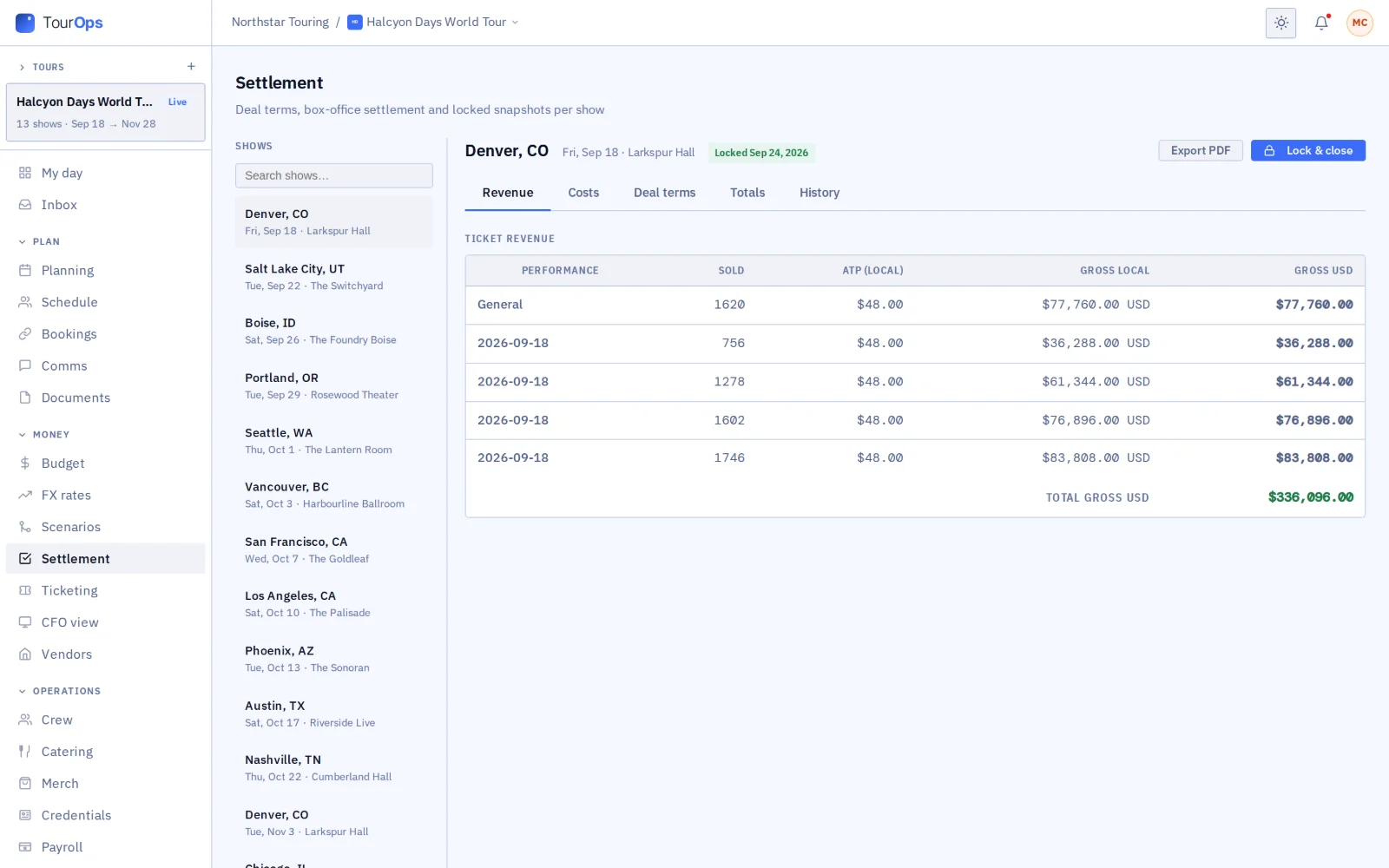
Set the deal terms, pull in the box office counts, enter the actual costs and read the split between artist and promoter on the Totals tab. Review before lock shows what is still open. Lock it and it becomes the official record; send it for signature, or send the deal terms out as a deal memo. When the other company is on GigOps too, you settle the same show together.
The P&L without asking anyone for it
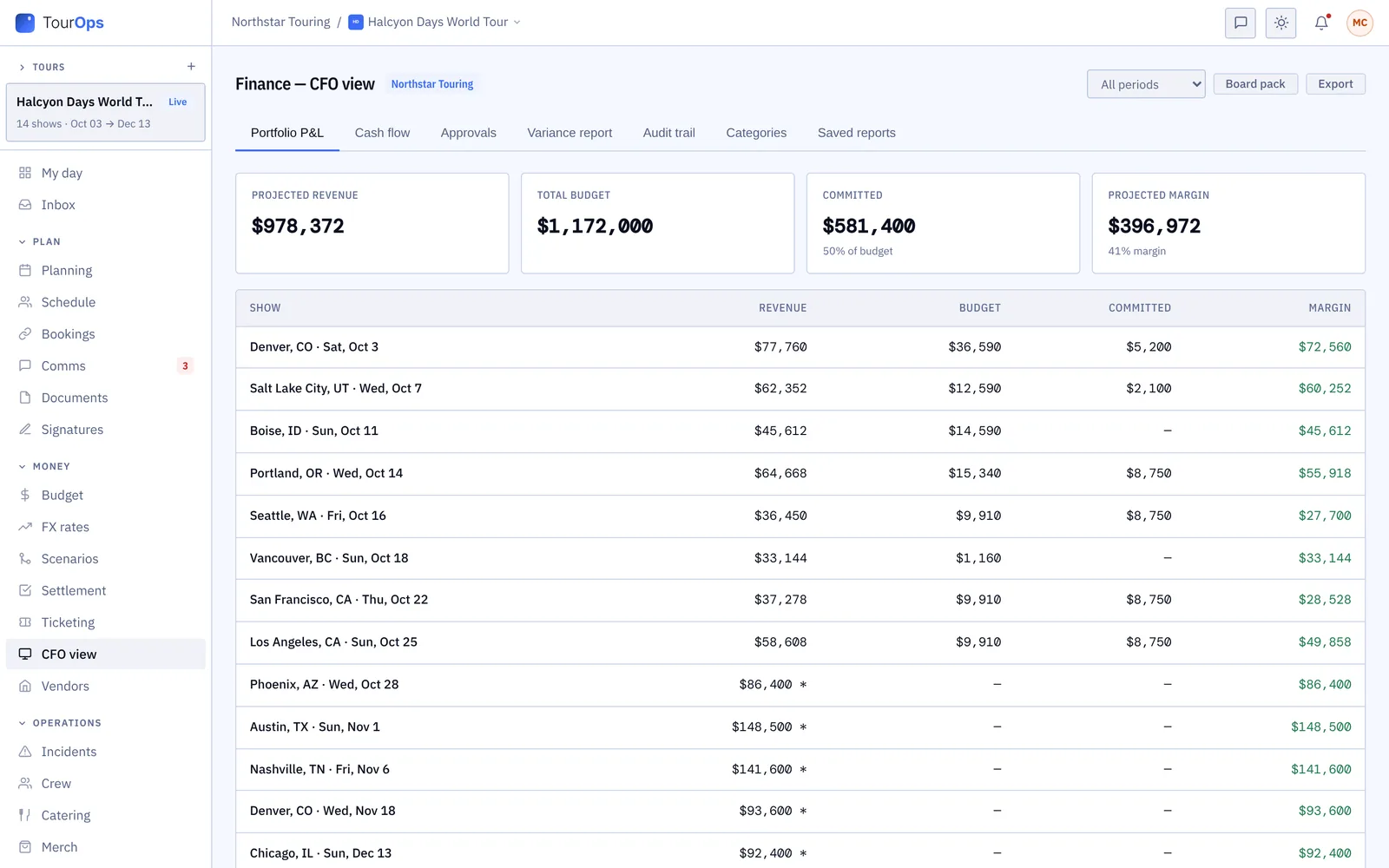
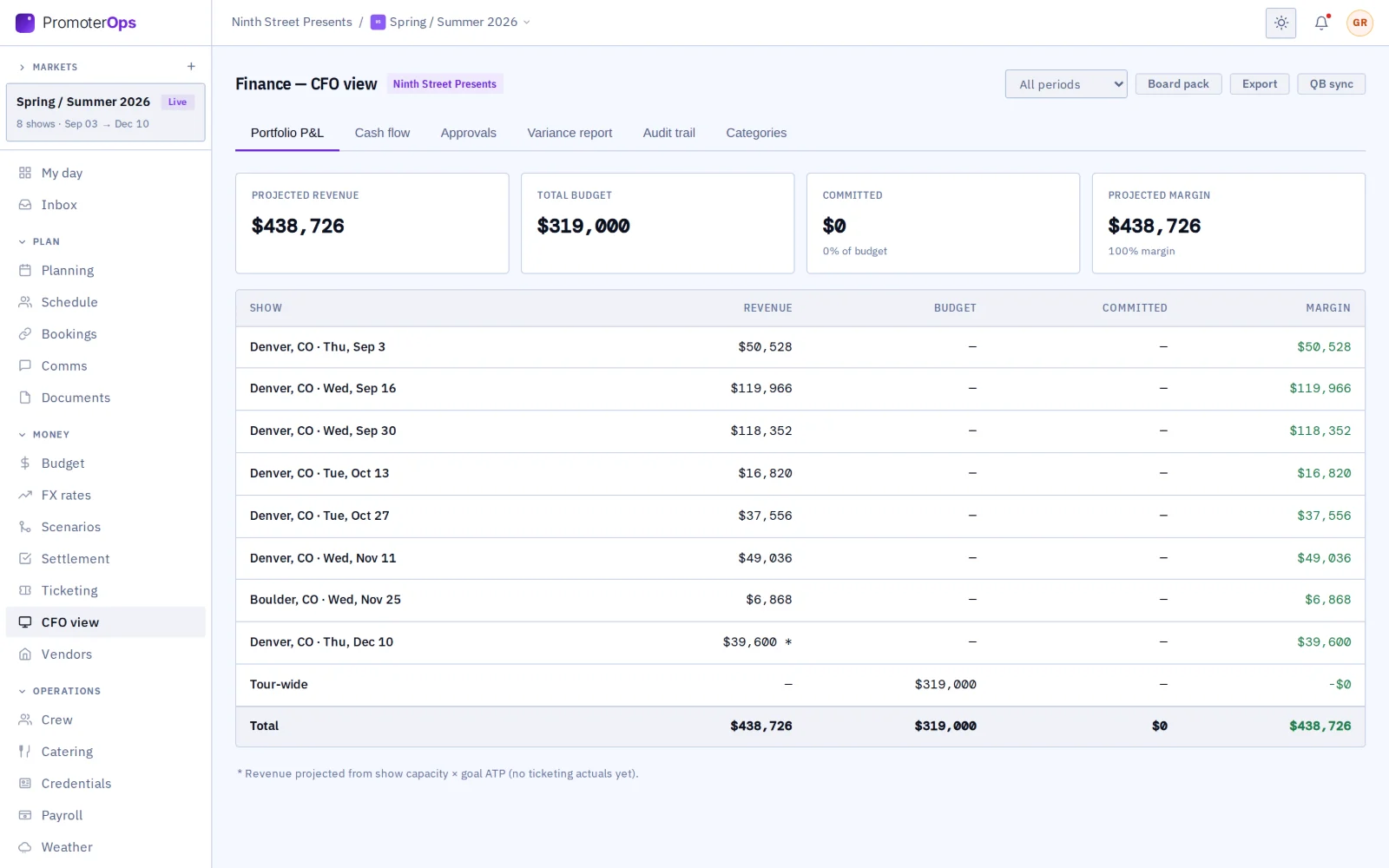
The CFO view rolls the budget, the ticket revenue and the approvals into profit and loss by show, committed spend by category and variance against plan. Look at a quarter or a year, work the approvals queue, build a report of your own and have it emailed on a schedule.
Pay the crew from the clock
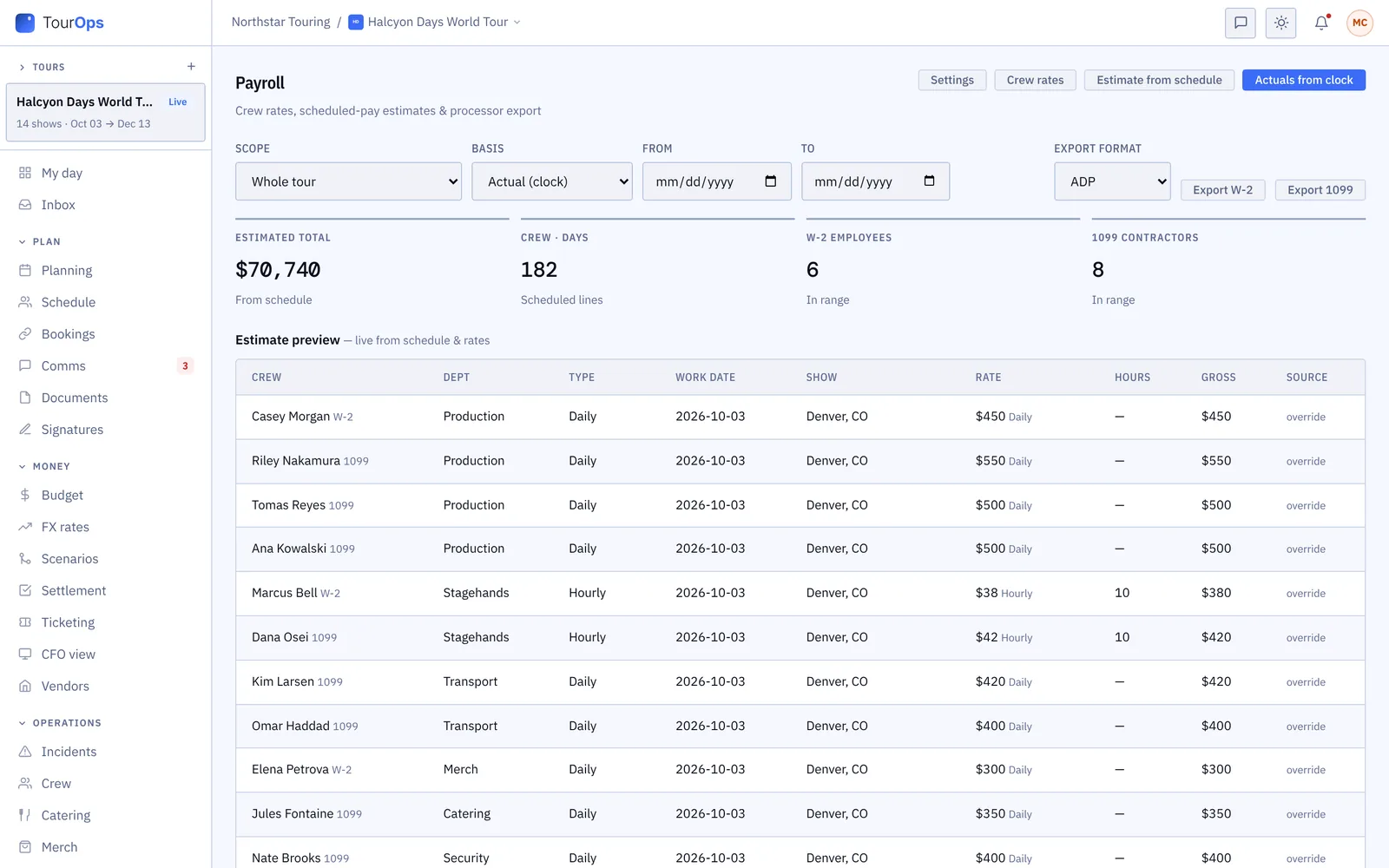
Rates and the schedule give you an estimate before the run; clock-in and clock-out times give you the actual. Overtime, meal premiums and union premiums are worked out with it. Approve the entries and export a CSV for your payroll processor. Rates can differ for one tour or one show.
What it connects to
- Scenarios
- Try a what-if on the budget category by category and save the versions worth keeping. The real budget does not move until you want it to.
- FX rates
- Budget, counts and settlements convert between currencies on the rate you choose: the budget rate, today’s rate or your own override.
- Counts feed the settlement
- Ticket counts come in from the box office and land in the settlement, so the split is worked out on the numbers already in the system.
- Signed and sealed
- A settlement or a deal memo goes out through GigOps Sign and comes back sealed, with a QR code anyone can check.
- Runner and crew expenses
- An approved runner expense can be pushed to the budget as a line, with its receipt attached.
- QuickBooks Online
- Approved budget lines go across as bills and locked settlements as journal entries, once a Company Admin connects the company’s own QuickBooks and maps its account codes.
- Export anything
- Budget, settlement, payroll and the CFO view all export, and a saved report can email itself on a schedule.
More on settling a show with the other company on it: How it connects. Step by step in the help guide: budget, settlement, the CFO view, payroll, scenarios and FX rates.
Who it is for
The same money, from each side.
TourOps
Budget the run, settle each show against its counts and costs, and pay the crew from their clocked hours. Per diem and runner expenses push into the budget as lines.
Explore TourOpsFestivalOps
A P&L by day for the whole festival: the bar and the vendor village against the artist fees, production and staffing, with approvals on every overage.
Explore FestivalOpsVenueOps
Settlement defaults the house uses every time, so each show settles on the same terms and the same cost lines instead of a fresh argument.
Explore VenueOpsPromoterOps
Budget a show against the pace its counts are running at, settle it with the tour, and see the season roll up in the CFO view.
Explore PromoterOpsActionOps
An event P&L across the comp, with prize money worked out by place, recorded as approved or paid and sent to payroll as a draft.
Explore ActionOpsQuestions
What people ask about finance.
- Does GigOps connect to my accounting system?
- There is a QuickBooks Online sync: approved budget lines go across as bills and locked settlements as journal entries. A Company Admin connects the company’s own QuickBooks and maps its account codes first. There is no Xero connection; a chart of accounts in a QuickBooks or Xero style file can be imported.
- Where do the ticket numbers in a settlement come from?
- From the counts already in GigOps. A venue or promoter on GigOps reports them on the booking, a count feed fills them in, or a box office wrap is dropped in and read. The settlement works the split from those, so nobody retypes a number off a PDF.
- Can I stop a budget going over without anyone noticing?
- That is what the approval trail is for. A line that needs more than it has asks for approval, a Company Admin, Tour Manager or Finance seat approves or denies it, and the request and the answer stay on the line. The CFO view lists everything waiting.
- Who can see the money?
- Owner, Company Admin, Tour Manager, Finance and Legal seats work on budget, settlement and the CFO view, and View only reads them. Ops and Coordinator seats see no budget lines unless a Company Admin gives them access. Payroll is narrower again.
- Does payroll handle overtime and union rules?
- Yes. Overtime, meal premiums and union premiums are worked out from the clocked hours, and overtime can follow state rules or different rules at each venue. GigOps produces the numbers and a CSV for your processor; it does not move money.
- Can I model a change without wrecking the budget?
- Open Scenarios, change a category and see the margin impact, then save the version if it is worth keeping. The real budget is untouched until you decide to act on it.
Put the next run on one set of numbers.
Finance comes with every product. 7-day free trial. Company Users are $39 per user / month. View only seats are $0. Crew are always free.
Book a demo.
Tell us about the show you are planning, and we will walk you through the product that fits it, on your own dates. We reply within 48 hours.