Reporting
Ask once.
Get the same answer.
Reports run on the data already in GigOps: the budget, the settlements, the counts, the payroll and the travel. Run one, download it, or save it with its filters and have it email itself every week. Debriefs ask the people who were there what the numbers do not say.
In TourOps, FestivalOps, VenueOps, PromoterOps and ActionOps. No module to buy.

What it replaces
Four people, four answers,
one question.
Reporting on a run usually means somebody exporting three things and joining them in a spreadsheet on a Sunday. By the time it is circulated it is a week old, and the next version is built from scratch.
The Sunday export
Rebuilt from nothing each time
The report is assembled by hand from whatever was exported that week, so it is only as current as the last export and nobody can reproduce last month’s. Save it once with its filters and it runs itself and arrives by email.
The joined spreadsheet
Numbers that have drifted apart
Budget in one file, settlements in another, counts in a third, and three different ideas of what a show cost. These run on the same records the rest of the platform works on, so there is one answer.
The thing nobody asked
What the numbers do not say
The P&L cannot tell you the load-in was a mess or the catering was cold. A debrief goes to the people who worked the show, and their answers come back per show and per tour.

How it works
Run it, schedule it, then ask the room.
Pick it, run it, take it away
Tour P&L, settlement summary, ticket counts and pace, budget drift day by day, settlement against budget line by line, and the travel footprint per traveller. Pick the report, the tour and the dates and run it: the totals come first, then the rows. Download the CSV, or save it with its filters so it emails itself every week or every month.
The portfolio, not one show
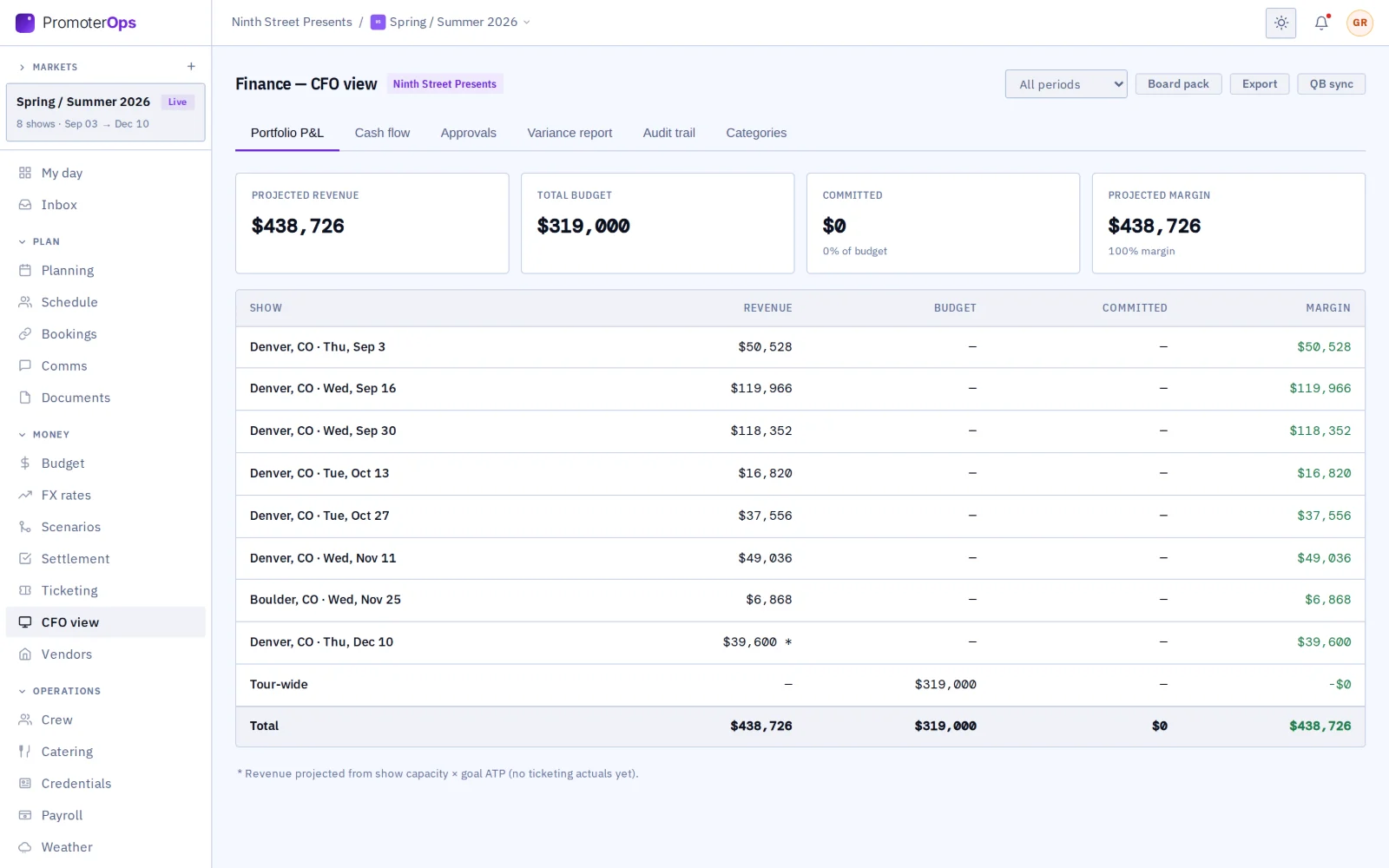
The CFO view rolls it up: profit and loss by show, committed spend by category, cash flow and the variance against plan, for a quarter or a year. Build a report of your own by picking a source, its fields, its filters and how it groups, and keep it beside the standard ones.
Pace, while there is still time to act
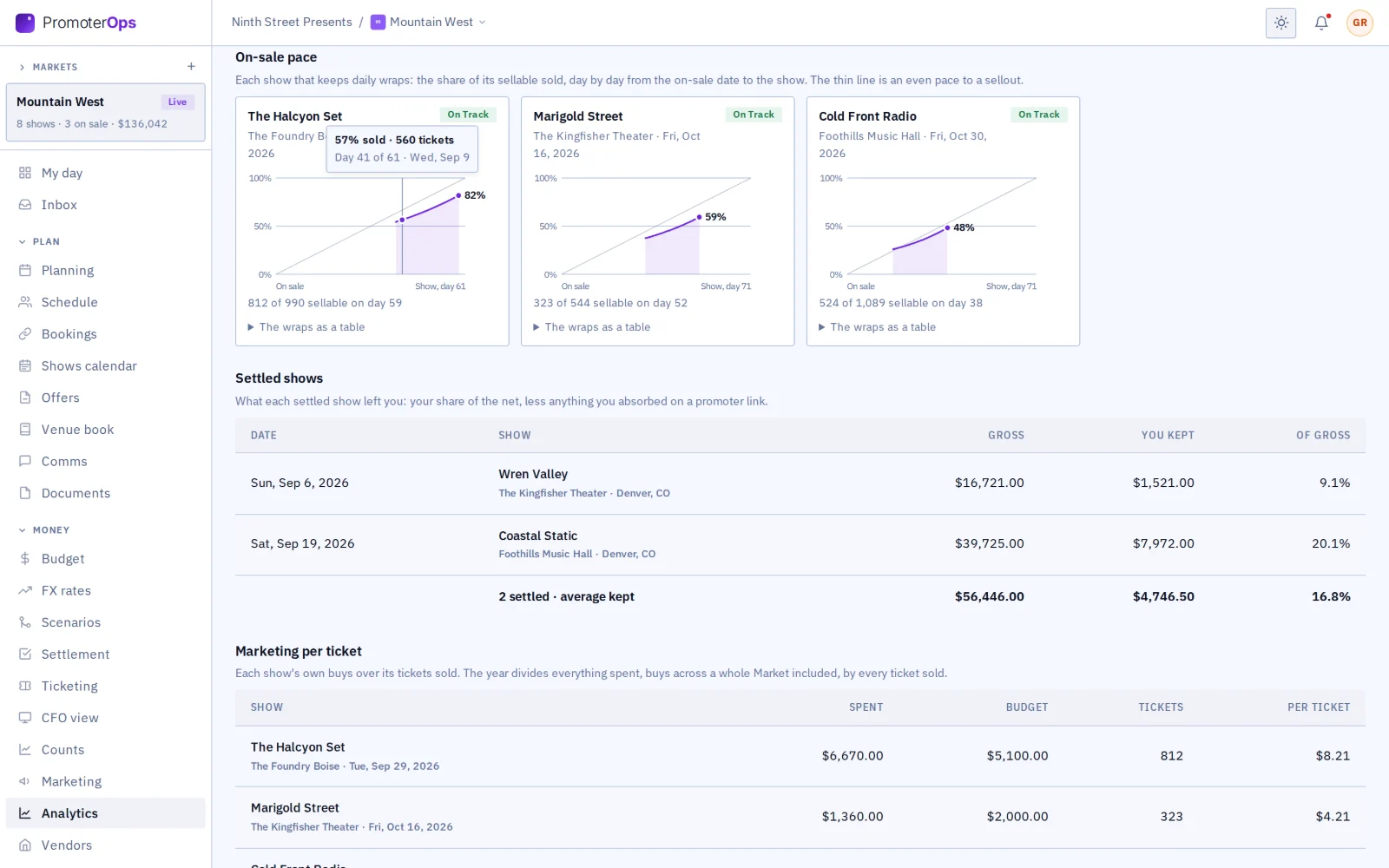
Counts against the pace a show needs, by channel and by day, so a show that is behind is visible while something can still be done about it rather than in the settlement afterwards.
What it connects to
- Debriefs
- Build a short form of ratings, yes or no, choices and a few words, and send it after a show to the Company Users and the crew who worked it.
- It can send itself
- Set a debrief to go out by itself one to fourteen days after every show on a tour, to the crew who worked it and anyone else you name.
- Answers that add up
- Ratings come back with their average and the spread, per show or across a whole tour, so a bad night shows as a bad night rather than an anecdote.
- Crew answer on their phone
- Crew get it in GigOps Crew on the To-Do tab. Anyone a notification cannot reach gets an email with a link instead.
- Budget drift
- A snapshot taken every day shows how the budget and what is committed against it moved. The history starts the first day the snapshot ran.
- Settlement against budget
- Every cost line of every locked settlement, what it was budgeted at against what it settled for, largest difference first.
- You see what your access covers
- The money reports follow the money modules: a seat that cannot see Budget or Settlement does not get the P&L either.
Step by step in the help guide: running a report, debriefs, the CFO view and the report builder, budget and settlement. Deeper on the money itself: Finance.
Who it is for
What each product reports on.
TourOps
P&L down the run, settlement against budget line by line, the travel footprint per traveller, and a debrief after every show.
Explore TourOpsFestivalOps
A P&L by day across the festival, counts and pace per day, and a debrief that asks the crew who worked the grounds how it went.
Explore FestivalOpsVenueOps
The house’s own numbers across every show it took, and the promoter book behind them.
Explore VenueOpsPromoterOps
Pace against what a show needs while it is still on sale, marketing spend against the budget, and the season rolled up in the CFO view.
Explore PromoterOpsActionOps
An event P&L across the comp, with prize money by place and the payroll that follows it.
Explore ActionOpsQuestions
What people ask about reporting.
- Which reports are built in?
- Tour P&L, settlement summary, ticket counts and pace, budget drift, settlement against budget, and the travel footprint per traveller. Beside them the CFO view holds the portfolio P&L and variance, and a report builder for one of your own.
- Can a report email itself?
- Yes. Save a report with its filters and schedule it, and it arrives weekly or monthly without anybody running it. The saved reports live in the CFO view alongside the ones you build yourself.
- Can I get the numbers into my own spreadsheet?
- Every report downloads as a CSV, and budget, settlement, payroll and the CFO view export as well. Approved budget lines and locked settlements can also go to QuickBooks Online as bills and journal entries once a Company Admin connects it.
- What is budget drift?
- How the budget and the spend committed against it moved day by day, from a snapshot GigOps takes every day. It can only show from the first day the snapshot ran, so there is nothing from before that.
- How do debriefs work?
- Build a form of up to thirty questions, ratings, yes or no, choices and text, and send it after a show to the Company Users and the crew who worked it. It can also send itself one to fourteen days after every show on a tour.
- Why is a report missing from my list?
- Because your access does not cover what it reports on. Ops and Coordinator seats do not see Budget or Settlement by default, so the P&L, budget drift and settlement against budget stay off their list until a Company Admin changes it.
Report on the next run without the spreadsheet.
Reporting comes with every product. 7-day free trial. Company Users are $39 per user / month. View only seats are $0. Crew are always free.
Book a demo.
Tell us about the show you are planning, and we will walk you through the product that fits it, on your own dates. We reply within 48 hours.