Weather
The day’s forecast.
The date’s record.
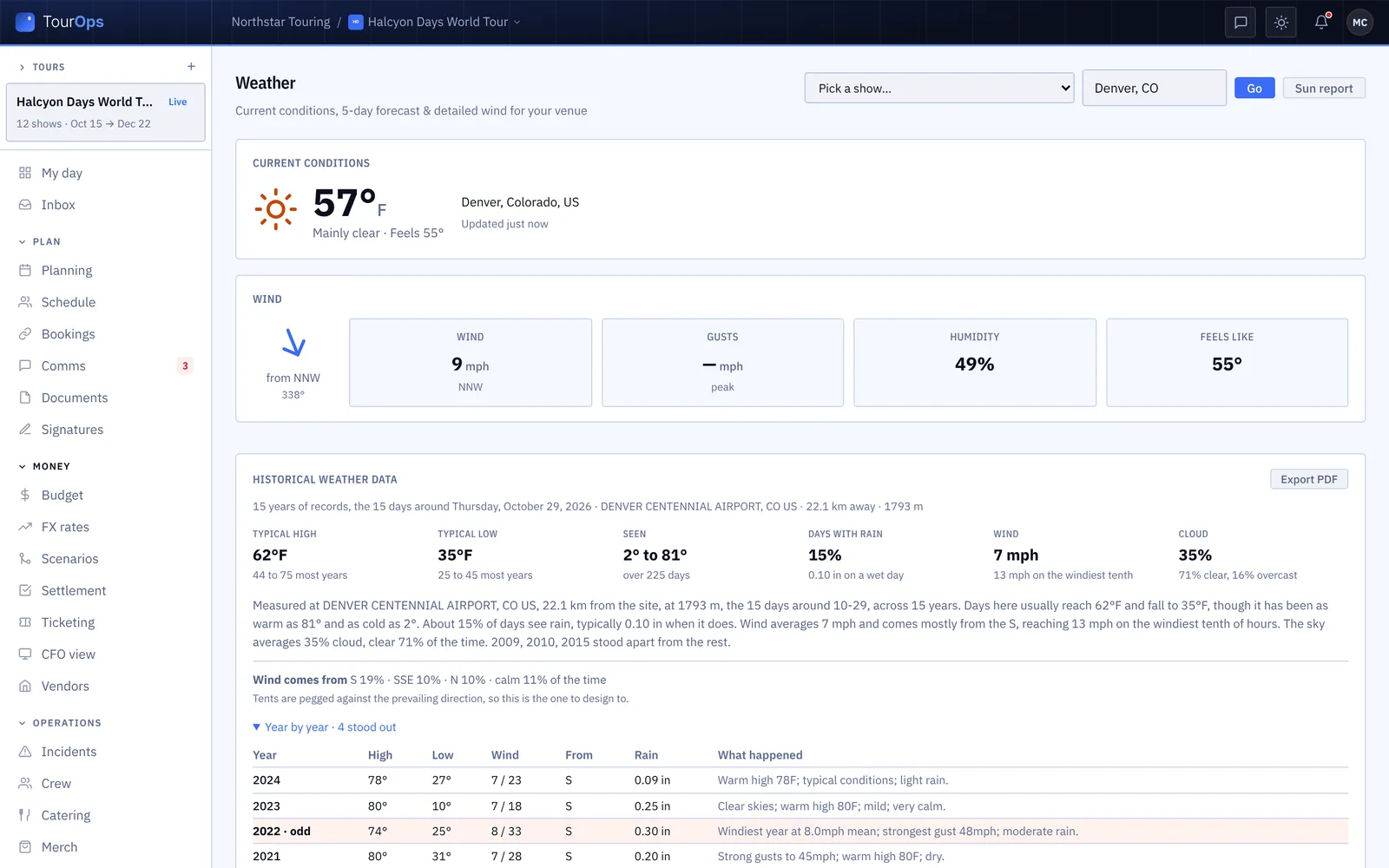
Current conditions and wind at the venue, a five day forecast with the show’s own day marked, and fifteen years of what that date has actually done at that place. Connect a weather station on site and set the lines that should wake somebody up.
In every product. No module to buy.

What it replaces
A phone app tells you
about a city.
Everybody has a weather app. None of them knows your date, your venue, or that the thing you are actually deciding is whether the tent goes up and which way it faces.
The city forecast
Right place, wrong question
A forecast for a city centre says nothing about a field twenty minutes out, and nothing at all about the date you are designing for, which is often months away.
The guess
What does it usually do in October?
Somebody asks, somebody guesses, and the tent gets pegged against the wrong prevailing direction. Fifteen years of records for the days around that date answer it instead: typical high and low, days with rain, and where the wind comes from.
The call nobody made
Nobody was watching at 3am
The gust that matters arrives while everyone is asleep. A station on site with a line set on it tells whoever runs the day, once, as it crosses.

How it works
The day, the date and the light.
The venue, not the city
Pick the show and GigOps uses the venue’s own address to find the conditions: temperature, what it feels like, humidity, and wind with its gusts and the direction it comes from. Type a ZIP or a town to look somewhere else without losing the show.
Fifteen years of that date
Before there is a forecast there is a record. The days around your date, fifteen years deep, from the nearest station: the typical high and low, how far it has gone either way, how often it rains and how much, the average and peak wind, and the share of the time the wind comes from each direction. That last one is the one you design the tents against.
Five days, and the light you have
A five day forecast with high, low, conditions, chance of rain and wind, and the show’s own day marked. Beside it the sun and the moon for any time you pick: golden hour, solar noon, sunset, how much daylight you have against yesterday, and the moon phase.
What it connects to
- Your own station on site
- Connect an Ambient Weather station for a venue or an event and the panel shows live wind, gusts, temperature, rain rate and lightning, refreshed every couple of minutes.
- Lines that wake somebody
- Set a line on gusts, sustained wind, rain rate, lightning within a distance or temperature, and everyone who runs the day is told once as it crosses, and again after it clears and crosses back.
- A station that goes quiet
- A reading more than half an hour old shows its age, so a station that has stopped reporting looks like one rather than like calm weather.
- On the day sheet
- The venue forecast prints on the day sheet when the show is within about a week, and shows on the show page inside five days.
- On My day
- Your own local weather is on My day, from your location or a ZIP you save.
- A hold line on a course
- In ActionOps a course can carry its own hold above a wind speed, and a gust over it alerts the same way.
- Export the history
- The historical record exports as a PDF, for the people who want the reasoning rather than the answer.
Step by step in the help guide: the Weather page and on-site stations, incidents, the day sheet and structures. Site plans are drawn in GigOps CAD.
Who it is for
Who needs to know.
FestivalOps
An outdoor site lives and dies on wind. The prevailing direction over fifteen years decides which way the tents face, and a station on site decides whether they stay up.
Explore FestivalOpsTourOps
The venue forecast on the show page and printed on the day sheet, so the crew arriving know what they are loading in through.
Explore TourOpsActionOps
A course can hold above a wind speed, and a gust over it tells whoever runs the day. The light matters too when the comp runs to a broadcast window.
Explore ActionOpsVenueOps
For the outdoor rooms, the terrace and the lot: what the date usually does, and what it is doing now.
Explore VenueOpsQuestions
What people ask about weather.
- Is this just a weather app?
- The forecast part is a forecast. The part that is worth having is the record: fifteen years of what the days around your date have actually done at that place, including the share of the time the wind came from each direction, which is what you peg a tent against.
- Can I use my own weather station?
- Yes. An Owner or Company Admin connects an Ambient Weather station to a venue or an event with a key from their own Ambient Weather account. The panel then shows live wind, gusts, temperature, rain rate and lightning, refreshed every couple of minutes.
- How do weather alerts work?
- You set the lines that matter: gusts, sustained wind, rain rate, lightning within a distance, or temperature at or over a figure. When a reading crosses one, everyone who runs the day is notified once. It clears when the readings drop back, and the next crossing notifies again.
- Does the weather show anywhere but the Weather page?
- Yes. My day shows your own local weather, a show’s page shows the venue forecast inside five days, and the day sheet prints it when the show is about a week out, so the crew reading the sheet see it without going looking.
- What if the venue has no address yet?
- Then there is nothing to look up and GigOps says so. Add the venue details to the show, or type a ZIP or a town into the box to look at a place directly while you sort it out.
- Where does it come from?
- The forecast comes from an outside weather service and the historical record from national surface observation data, worked out from the station nearest the site. The page says which, and the history is labelled as what happened rather than as a prediction.
Know what the date does before you design for it.
Weather comes with every product. 7-day free trial. Company Users are $39 per user / month. View only seats are $0. Crew are always free.
Book a demo.
Tell us about the show you are planning, and we will walk you through the product that fits it, on your own dates. We reply within 48 hours.