Logistics
It shipped.
It came back.
Shipments in and out with the carrier’s own tracking on them, gear with a QR label on the case that gets checked out to a person and back in, and a list of who is holding what. Three questions that cost real money when nobody can answer them.
In TourOps, FestivalOps and ActionOps. No module to buy.

What it replaces
Four carrier websites
and a radio call.
Freight and gear are tracked in the places they came from: one carrier’s site, another’s email, a case list in a binder, and a radio call to find out who took the spare radio.
The tracking number
In an email somebody else got
Every carrier has its own site and its own email, so the answer to where the backline is depends on who you ask. Put the tracking number on the shipment and the status comes back on its own.
The case
Last seen on the truck
Gear goes out and does not come back, and nobody finds out until the next load-in. A QR label on the case, checked out to a person, makes that somebody’s name rather than a mystery.
The radio
Signed out to nobody
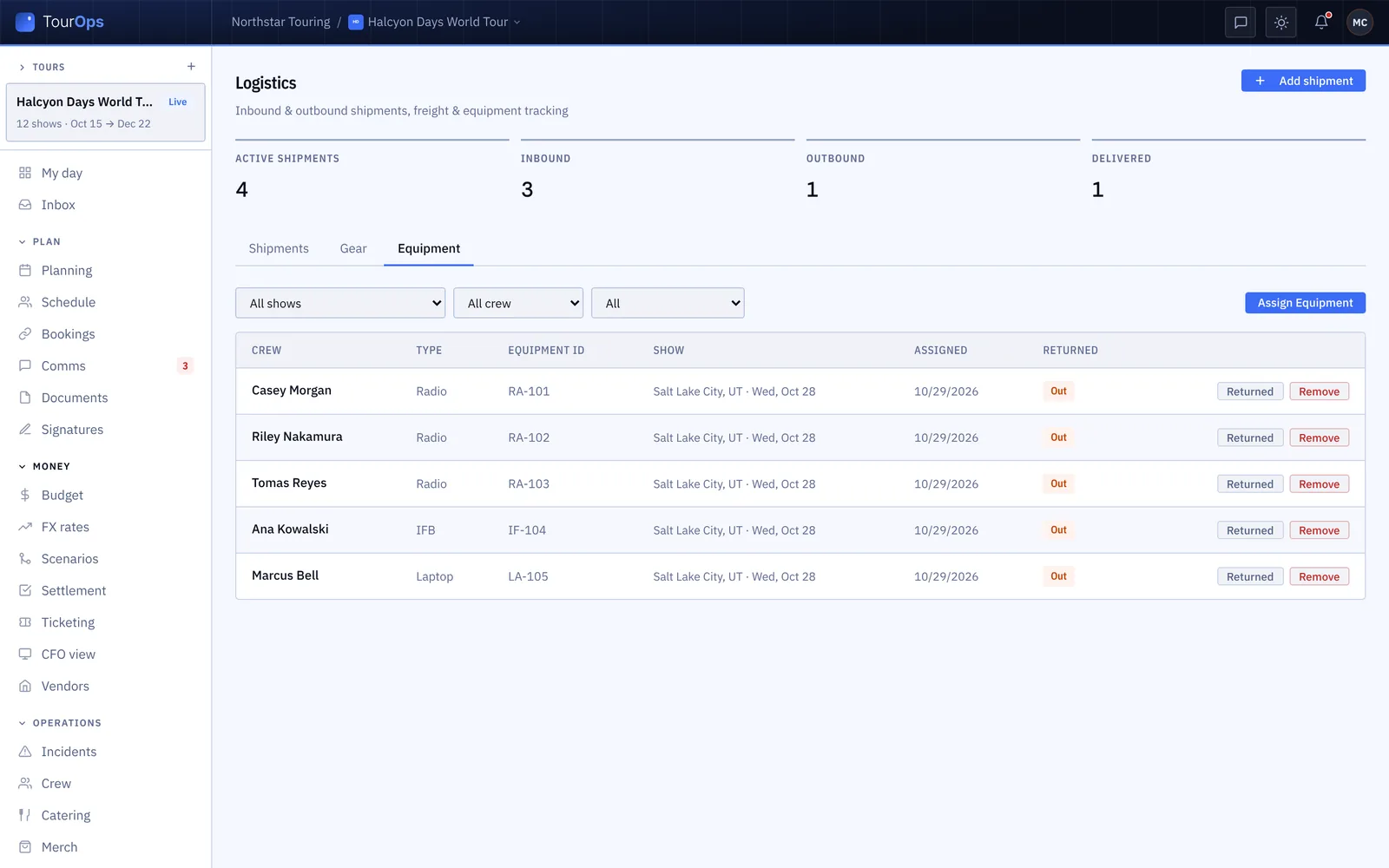
Radios, IFBs and laptops get handed out at the start of the day and chased at the end of it. The equipment list says who has what, from which show, and whether it came back.

How it works
Out the door, and back again.
Shipments that track themselves
Log what is going in or out against the show it belongs to, with its carrier and tracking number, and the status updates itself as the carrier moves it. In transit, out for delivery, delivered, or an exception you want to know about before load-in rather than during it.
A label on every case
Tag gear with a QR label you print from GigOps, sort it into categories, and check it out to a person and back in with a scan. The list says what is tracked, what is out, what is on the shelf and what is overdue, with a name and a time against everything that is out.
Who is holding what
Radios, IFBs, laptops and keys handed out for a show sit against the crew member who took them, with the show and the day. At the end of the run the list of what has not come back is a list of names, not a question.
What it connects to
- A station on a tablet
- Set up a gear scan station at the door and crew scan their own gear out and in, without anyone standing there with a clipboard.
- Scan from a phone
- Gear can be scanned in and out from a phone as well as a station, so the case that goes out of the back door is still logged.
- Crew can log a shipment
- Some crew can add a shipment from GigOps Crew, so the thing that was couriered from the road is on the list before anyone gets back.
- Print the labels
- QR labels print from GigOps in a sheet, so tagging a new flight case takes a minute rather than an order.
- It belongs to a show
- Shipments and equipment sit against the show they are for, so the day sheet and the settlement know what was moving.
- Field gear in CoralOps
- The same module, named for what it holds there, for a field programme rather than a show.
- Who can see it
- Owners, Company Admins, Managers, Ops and Coordinators edit logistics. Finance, Legal and View only seats do not see it.
Step by step in the help guide: shipments, gear and equipment, crew and the budget. Moving people rather than things: Transport and runners.
Who it is for
What is moving.
TourOps
Backline and merch freight down the run, the cases that go out at every load-out, and the radios handed to a local crew who leave at midnight.
Explore TourOpsFestivalOps
Everything arriving on site in build week, tracked against the day it is needed, and the gear handed out across a site too big to walk.
Explore FestivalOpsActionOps
Course equipment, timing gear and broadcast kit moving between venues, with a name against every case.
Explore ActionOpsQuestions
What people ask about logistics.
- Does it track shipments on its own?
- Yes, when the shipment has a carrier and a tracking number. GigOps registers it with the carrier and the status updates itself as it moves, so nobody is refreshing four carrier websites to find out where the backline is.
- How does gear check-out work?
- Print a QR label, put it on the case, and scan it out to a person and back in. The list then says what is tracked, what is out, what is on the shelf and what is overdue, with a name and a time against everything that is out.
- Can crew scan gear themselves?
- Yes. Set up a gear scan station on a tablet at the door and crew scan their own gear in and out, or scan from a phone. Nobody has to stand there with a clipboard for it to be recorded.
- What is the difference between gear and equipment?
- Gear is tracked by tag: a case, a camera, a radio pack with a label on it, checked out and back in. Equipment is a simpler log of what a crew member was handed for a show, by type and ID, and whether it came back.
- Does it handle customs or carnets?
- No. GigOps records the shipment, its carrier and its status, and the documents for it attach to the show. The paperwork itself is done where you do it today.
- Who can see it?
- Owners, Company Admins, Managers, Ops and Coordinators edit logistics. Finance, Legal and View only seats do not see it at all. Some crew can log shipments from GigOps Crew.
Know where the gear is.
Logistics comes with TourOps, FestivalOps and ActionOps. 7-day free trial. Company Users are $39 per user / month. View only seats are $0. Crew are always free.
Book a demo.
Tell us about the show you are planning, and we will walk you through the product that fits it, on your own dates. We reply within 48 hours.