Incidents and permits
Write it down
while it is happening.
The health and safety log: injuries, security, weather holds, lost and found, ejections and equipment failures, each with a severity, a location, somebody handling it and how it was resolved. Crew report from their phones. Beside it, the register of every permit the event is standing on.
In every product. No module to buy.

What it replaces
It went in the radio log,
which nobody kept.
Incidents get handled well and recorded badly. The radio call is answered, the person is looked after, and six weeks later nobody can say what time it happened, who dealt with it or what was done.
The radio
Handled, then forgotten
What happened on the night lives in somebody’s memory and a notebook that went home with them. Logged here it has a time, a severity, a location and a name against it from the moment it starts.
The write-up
Reconstructed weeks later
The insurer or the authority asks months on, and the account gets rebuilt from recollection. The log holds what was recorded as it happened, and a write-up is made from it rather than from memory.
The permit
The one nobody filed
A deadline missed on one filing can stop a build. The register holds every permit, its authority, its filing date and the inspections that follow, and reminds the people who have to act.
How it works
Logged, handled, and on the record.
The log, with a severity on it
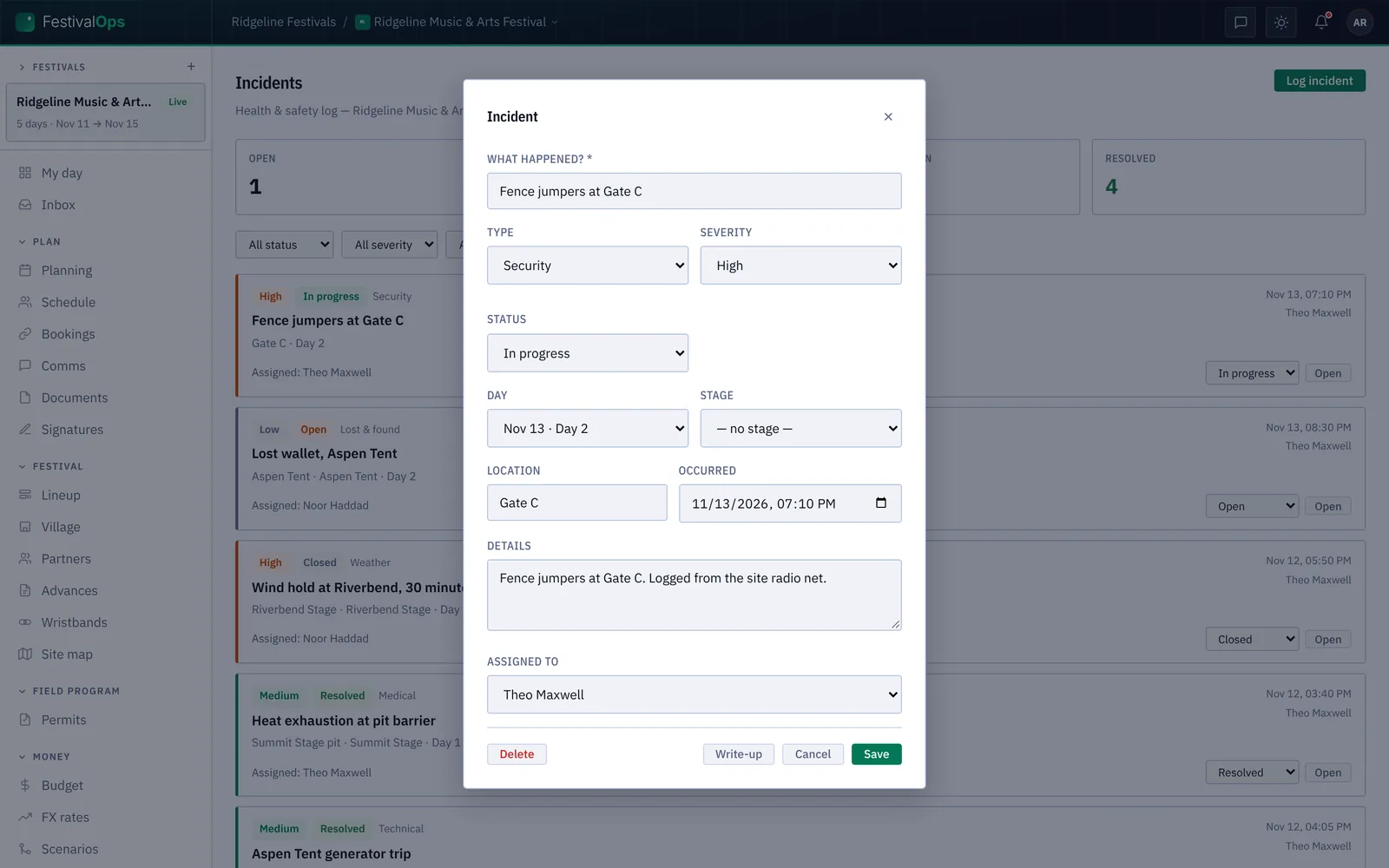
Medical, security, weather, lost and found, ejection, technical, fire or anything else, each with a severity from low to critical and a status you move as it is dealt with. Filter by any of them to find the night you are being asked about. The counts across the top are what is open, what is in progress and what is critical right now.
Enough detail to stand up later
What happened, the type and the severity, the day and the stage, the exact location and the time it occurred, the details, and who it is assigned to. When it is over, produce the write-up from what was recorded rather than from what anyone remembers.
Reported from the gate
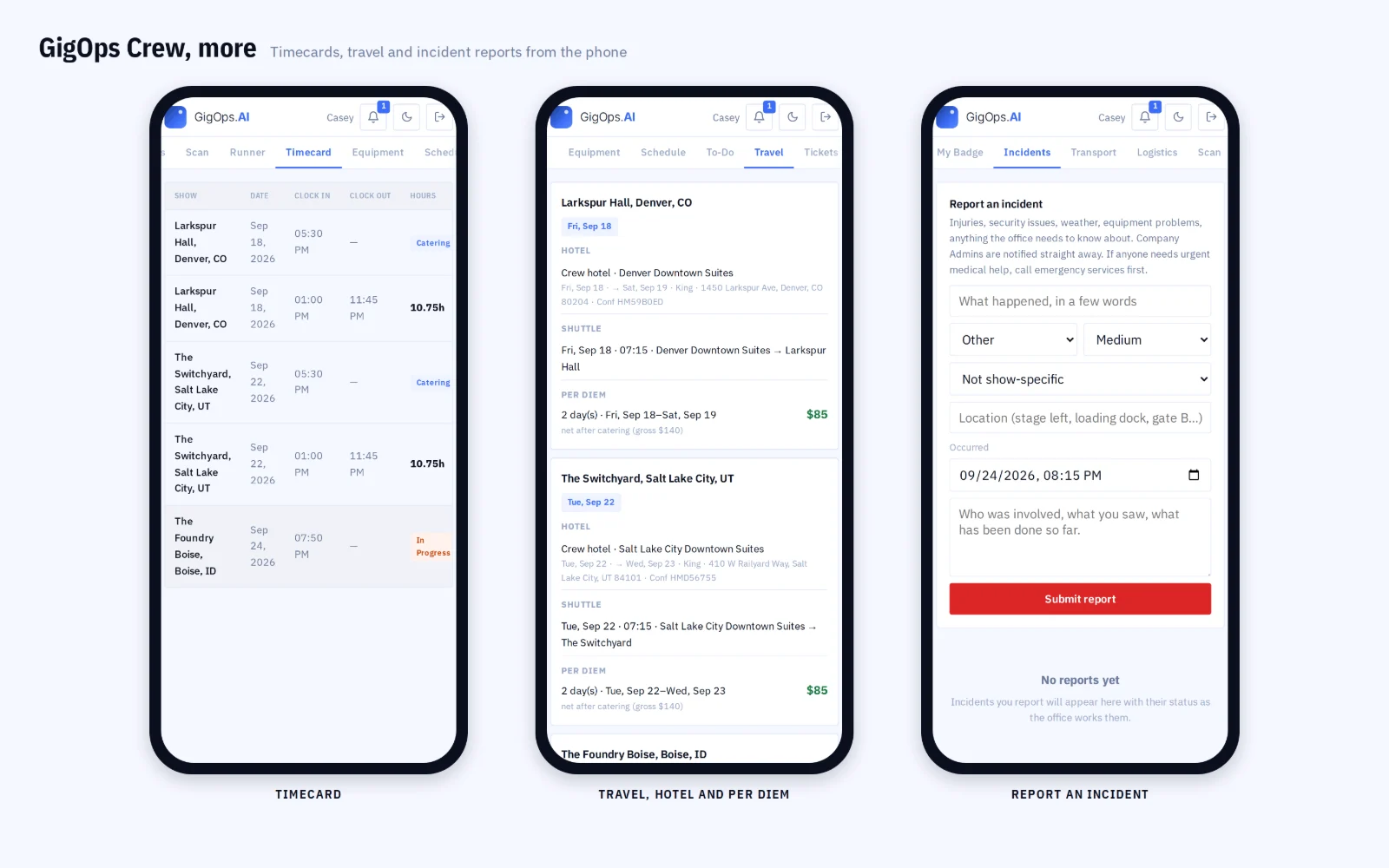
Crew file an incident from GigOps Crew on their own phone, with photos, so the record starts where the thing happened. The people who run the day are told as it lands, and it is on the log before anybody has walked back to the office.
What it connects to
- The permit register
- Every filing the event depends on: the authority, the number, what it covers, when it has to be in, where the application has got to and when it expires.
- Inspections on the calendar
- Schedule the inspection that follows a permit and it goes on the event calendar, with what happened at it recorded against the permit afterwards.
- Reminders that reach somebody
- The filing date works itself out from the event, and the people who have to act are reminded rather than trusted to remember.
- Packs you reuse
- Save a jurisdiction’s set of permits as a pack and apply it to the next event there, instead of rebuilding the list from a previous year’s folder.
- What a permit costs
- Record the cost against the permit, visible to the seats that are allowed to see money, so the filings are in the budget rather than beside it.
- Weather that triggers it
- A station on site can alert on gusts, wind, rain or lightning, which is often the thing that becomes a weather hold on this log.
- Named for the work
- Incidents and medical in ActionOps, dive safety in CoralOps. The same log, named for what it holds.
Step by step in the help guide: the incident log, permits and inspections, crew and weather. Related: Weather and Crew.
Who it is for
Who has to know.
FestivalOps
A multi-day site with a public on it: medical, security, ejections and weather holds by day and stage, with the permit register the build stands on.
Explore FestivalOpsTourOps
What happened at each venue on the run, logged by the crew who were there, so a pattern across rooms is visible rather than anecdotal.
Explore TourOpsVenueOps
The house log across every show the building takes, and the licences and inspections the room has to keep current.
Explore VenueOpsActionOps
Incidents and medical for a comp, where a crash is an incident and a hold above a wind speed is a decision somebody has to be told about.
Explore ActionOpsQuestions
What people ask about incidents.
- Who can log an incident?
- Owners, Company Admins, Managers, Ops and Coordinators log and edit them in the web app, and crew report one from GigOps Crew on their own phone with photos. Finance, Legal and View only seats do not see the log at all.
- Does anyone get told when something is logged?
- Yes. The people who run the day are notified as it lands, so a critical incident reaches the office without somebody deciding to walk over and mention it.
- Can I produce a report for an insurer or an authority?
- Yes. Each incident carries its time, type, severity, location, details, who handled it and how it ended, and a write-up is produced from that record rather than reconstructed from memory months later.
- What does the permit register hold?
- Every filing an event stands on: special event, building, tent and structure, fire, electrical, crane and rigging, road closure, noise, signage, food, liquor, pyrotechnics, drone and the rest, each with its authority, number, filing date, stage and expiry.
- What happens with inspections?
- Schedule one against its permit and it goes on the event calendar. Record what happened at it afterwards, and schedule the revisit if it failed, so the inspection history sits with the permit it belongs to.
- Do I rebuild the permit list for every event?
- No. Save a jurisdiction’s permits as a pack and apply it next time you are in that city, so the list starts from what was actually needed last time.
Start the log before you need it.
Incidents comes with every product. 7-day free trial. Company Users are $39 per user / month. View only seats are $0. Crew are always free.
Book a demo.
Tell us about the show you are planning, and we will walk you through the product that fits it, on your own dates. We reply within 48 hours.