Operations software for live events

Enter it once.
The whole show updates.

The date moves at 11pm. That means five spreadsheets, three emails and a day sheet somebody prints wrong. In GigOps you change it once, and the schedule, the day sheet and every crew member’s phone already know. Tours, festivals, venues, promoters and action sports, one login.

Venue, tour and promoter share one page per show. See how it works →

7-day free trial, cancel any time. $39 per person who changes things; crew and anyone who only looks are free. How we keep your data safe →

Run the road. Routing, advancing, travel, show day and settlement for one act in many cities.

Tour schedule, week view

The five products

Advance, hold, day sheet, settlement.
The words you already use.

GigOps is one platform with five products. Each one shows the tools and the words for your kind of company, on the same login and the same data.

TourOps
Run the road.

Touring acts, tour managers, production companies.

  • Route the tour with drive times, and find open venues for the nights you have not booked.
  • Advance every venue. Paste a venue’s reply and GigOps fills in the advance for you to check.
  • Print a day sheet built from the run of show, travel, hotels and crew.
Explore TourOps →
FestivalOps
Run the grounds.

Festivals and their site and production teams.

  • Run the festival from a set-times grid by stage and day.
  • Send each act an advance form. Confirmed answers become passes, meal counts and run-of-show times.
  • Manage the vendor village, wristbands, site map and incident log.
Explore FestivalOps →
VenueOps
Run the house.

Venues, rooms and venue groups.

  • Enter your tech pack once, or import the one you have and let AI fill in the profile.
  • Hold dates with H1, H2 and H3, and challenge a hold with a deadline.
  • Work each booking with the tour on one shared page, from the checklist to the signed settlement.
Explore VenueOps →
PromoterOps
Run the deal.

Promoters and talent buyers.

  • Send offers the agent accepts, counters or declines on a private link.
  • Track ticket counts every day against the pace a show needs to sell out.
  • Settle each show with the tour on one shared page, and both sign it.
Explore PromoterOps →
ActionOps
Run the comp.

Action and adventure sports events.

  • Schedule each comp by course and day, with start lists by bib, seed and heat.
  • Judges score each run from their phones, and the leaderboard updates as the scores land.
  • Share live results with the media, and work out prize money by place.
Explore ActionOps →
The shared core

You don’t pay extra for any of it

The same login and the same data, whichever product you run.

  • My day
  • Planning and tasks
  • Crew and payroll
  • Catering and meal check-in
  • Credentials and gate scanning
  • Guest list and will-call
  • Budget and finance
  • Documents
  • Signatures
  • Comms and alerts
  • Logistics and dispatch
  • Weather
  • Your own systems
  • CAD
See the shared core →

Your first week

Three jobs off your desk.
By Friday.

Three jobs that currently live in an email thread, a group chat and a spreadsheet nobody trusts. Here is what each one looks like when it does not.

A TourOps post: the advance open on app.gigops.ai beside the venue’s own copy of it on a phone, with the load-in, soundcheck, doors and curfew times filled in.

The advance

You have chased that advance more times than you should have to. Send one link instead. The venue fills in the curfew, the production notes and the stage size on their phone, and it lands in your show as returned with the new times already in. No account for them to make, and nobody retypes anything.

Explore TourOps →
A TourOps post: a crew member’s badge in GigOps Crew on a phone, with the QR code that changes every 20 seconds, their department, status and company.

The crew’s phones

Nobody walks into load-in with last week’s day sheet. Every crew member carries today’s, in the venue’s time zone, with their flights, hotel, shuttle, per diem and credential beside it. Paid seats are only for the people who make changes. Crew seats are free in every product.

See the apps →
A FestivalOps post: the incident board on app.gigops.ai beside the report form in GigOps Crew on a phone, with a fence panel down at Gate C open at high severity.

The incident log

Something goes wrong on site. The crew member standing next to it reports it from their phone with the severity, the location and what has been done so far, and the office knows before it becomes an insurance claim. Logged, timestamped and ready to assign.

Explore FestivalOps →

The connected network

One show.
Every company on it.

A clean advance and a settlement that adds up are what get you the next offer. So when the venue, the tour and the promoter are all on GigOps, they stop emailing versions of the show at each other and work one page instead. No reconciling two settlements line by line. No arguing about which day sheet is current. Each company sees its own part, and nothing else.

  1. 01 / 05

    The venue shares its open dates.

    Publicly, or only with the companies it picks. Tours search by city, distance, capacity and type of room.

    Tour searching venue avails
  2. 02 / 05

    The tour asks for a hold, and a booking opens.

    One click holds the date, adds the show to the tour and opens the booking. The venue’s tech pack is on it from the start.

    Booking, tour side: venue tech pack and show
  3. 03 / 05

    Both sides advance the show together.

    Each side fills in its own part of one advance, and both sign off when it is done.

    Shared advance, confirmed by both
  4. 04 / 05

    Ticket counts come from the box office.

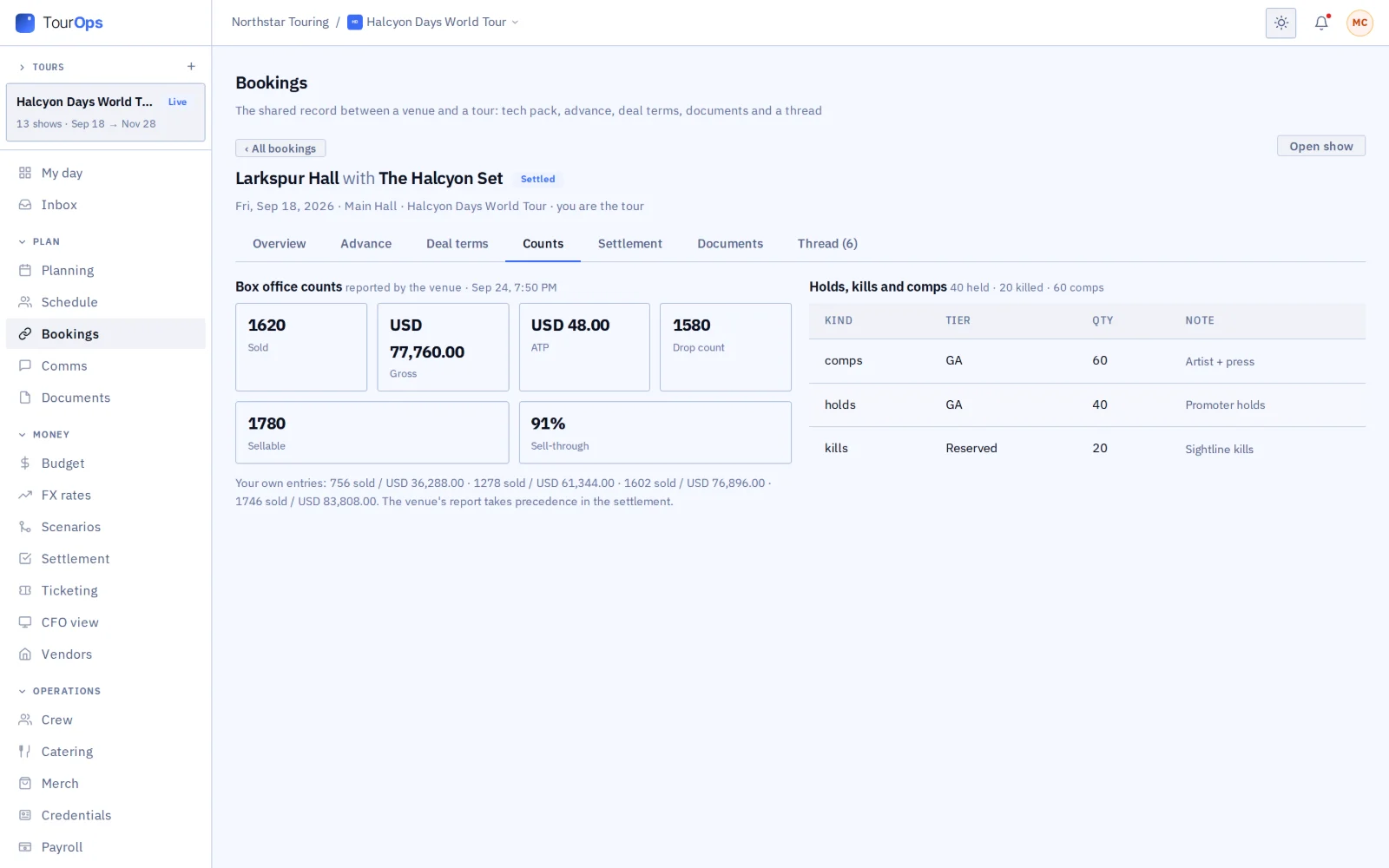
    The venue’s counts reach the tour’s ticketing, each marked with where it came from.

    Venue-reported counts and allocations
  5. 05 / 05

    Both sides sign the settlement.

    Both add their lines to one settlement, with the math done for guarantee, versus, percentage and door deals. Once both sign, it locks.

    Two-party settlement, signed and locked
See how it connects →

The shared core

Crew and payroll, catering, credentials and the gate, guest list and will-call, budget and settlement, documents and signatures, comms, logistics, weather and CAD. One login and one set of data, whichever product you run. See the whole platform →

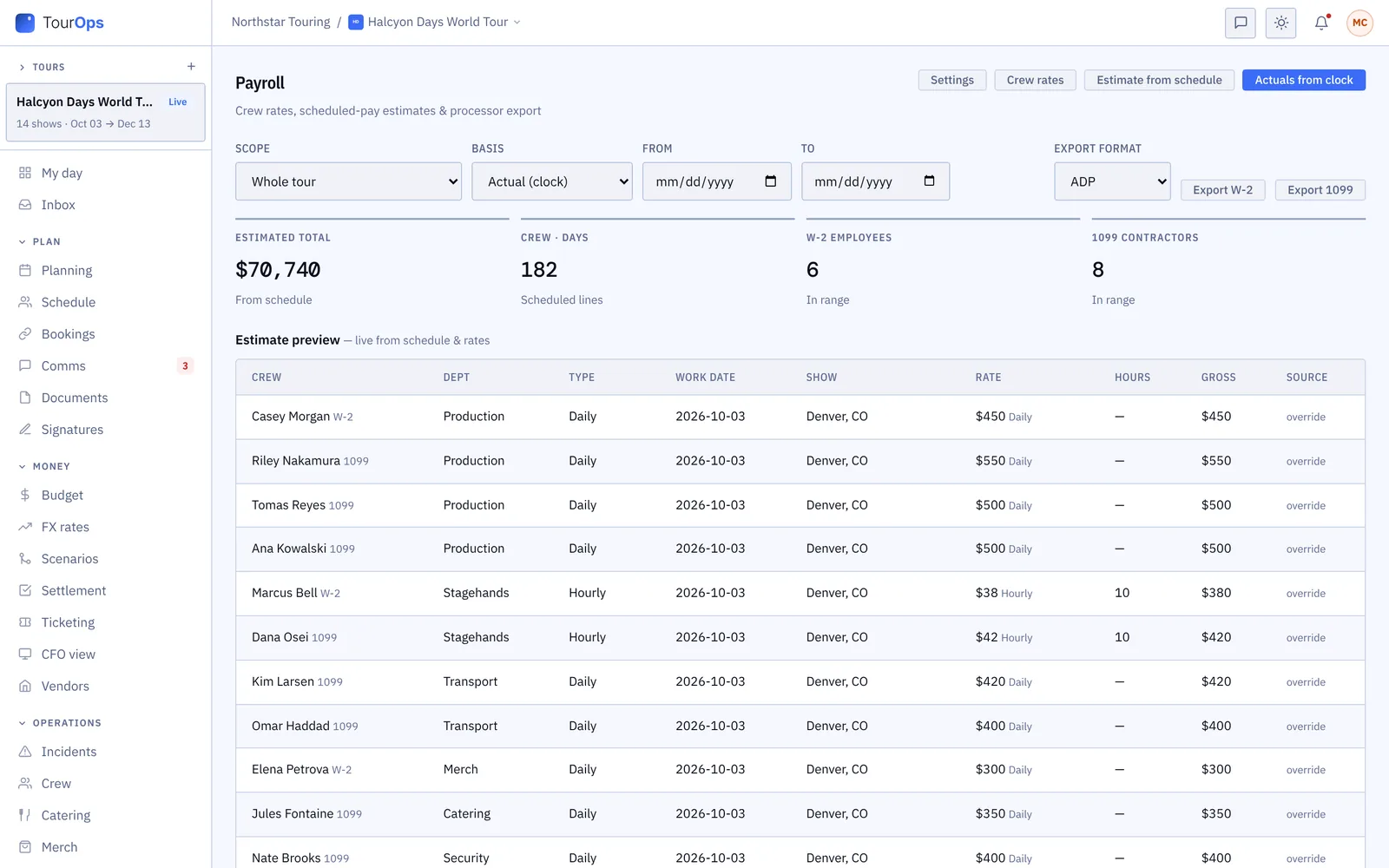
Payroll: estimates from the schedule or the clock, with the export format
Payroll already filled in by the time you get to it.
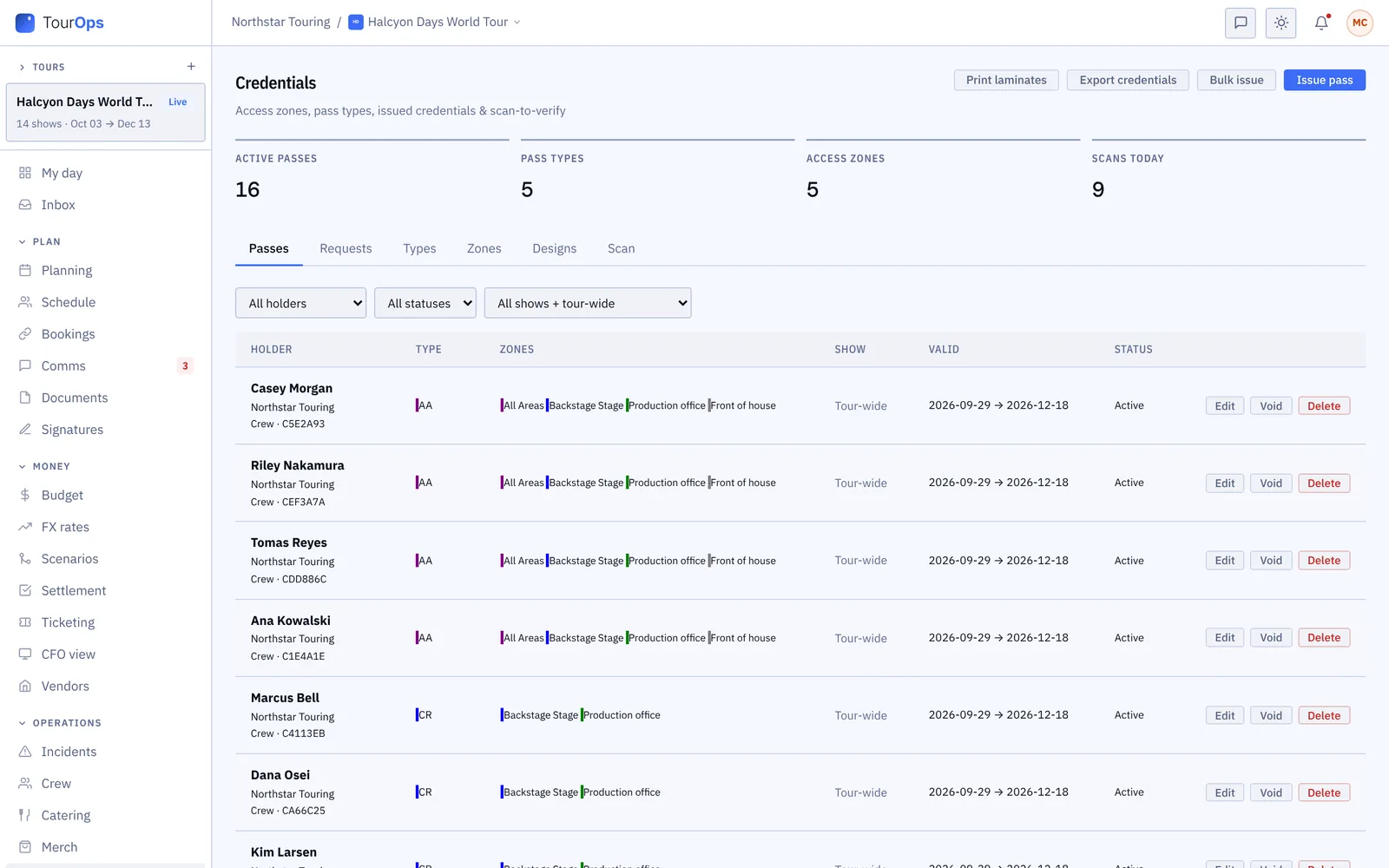
Credentials: passes with their zones, for the tour or one show
Who gets in where, settled before anyone reaches the gate.
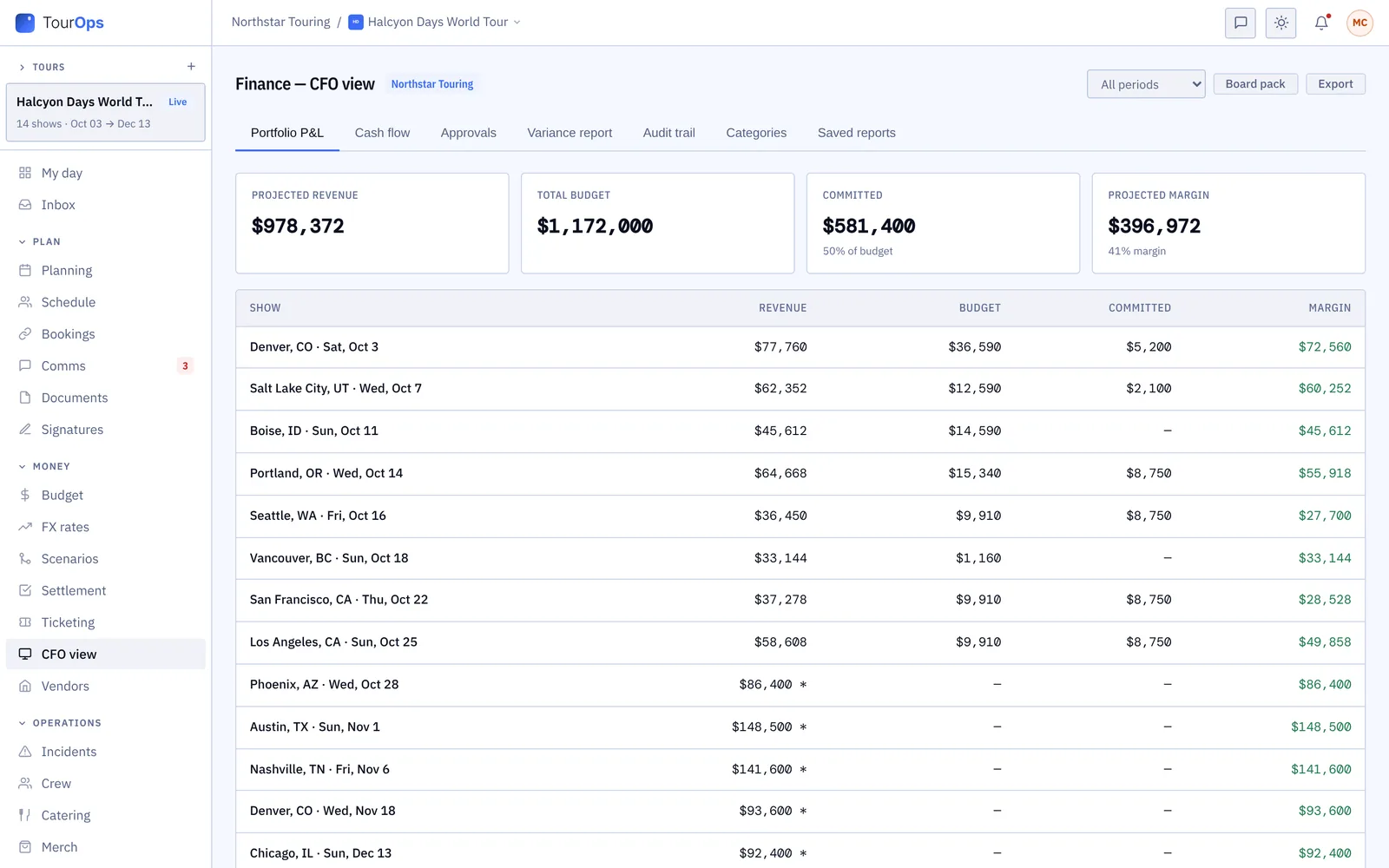
The CFO view: revenue, budget, committed costs and margin by show
Whether the show made money, show by show.
Stop retyping

Paste the venue’s advance reply, a flight confirmation, a tech pack, a box office count email or a list of athletes, and GigOps fills in the fields for you to check. The part of this job that is just moving text from one window into another is over.

The apps

Four iPhone apps. Crew are always free.

On the App Store
GigOps Crew
The free crew app: badge, schedule, tasks and travel on the phone. App Store →
GigOps Athlete
The ActionOps athlete app: comps and start positions, live results, travel, pass and alerts. App Store →
GigOps Company
The office on your phone, for Company Users. On the App Store as GigOps. App Store →
GigOps Scan
The gate scanner: verify credentials online or offline, and log every scan. App Store →

Nothing for crew to download if you don’t want to. Everything works in a phone browser too, including GigOps Crew at app.gigops.ai/crew.

See the apps →
GigOps Crew on three phones

The deal, in numbers

Crew are free. Everyone who only looks is free. Every feature comes with the seat, and you pay for the people who change things.

Built by a tour director with arena and stadium shows in more than 25 countries, not by a software company. Who built it →

Per month, per person who changes things
$39
Every crew member, on every show, always
Free
Everyone who only needs to look
Free
Modules to buy on top
None
Login, for all five products
1
Products included, same data
5
Free trial, onboarding run with you
7 days

What stays private

Nothing leaves your company
unless you put it there.

A booking joins a venue and a tour or festival. The promoter link joins a tour and its promoter. The festival link joins a festival and an act on its lineup. Everything else stays inside your company.

Each person changes only their own part.

Finance signs settlements, ops runs the day, and anyone who is view only can touch nothing.

You pick what the other companies see.

A promoter or a venue sees a budget line, a count, a guest or a document only after you share it.

Even our own support cannot see your money.

When GigOps Support opens your account to help, every money and ticket figure is hidden from them.

How we keep your data safe →

Pricing

The price is on the page.
No “contact us” required.

$39per user / month

$39 a month for each person who changes things. Everyone who only needs to look, and every crew member on the show, is free.

View only $0. Read access to every module, no edits. Not billed.

  • Crew are always free, in every product, including the crew and athlete apps.
  • View only seats read everything their role covers, and are not billed.
  • Paid seats are only for the people who make changes: $39 per user / month.
  • Every product and every app is included. There are no modules to buy.
  • 7-day free trial, with our team running the onboarding alongside you. Cancel any time from the billing portal.
  • Full pricing →

Questions

The things everyone asks before they switch.

What happens to my data if I leave?
It stays yours. Cancel from the billing portal and access runs to the end of the paid period. Closing the account deletes nothing. Email hello@gigops.ai for a copy of your company’s data in one file, or to delete it for good, which is done within 30 days. You can also export schedules, budgets, payroll and settlements yourself, as CSV or PDF, at any time.
We run on spreadsheets today. What does switching actually involve?
Less than you think, because most of what you have does not need retyping: paste a venue’s tech pack, a box office count email or a list of athletes and GigOps fills in the fields for you to check, and import your chart of accounts from a CSV or Excel file. Our team runs the onboarding with you rather than handing you a manual, so book a demo and we will set it up around one of your own shows.
Does GigOps sell tickets?
Keep the ticketing company each venue already uses: Ticketmaster here, AXS there, a box office next week. They all report differently, so every week you are reading a new format. GigOps puts them in one, so this week against last week is a glance.
Book a demo

See it on your own show.

Tell us about the show you are planning, and we will walk you through the product that fits it, on your own dates. We reply within 48 hours.

$39 per user / month · View only $0 · 7-day free trial

Your name, company and email reach the GigOps team and nobody else. No marketing list, no newsletter.